WebDB - From Website to Database. Using HTML, PHP, and MySQL
| |
Copyright 2024, 2025, 2026 Josef L. Staud |
|
Author: Josef L. Staud |
|
Last updated: November 2026 |
|
Length of the printed version: approx. 118 pages |
|
This text is intended for participants in my seminars and other interested parties.
It is constantly updated and expanded. |
|
Web Formatting |
|
These HTML pages were generated using a program I developed, WebGenerator2026. The program converts text into HTML pages and is still under development. This automated generation process makes it possible to regenerate the HTML pages immediately after every change to the text. |
|
Since it is not possible to check every page after each regeneration, errors may occasionally occur on individual pages. I apologize for any such errors and would appreciate it if you reported them to me at hs@staud.info. |
|
Since 2022, the website has been published in two versions: one using frames and one without frames. Unfortunately, frame technology is now considered obsolete, and some browsers no longer display frame-based pages correctly. For this reason, I developed a second version of my WebGenerator program that does not use frames. |
|
Copyright |
|
This text is protected by copyright. All rights are reserved, in particular the rights of translation, reprinting, public presentation, use of illustrations and tables, reproduction by other means, and storage in data processing systems. This also applies to the use of excerpts. Reproduction of this text or parts thereof is permitted only in individual cases and within the limits of the applicable provisions of the Copyright Act of the Federal Republic of Germany, as amended. Such reproduction may be subject to a fee. Violations are subject to the applicable provisions of copyright law. |
|
Trademarks and Trademark Protection |
|
All trade names, brand names, trademarks, product names, and similar designations mentioned in this text may be subject to trademark, brand, or patent protection and may be trademarks or registered trademarks of their respective owners. The use of such names and designations in this text does not imply, even if they are not specifically identified as protected, that they are free from protection under applicable trademark and brand legislation or that they may be used without restriction. |
|
Prof. Dr. Josef L. Staud |
|
hs@staud.info |
|
1 Introduction
| |
This section describes how a web-based user interface with database access is created. On the long journey from the requirements (for the software and database) to the graphical user interface, this is the final step, highlighted in bold here: |
|
Requirements -> Data Model (Schema) -> Database -> Web User Interface |
|
The examples use XAMPP, phpMyAdmin, and MySQL. Together, these provide a local server environment on your own PC for safe development, experimentation, and testing. A small relational database containing customers, invoices, and products, called Invoices, is used throughout this text. |
Invoices Database |
More specifically, the focus is on creating a graphical user interface (GUI) using HTML and CSS and connecting it to a MySQL database using PHP. The examples begin with very simple solutions and gradually progress to more advanced designs that also include security-related features. |
|
Some exercises on this topic can be found in Chapter 5 of the text "Database Training": |
|
|
https://www.staud.info/AufgabenDBoF/db_t_1.php#Kapitel5
|
|
The Invoices database is also used in several of the exercises presented there. |
|
|
|
1.1 Invoices Database |
|
The explanations and examples in this chapter are based on the Invoices database. |
|
1.1.1 The Data Model |
|

|
|
Figure 1.1-1: Relational data model of the Invoices database. The diagram was created using the phpMyAdmin Designer. |
|
1.1.2 A Dump |
|
An SQL dump contains SQL statements that can be used to create a database, including its relations, key constraints, and sample data. |
|
The following SQL dump was generated using phpMyAdmin and adapted for this text. To create the database, paste the dump into the SQL window in phpMyAdmin and click the Go button. |
|
|
CREATE DATABASE IF NOT EXISTS Invoices
|
|
|
CHARACTER SET utf8mb4
|
|
|
COLLATE utf8mb4_unicode_ci;
|
|
|
USE Invoices;
|
|
|
--
|
|
|
-- Relation structure for Products
|
|
|
--
|
|
|
CREATE TABLE Products (
|
|
|
ProductNo SMALLINT(4) NOT NULL,
|
|
|
Description VARCHAR(30) DEFAULT NULL,
|
|
|
Price DECIMAL(7,2) DEFAULT NULL
|
|
|
) ENGINE=InnoDB
|
|
|
DEFAULT CHARSET=utf8mb4
|
|
|
COLLATE=utf8mb4_unicode_ci;
|
|
|
--
|
|
|
-- Data for Products
|
|
|
--
|
|
|
INSERT INTO Products (ProductNo, Description, Price) VALUES
|
|
|
(100, 'Gaming PC', 2500.00),
|
|
|
(101, 'Office PC', 1200.00),
|
|
|
(102, 'Developer Workstation', 3200.00),
|
|
|
(554, 'Smartphone', 330.00);
|
|
|
--
|
|
|
-- Relation structure for Customers
|
|
|
--
|
|
|
CREATE TABLE Customers (
|
|
|
CustomerNo SMALLINT(5) NOT NULL,
|
|
|
LastName CHAR(15) DEFAULT NULL,
|
|
|
FirstName CHAR(15) DEFAULT NULL
|
|
|
) ENGINE=InnoDB
|
|
|
DEFAULT CHARSET=utf8mb4
|
|
|
COLLATE=utf8mb4_unicode_ci;
|
|
|
--
|
|
|
-- Data for Customers
|
|
|
--
|
|
|
INSERT INTO Customers (CustomerNo, LastName, FirstName) VALUES
|
|
|
(1001, 'Miller', 'James'),
|
|
|
(1002, 'Johnson', 'Emily'),
|
|
|
(1009, 'Williams', 'Michael'),
|
|
|
(1010, 'Brown', 'Sarah'),
|
|
|
(9999, 'Davis', 'Robert');
|
|
|
--
|
|
|
-- Relation structure for InvoiceHeaders
|
|
|
--
|
|
|
CREATE TABLE InvoiceHeaders (
|
|
|
InvoiceNo SMALLINT(6) NOT NULL,
|
|
|
CustomerNo SMALLINT(5) DEFAULT NULL,
|
|
|
InvoiceDate DATE DEFAULT NULL
|
|
|
) ENGINE=InnoDB
|
|
|
DEFAULT CHARSET=utf8mb4
|
|
|
COLLATE=utf8mb4_unicode_ci;
|
|
|
--
|
|
|
-- Data for InvoiceHeaders
|
|
|
--
|
|
|
INSERT INTO InvoiceHeaders (InvoiceNo, CustomerNo, InvoiceDate) VALUES
|
|
|
(23001, 1002, '2026-03-27'),
|
|
|
(23010, 1009, '2026-05-20'),
|
|
|
(23020, 1010, '2026-01-07'),
|
|
|
(23050, 1001, '2026-11-19');
|
|
|
--
|
|
|
-- Relation structure for InvoiceItems
|
|
|
--
|
|
|
CREATE TABLE InvoiceItems (
|
|
|
InvoiceNo SMALLINT(6) NOT NULL,
|
|
|
PositionNo TINYINT(3) UNSIGNED NOT NULL,
|
|
|
ProductNo SMALLINT(4) DEFAULT NULL,
|
|
|
Quantity SMALLINT(2) DEFAULT NULL
|
|
|
) ENGINE=InnoDB
|
|
|
DEFAULT CHARSET=utf8mb4
|
|
|
COLLATE=utf8mb4_unicode_ci;
|
|
|
--
|
|
|
-- Data for InvoiceItems
|
|
|
--
|
|
|
INSERT INTO InvoiceItems (InvoiceNo, PositionNo, ProductNo, Quantity) VALUES
|
|
|
-- Invoice 23001: 3 items
|
|
|
(23001, 1, 101, 2),
|
|
|
(23001, 2, 554, 1),
|
|
|
(23001, 3, 100, 1),
|
|
|
-- Invoice 23010: 2 items
|
|
|
(23010, 1, 101, 3),
|
|
|
(23010, 2, 554, 2),
|
|
|
-- Invoice 23020: 4 items
|
|
|
(23020, 1, 100, 1),
|
|
|
(23020, 2, 101, 2),
|
|
|
(23020, 3, 102, 1),
|
|
|
(23020, 4, 554, 3),
|
|
|
-- Invoice 23050: 3 items
|
|
|
(23050, 1, 102, 2),
|
|
|
(23050, 2, 101, 3),
|
|
|
(23050, 3, 554, 1);
|
|
|
--
|
|
|
-- Indexes
|
|
|
--
|
|
|
ALTER TABLE Products
|
|
|
ADD PRIMARY KEY (ProductNo);
|
|
|
ALTER TABLE Customers
|
|
|
ADD PRIMARY KEY (CustomerNo);
|
|
|
ALTER TABLE InvoiceHeaders
|
|
|
ADD PRIMARY KEY (InvoiceNo),
|
|
|
ADD KEY CustomerNo (CustomerNo);
|
|
|
ALTER TABLE InvoiceItems
|
|
|
ADD PRIMARY KEY (InvoiceNo, PositionNo),
|
|
|
ADD KEY ProductNo (ProductNo);
|
|
|
--
|
|
|
-- Foreign key constraints
|
|
|
--
|
|
|
ALTER TABLE InvoiceHeaders
|
|
|
ADD CONSTRAINT InvoiceHeaders_ibfk_1
|
|
|
FOREIGN KEY (CustomerNo)
|
|
|
REFERENCES Customers (CustomerNo);
|
|
|
ALTER TABLE InvoiceItems
|
|
|
ADD CONSTRAINT InvoiceItems_ibfk_1
|
|
|
FOREIGN KEY (ProductNo)
|
|
|
REFERENCES Products (ProductNo),
|
|
|
ADD CONSTRAINT InvoiceItems_ibfk_2
|
|
|
FOREIGN KEY (InvoiceNo)
|
|
|
REFERENCES InvoiceHeaders (InvoiceNo);
|
|
1.1.3 Initial Data in the Relations |
|
After setting up the database, the four relations contain the sample data listed below. They serve as the starting point for the programs and database operations in the following chapters. |
|
select * from customers; |
|
| CustomerNo |
LastName |
FirstName |
| 1001 |
Miller |
James |
| 1002 |
Johnson |
Emily |
| 1009 |
Williams |
Michael |
| 1010 |
Brown |
Sarah |
| 9999 |
Davis |
Robert |
| |
|
|
select * from invoiceheaders; |
|
| InvoiceNo |
CustomerNo |
InvoiceDate |
| 23001 |
1002 |
2026-03-27 |
| 23010 |
1009 |
2026-05-20 |
| 23020 |
1010 |
2026-01-07 |
| 23050 |
1001 |
2026-11-19 |
| |
|
|
SELECT * FROM invoiceitems; |
|
| InvoiceNo |
PositionNo |
ProductNo |
Quantity |
| 23001 |
1 |
101 |
2 |
| 23001 |
2 |
554 |
1 |
| 23001 |
3 |
100 |
1 |
| 23010 |
1 |
101 |
3 |
| 23010 |
2 |
554 |
2 |
| 23020 |
1 |
100 |
1 |
| 23020 |
2 |
101 |
2 |
| 23020 |
3 |
102 |
1 |
| 23020 |
4 |
554 |
3 |
| 23050 |
1 |
102 |
2 |
| 23050 |
2 |
101 |
3 |
| 23050 |
3 |
554 |
1 |
| |
|
|
SELECT * FROM products; |
|
| ProductNo |
Description |
Price |
| 100 |
Gaming PC |
2500.00 |
| 101 |
Office PC |
1200.00 |
| 102 |
Developer Workstation |
3200.00 |
| 554 |
Smartphone |
330.00 |
| |
The Entire Database in One Relation
|
|
|
SELECT c.CustomerNo AS CustNo, CONCAT(c.FirstName, ' ', c.LastName)
|
|
|
AS Customer, ih.InvoiceNo AS InvNo, ih.InvoiceDate AS Date,
|
|
|
ii.PositionNo AS Pos, p.ProductNo AS ProdNo,
|
|
|
p.Description AS Product, ii.Quantity AS Qty, p.Price AS Price
|
|
|
FROM InvoiceHeaders AS ih,
|
|
|
customers AS c, invoiceitems AS ii,
|
|
|
products AS p
|
|
|
where ih.CustomerNo = c.CustomerNo
|
|
|
AND ih.InvoiceNo = ii.InvoiceNo
|
|
|
AND ii.ProductNo = p.ProductNo
|
|
|
ORDER BY ih.InvoiceNo, ii.PositionNo;
|
|
| CustNo |
Customer |
InvNo |
Date |
Pos |
ProdNo |
Product |
Qty |
Price |
| 1002 |
Emily Johnson |
23001 |
2026-03-27 |
1 |
101 |
Office PC |
2 |
1200.00 |
| 1002 |
Emily Johnson |
23001 |
2026-03-27 |
2 |
554 |
Smartphone |
1 |
330.00 |
| 1002 |
Emily Johnson |
23001 |
2026-03-27 |
3 |
100 |
Gaming PC |
1 |
2500.00 |
| 1009 |
Michael Williams |
23010 |
2026-05-20 |
1 |
101 |
Office PC |
3 |
1200.00 |
| 1009 |
Michael Williams |
23010 |
2026-05-20 |
2 |
554 |
Smartphone |
2 |
330.00 |
| 1010 |
Sarah Brown |
23020 |
2026-01-07 |
1 |
100 |
Gaming PC |
1 |
2500.00 |
| 1010 |
Sarah Brown |
23020 |
2026-01-07 |
2 |
101 |
Office PC |
2 |
1200.00 |
| 1010 |
Sarah Brown |
23020 |
2026-01-07 |
3 |
102 |
Developer Workstation |
1 |
3200.00 |
| 1010 |
Sarah Brown |
23020 |
2026-01-07 |
4 |
554 |
Smartphone |
3 |
330.00 |
| 1001 |
James Miller |
23050 |
2026-11-19 |
1 |
102 |
Developer Workstation |
2 |
3200.00 |
| 1001 |
James Miller |
23050 |
2026-11-19 |
2 |
101 |
Office PC |
3 |
1200.00 |
| 1001 |
James Miller |
23050 |
2026-11-19 |
3 |
554 |
Smartphone |
1 |
330.00 |
| |
|
|
The same query can be written using the modern INNER JOIN syntax. The relationships between the relations are then specified explicitly using ON: |
|
|
SELECT
|
|
|
c.CustomerNo AS CustNo,
|
|
|
CONCAT(c.FirstName, ' ', c.LastName) AS Customer,
|
|
|
ih.InvoiceNo AS InvNo,
|
|
|
ih.InvoiceDate AS Date,
|
|
|
ii.PositionNo AS Pos,
|
|
|
p.ProductNo AS ProdNo,
|
|
|
p.Description AS Product,
|
|
|
ii.Quantity AS Qty,
|
|
|
p.Price AS Price
|
|
|
FROM InvoiceHeaders AS ih
|
|
|
INNER JOIN Customers AS c
|
|
|
ON ih.CustomerNo = c.CustomerNo
|
|
|
INNER JOIN InvoiceItems AS ii
|
|
|
ON ih.InvoiceNo = ii.InvoiceNo
|
|
|
INNER JOIN Products AS p
|
|
|
ON ii.ProductNo = p.ProductNo
|
|
|
ORDER BY ih.InvoiceNo, ii.PositionNo;
|
|
xxxVgl. Anhang 11.11 |
|
1.2 Typographic Conventions for Model Elements |
|
In data modeling, we can distinguish between a starting point and three model levels. The starting point is the application domain to be modeled, sometimes also referred to as the universe of discourse. The first model level consists of the attributes used to describe objects and relationships. The second level comprises the basic elements of the respective modeling approach, such as relations, entity types, and classes. The third level represents the complete data model. |
Improving Clarity through
Typography |
To make these different elements easier to distinguish in the text, the following typographic conventions are used: |
|
- Names of application domains are set in a slightly larger font, in small caps, and in Arial: University, Human Resources, WebShop. In the web version, they are also displayed in red.
- Names of data models and databases are set in normal size, bold, and in Arial: Sales, Zoo, WebShop, Database Systems (market for database systems). In the web version, they are also displayed in red.
- Names of relations, entity types, and classes are set in a slightly smaller font and in Arial: Employees, Departments, Projects. In the web version, they are also displayed in red.
- Method names are set in normal size, bold, and in Arial: print().
- Attribute names are set in a slightly smaller font, bold, and in Arial: Salary, Name, Date. In compound attribute names, the second word begins with a capital letter: EmployeeNo (employee number), ProjectName (project name).
- When an attribute is specified together with its relation, the notation relation.attribute is used, for example, Employees.EmployeeNo for the attribute EmployeeNo of the relation Employees.
- Attribute values are displayed in normal size and in Courier font, for example, "Miller" as a value of the attribute Name.
- Programs and program fragments are displayed in normal size and in Courier font, for example:
|
|
|
$dsn = "mysql:host=localhost;dbname=Invoices;charset=utf8mb4";
|
|
For the basic elements of the models - relations, entity types, and classes - plural names are always used because they generally represent sets of multiple objects or relationships. |
|
2 Establishing a Connection and First Queries |
|
|
|
2.1 MySQLi vs. PDO |
|
PHP programs can access relational databases through various interfaces. For MySQL and MariaDB, two PHP extensions are primarily used: |
|
|
|
|
Both extensions allow a program to establish a database connection, execute SQL statements, and process the results. Additionally, both support prepared statements and transactions. |
|
MySQLi is specifically designed for MySQL and the largely compatible MariaDB database. PDO, on the other hand, provides a unified programming interface for various database systems. |
|
The following table summarizes the basic features of both approaches. |
|
PDO and MySQLi - Comparison |
|
| Feature |
PDO |
MySQLi |
| Full Name |
PHP Data Objects |
MySQL Improved |
| Supported database systems |
Many DBMS (MySQL, PostgreSQL, SQLite, ...) |
Only MySQL and compatible systems such as MariaDB |
| Programming Style |
Object-oriented |
Object-oriented and procedural |
| Prepared statements |
Yes |
Yes |
| Transactions |
Yes |
Yes |
| Changing the database system |
Generally easier |
Not directly supported |
| Main class used |
PDO |
mysqli |
| |
PDO
|
|
PDO provides a unified interface for accessing different database systems. Methods such as prepare(), execute(), and fetch() are used in a similar way regardless of the database system being used. |
|
However, PDO does not standardize the different SQL dialects. Therefore, if the database system is changed, SQL statements may need to be adjusted accordingly. |
|
A connection to the Invoices database can be established as follows: |
|
|
$dsn = "mysql:host=localhost;dbname=Invoices;charset=utf8mb4";
|
|
|
$pdo = new PDO($dsn, "root", "",
|
|
|
[PDO::ATTR_ERRMODE => PDO::ERRMODE_EXCEPTION]);
|
|
The variable $dsn contains the Data Source Name (DSN), a string that specifies the database driver, server, database, and character set to be used. |
|
- Thanks to new PDO(), $pdo refers to an object of the PDO class.
- mysql: means that the SQL driver should be used within PDO.
- host=localhost indicates that the database server is running locally.
- dbname=Invoices specifies the database to be used.
- charset=utf8mb4 specifies the character set.
- root specifies the MySQL database user.
- "" specifies an empty password
- [PDO::ATTR_ERRMODE => PDO::ERRMODE_EXCEPTION] sets the error mode so that PDO throws exceptions when problems occur. Without this option, PDO would often only return error codes that would need to be checked manually. See the appendix fo further details.
|
|
MySQLi |
|
MySQLi is a special extension designed exclusively for MySQL databases. A connection is established using the following commands (using the Invoices database as an example): |
|
|
$con = new mysqli("localhost", "root", "", "Invoices");
|
|
|
if ($con->connect_error) {
|
|
|
die("Connection error: " . $con->connect_error);
|
|
|
}
|
|
$con is a PHP variable. It refers to an object of the mysqli class that represents the connection between the PHP program and the database server. The $con object provides properties such as $con->connect_error and methods such as $con->query(), $con->execute_query(), $con->close(), and $con->prepare(). The name $con is short for "connection." However, any valid variable name could be used. |
|
The individual parts of the connection statement have the following meanings: |
|
- mysqli is the PHP class used to establish a MySQL connection.
- new mysqli() creates an object of the mysqli class and attempts to establish the connection.
- "localhost" specifies the MySQL server. During local development, localhost means that the database server is running on the same computer as the PHP program. Alternatively, a host name or IP address can be specified.
- "root" specifies the MySQL user account.
- "" specifies an empty password.
- "Invoices" specifies the database to be used.
|
|
The following if statement handles a failed connection attempt: |
|
|
if ($con->connect_error) {
|
|
|
die("Connection error: " . $con->connect_error);
|
|
|
}
|
|
- $con->connect_error contains information about an error that occurred while establishing the connection. If a connection error occurred, die() terminates the script and outputs the specified error message.
- The functions die() and exit() can both be used to terminate a PHP script immediately.
|
|
MySQLi supports prepared statements, stored procedures, and multiple statements. In addition to the object-oriented programming style shown above, MySQLi can also be used procedurally: |
|
|
$con = mysqli_connect("localhost", "root", "", "Invoices");
|
|
This is possible because the MySQLi extension provides both an object-oriented and a procedural interface. |
|
2.2 CustomerQueriesMySQLi_1.php |
|
2.2.1 Program Features |
|
- Launched via browser command
- Simple query
- Direct access to the database.
- Class used for establishing a connection: mysqli
- HTML output of the result
|
|
The first program executes a simple, fixed SQL query. Since the SQL statement contains no user input or other variable values, a prepared statement is not required here. In the following example, a search value is added to the query, so it is executed as a prepared statement. |
|
2.2.2 The program |
|
|
<!doctype html>
|
|
|
<html lang="en">
|
|
|
<head>
|
|
|
<meta charset="utf-8">
|
|
|
<title>Customer Relation</title>
|
|
|
<link rel="stylesheet" type="text/css" href="mySQL_1.css">
|
|
|
</head>
|
|
|
<body>
|
|
|
<p class="text-red">
|
|
|
Customer Relation - with column headers:
|
|
|
</p>
|
|
|
<table border="1">
|
|
|
<caption class="text-bold">Customer Relation</caption>
|
|
|
<thead>
|
|
|
<tr>
|
|
|
<th>Customer No.</th>
|
|
|
<th>Last Name</th>
|
|
|
<th>First Name</th>
|
|
|
</tr>
|
|
|
</thead>
|
|
|
<tbody>
|
|
|
<?php
|
|
|
/*
|
|
|
Establish a connection to the database.
|
|
|
mysqli stands for MySQL Improved. The statement "new mysqli()"
|
|
|
creates an object of the mysqli class. The variable $con refers to
|
|
|
this object and allows access to its properties and methods.
|
|
|
*/
|
|
|
$con = new mysqli("localhost", "root", "", "Invoices");
|
|
|
/*
|
|
|
Check whether an error occurred while establishing the database
|
|
|
connection. If an error occurs, die() displays the error message
|
|
|
and immediately terminates the program.
|
|
|
*/
|
|
|
if ($con->connect_error) {
|
|
|
die("Database connection failed: "
|
|
|
. $con->connect_error);
|
|
|
}
|
|
|
// Set the character set for the database connection.
|
|
|
// utf8mb4 supports Unicode characters.
|
|
|
$con->set_charset("utf8mb4");
|
|
|
// Define the SQL statement. Using AS gives the selected columns
|
|
|
// new names. These names are later used as keys for the
|
|
|
// associative array.
|
|
|
$sql = "SELECT CustomerNo AS CustNo, LastName, FirstName
|
|
|
FROM Customers ORDER BY CustNo";
|
|
|
/*
|
|
|
Execute the SQL statement.
|
|
|
execute_query() is a method of the mysqli class. When used with a
|
|
|
SELECT statement, it returns an object of the mysqli_result class.
|
|
|
The variable $res refers to this result object.
|
|
|
*/
|
|
|
$res = $con->execute_query($sql);
|
|
|
// num_rows is a property of the result object. It contains
|
|
|
// the number of rows returned by the query.
|
|
|
if ($res->num_rows === 0) {
|
|
|
echo "
|
|
|
<tr>
|
|
|
<td colspan=\"3\">No results</td>
|
|
|
</tr>
|
|
|
";
|
|
|
}
|
|
|
/*
|
|
|
fetch_assoc() reads one row at a time from the result object
|
|
|
and returns it as an associative array.
|
|
|
The column names - or the names assigned using AS - form the keys
|
|
|
of the array.
|
|
|
The loop continues as long as another row
|
|
|
remains.
|
|
|
*/
|
|
|
while ($row = $res->fetch_assoc()) {
|
|
|
echo "<tr>";
|
|
|
echo "<td>" . htmlspecialchars((string)$row["CustNo"],
|
|
|
ENT_QUOTES,"UTF-8") . "</td>";
|
|
|
echo "<td>" . htmlspecialchars($row["LastName"],
|
|
|
ENT_QUOTES, "UTF-8") . "</td>";
|
|
|
echo "<td>" . htmlspecialchars($row["FirstName"],
|
|
|
ENT_QUOTES, "UTF-8") . "</td>";
|
|
|
echo "</tr>";
|
|
|
}
|
|
|
// Close the result object and release the resources used for it
|
|
|
$res->close();
|
|
|
// Close the database connection and associated resources.
|
|
|
$con->close();
|
|
|
?>
|
|
|
</tbody>
|
|
|
</table>
|
|
|
</body>
|
|
|
</html>
|
|
Browser Output |
|

|
|
2.2.3 The stylesheets |
|
File mySQL_1.css |
|
|
body {margin: 10px; color: black; font-family: Arial, sans-serif;}
|
|
|
h1 {margin: 5px 0 10px; color: blue; font-family: Calibri, Arial,
|
|
|
sans-serif; font-size: 16pt; font-weight: bold; text-align: left;}
|
|
|
p {margin: 10px 0;}
|
|
|
table {border-collapse: collapse;font-family: inherit;}
|
|
|
thead {font-size: 10pt; font-weight: bold;}
|
|
|
td, th {padding: 3px; border: 1px solid black; text-align: left;
|
|
|
vertical-align: middle;}
|
|
|
.text-red {color: red; font-size: 14pt;}
|
|
|
.text-bold {font-size: 14pt; font-weight: bold;}
|
|
2.2.4 Notes |
|
The following classes are used in this program: |
|
- mysqli: This class is used to establish a connection to a MySQL database. An object created from this class - for example, the object referred to by $con - provides properties and methods for working with the database. One method of mysqli is execute_query(). It executes an SQL statement and, in the case of a SELECT statement, returns a result object of the mysqli_result class.
- mysqli_result: An object of the mysqli_result class contains the result of a query. One of its properties is num_rows. One of its methods is fetch_assoc(). This method reads one row at a time from the result and returns it as an associative array.
|
|
Integration |
|
The program illustrates how procedural and object-oriented programming elements can be combined in PHP. With the statement |
|
|
$con = new mysqli("localhost", "root", "", "Invoices");
|
|
an object of the mysqli class is created. The PHP variable $con refers to this object. Its properties and methods can be accessed via $con. |
|
For example: |
|
|
$con->connect_error // property
|
|
|
$con->query($sql) // Method
|
|
Regarding the Programming |
|
- fetch_assoc() does not output the rows itself. The method reads one row at a time and returns it as an associative array. The actual output can then be generated using echo, for example.
- The values read from the database are processed using htmlspecialchars() before being inserted into the HTML output (see Appendix). This converts characters that have a special meaning in HTML so that they are not interpreted as part of the HTML markup.
- The execute_query() method has been available since PHP 8.2. If the SQL statement does not contain any placeholders, $con->query($sql) can be used instead in older PHP versions. If it contains placeholders, the query must be executed as a prepared statement using prepare(), bind_param(), and execute().
|
|
2.3 CustomerQueriesMySQLi_2.php |
|
2.3.1 Program Features |
|
- Launched via a browser
- Query using a prepared statement
- Fixed search value in the program
- Direct access to the database
- Classes used: mysqli, mysqli_stmt, and mysqli_result
- Preformatted output in the browser
|
|
The second example again demonstrates the basic structure of a PHP program that is launched via a browser and queries a database using the mysqli class. However, the query is now executed as a prepared statement () rather than a simple SQL query, which is highly recommended for security reasons. |
Prepared Statement |
2.3.2 The program |
|
|
<?php
|
|
|
|
|
|
/*
|
|
|
Customer number to search for.
|
|
|
In this example, the customer number is defined directly in the
|
|
|
program. In a web application, it would normally come from an input
|
|
|
form.
|
|
|
*/
|
|
|
$id = 1002;
|
|
|
|
|
|
/*
|
|
|
The HTML element <pre> ensures that spaces and line breaks in
|
|
|
the input are preserved in the output.
|
|
|
This allows the result of print_r() to be displayed clearly.
|
|
|
*/
|
|
|
echo "<pre>";
|
|
|
echo "--- Establishing a connection with MySQLi ---\n";
|
|
|
echo "--- Invoices, Customers Relation ---\n\n";
|
|
|
|
|
|
/*
|
|
|
Establish a connection to the database.
|
|
|
The statement new mysqli()creates an object of the mysqli class
|
|
|
is created:
|
|
|
- "localhost" refers to the database server.
|
|
|
- "root" is the MySQL user.
|
|
|
- "" is the password, which is empty here.
|
|
|
- "Invoices is the name of the database.
|
|
|
The variable $con refers to the created mysqli connection object.
|
|
|
*/
|
|
|
$con = new mysqli("localhost", "root", "", "Invoices");
|
|
|
|
|
|
/* Check whether an error occurred while establishing the
|
|
|
connection. If an error occurs, connect_error contains the
|
|
|
corresponding error message. die() outputs the message and
|
|
|
immediately terminates the program.
|
|
|
*/
|
|
|
if ($con->connect_error) {die(
|
|
|
"MySQLi connection error: ". $con->connect_error. "\n");
|
|
|
}
|
|
|
|
|
|
// Set the character set for the database connection. utf8mb4
|
|
|
// supports all standard Unicode characters.
|
|
|
$con->set_charset("utf8mb4");
|
|
|
|
|
|
/*
|
|
|
Prepare the SQL statement.
|
|
|
The question mark is a placeholder for the customer number.
|
|
|
The actual value is bound to this placeholder later.
|
|
|
prepare() returns an object of the mysqli_stmt class.
|
|
|
The variable $stmt refers to this statement object.
|
|
|
*/
|
|
|
$stmt = $con->prepare(
|
|
|
"SELECT * FROM Customers WHERE CustomerNo = ?"
|
|
|
);
|
|
|
|
|
|
// Check whether the SQL statement was prepared successfully.
|
|
|
if (!$stmt) {
|
|
|
die("Failed to prepare the SQL statement: "
|
|
|
. $con->error . "\n"
|
|
|
);
|
|
|
}
|
|
|
|
|
|
/*
|
|
|
If successful, continue here:
|
|
|
Bind the value of the variable $id to the placeholder. The type
|
|
|
indicator "i" means that the value is treated as an integer.
|
|
|
*/
|
|
|
$stmt->bind_param("i", $id);
|
|
|
|
|
|
/*
|
|
|
Execute the prepared statement.
|
|
|
Only now is the prepared statement executed using
|
|
|
the bound customer number.
|
|
|
For the flow of control at this point, see the side note below.
|
|
|
*/
|
|
|
if (!$stmt->execute()) {
|
|
|
die("Failed to execute the SQL statement: "
|
|
|
. $stmt->error . "\n"
|
|
|
);
|
|
|
}
|
|
|
|
|
|
/*
|
|
|
Retrieve the result of the SELECT query.
|
|
|
get_result() returns an object of the mysqli_result class.
|
|
|
This result object can then be read row by row.
|
|
|
*/
|
|
|
$result = $stmt->get_result();
|
|
|
|
|
|
// Check whether a customer with the specified customer number
|
|
|
// was found.
|
|
|
if ($result->num_rows === 0) {
|
|
|
echo "No customer with customer number " . $id . " found.\n";}
|
|
|
|
|
|
/*
|
|
|
Read the result row by row.
|
|
|
fetch_assoc() returns the next row as an associative array.
|
|
|
The attribute names of the relation form the keys, and the
|
|
|
attribute values form the corresponding values of the array.
|
|
|
Since CustomerNo is the primary key, this query returns
|
|
|
at most one row.
|
|
|
*/
|
|
|
while ($row = $result->fetch_assoc()) {
|
|
|
print_r($row);
|
|
|
echo "\n";
|
|
|
}
|
|
|
|
|
|
// Close the result object and release its resources.
|
|
|
$result->close();
|
|
|
|
|
|
// Close the statement object and release its resources.
|
|
|
$stmt->close();
|
|
|
|
|
|
// Close the database connection.
|
|
|
$con->close();
|
|
|
|
|
|
// Close the HTML element for the preformatted output.
|
|
|
echo "</pre>";
|
|
|
?>
|
|
2.3.3 Browser Output |
|
For customer number 1002, the output is similar to the following: |
|

|
|
If the specified customer number does not exist, the program displays, for example: |
|
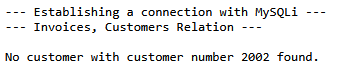
|
|
2.3.4 Side Note |
|
Where does the control flow occur in the following program fragment? |
|
|
if (!$stmt->execute()) {
die("Failed to execute the SQL statement: "
|
|
|
. $stmt->error . "\n");
|
|
|
}
|
|
The statement |
|
|
$stmt->execute()
|
|
is actually executed while PHP evaluates the condition of the if statement. The result of this method call is then checked immediately. This combines execution and error checking within a single if statement. |
|
Here’s how it works in detail: |
|
First, PHP executes this method: |
|
|
$stmt->execute()
|
|
The method normally returns a Boolean value: |
|
- true - the SQL statement was executed successfully
- false - an error occurred during execution
|
|
The logical NOT operator (! ) precedes the method call: It inverts the returned truth value. |
|
Successful Execution |
|
If execute() returns true, this results in !true. The result is therefore false. Thus, the if condition is not met. The error block is skipped: |
|
|
die(...);
|
|
The program continues after the if statement. |
|
Failed execution |
|
If execute() returns false, the result is !false. The result is true. Thus, the if condition is met. The error message is displayed, and the program terminates: |
|
|
die(
|
|
|
"Failed to execute the SQL statement: " . $stmt->error
|
|
|
. "\n"
|
|
|
);
|
|
Equivalent, more verbose syntax |
|
You could also split the execution and checking into two statements: |
|
|
$successful = $stmt->execute();
|
|
|
if (!$successful) {
|
|
|
die(
|
|
|
"Failed to execute the SQL statement: "
|
|
|
. $stmt->error . "\n"
|
|
|
);
|
|
|
}
|
|
2.3.5 Notes |
|
Summary of Classes and Methods |
|
The mysqli class represents a connection to a MySQL database. It is therefore an object-oriented MySQLi interface with the constructor |
mysqli |
|
new mysqli(host, user, password, database).
|
|
It has the attribute (often referred to as a property in programming) |
|
|
$con->connect_error
|
|
which contains an error message if the connection failed, and, among others, the following methods |
|
$con->prepare(string $sql), which prepares an SQL statement. |
|
$con->close(), which closes the connection to the database. |
|
In general: |
mysqli_stmt |
- Objects of the mysqli_stmt class each represent a prepared statement.
- The method $stmt->bind_param(string $types, mixed amp;$var, mixed amp;...$vars) binds the PHP variables to the placeholders in the SQL statement. The amp; symbol indicates that the variable is passed by reference. Therefore, variables rather than literal values are passed to bind_param().
- The method $stmt->execute() executes the prepared statement. This occurs on the server.
- The method $stmt->get_result() returns a result object of the mysqli_result class for a query that produces a result set.
- The method $stmt->close() closes the statement.
|
|
An example with multiple placeholders is: |
|
|
$stmt = $con->prepare(
|
|
|
"select * from customers where CustomerNo = ? AND Name = ?"
|
|
|
);
|
|
|
$stmt->bind_param("is", $id, $lastName);
|
|
The first parameter is an integer (i), and the second parameter is a string (s). |
|
The mysqli_result class represents the result of a query that returns rows. |
mysqli_result |
The method $result->fetch_assoc() reads the next result row and returns it as an associative array. If there are no more rows, it returns null. |
|
2.3.6 About the program |
|
- bind_param() does not insert the value into the SQL statement by ordinary text substitution. The prepared SQL statement and the parameter value are handled separately. Thus, the string SELECT * FROM Customers WHERE CustomerNo = 1002 is not simply constructed internally.
- Prepared statements (see also the Appendix) protect against SQL injection because a bound value is treated as data rather than as part of the SQL code. They should be used whenever values from external sources are incorporated into an SQL statement. This is good practice even in a local XAMPP development environment.
- Since the query searches for CustomerNo, which is the primary key of the Customers relation, the query returns at most one row. The while loop is nevertheless correct and can easily be reused later for queries that return multiple rows.
- In PHP, get_result() requires the MySQL native driver mysqlnd. This driver is normally included in XAMPP installations.
- Output using print_r() is particularly useful for learning and debugging. On a production website, the individual values should normally be incorporated into suitable HTML elements and processed using htmlspecialchars() before being displayed (see Appendix).
|
|
2.4 CustomerQueriesPDO_1.php |
|
2.4.1 Program Features |
|
- Class used for establishing a connection: PDO
- Security through prepared statements
- Launched via browser command
- Preformatted output in the browser
|
|
The following example shows how to establish a database connection using the PDO class. Once again, the program accesses the Customers relation in the Invoices database. |
|
2.4.2 The program |
|
|
<?php
|
|
|
/*
|
|
|
Customer number to search for. In this example the search value is
|
|
|
specified directly in the program. In a
|
|
|
web application, it would typically come from an input form.
|
|
|
*/
|
|
|
$id = 1002;
|
|
|
echo "<pre>";
|
|
|
echo "--- Establishing a Connection with PDO ---\n";
|
|
|
echo "--- Invoices, Customers Relation ---\n\n";
|
|
|
try {
|
|
|
/*
|
|
|
Establish a connection to the database.
|
|
|
PDO stands for PHP Data Objects. The variable $pdo refers to the
|
|
|
created PDO object. This object represents the connection to the
|
|
|
database.
|
|
|
The DSN (Data Source Name) contains:
|
|
|
- the database driver used: mysql
|
|
|
- the database server: localhost
|
|
|
- the database name: Invoices
|
|
|
- the character set: utf8mb4
|
|
|
"root" is the MySQL user. The following
|
|
|
quotes mean that no password is used.
|
|
|
PDO::ERRMODE_EXCEPTION causes PDO to throw an exception
|
|
|
when a database error occurs.
|
|
|
*/
|
|
|
$pdo = new PDO(
|
|
|
"mysql:host=localhost;dbname=Invoices;charset=utf8mb4",
|
|
|
"root","",[PDO::ATTR_ERRMODE => PDO::ERRMODE_EXCEPTION]);
|
|
|
/*
|
|
|
Prepare the SQL statement.
|
|
|
:id is a named placeholder for the customer number.
|
|
|
prepare() returns an object of the PDOStatement class.
|
|
|
The variable $stmt refers to this statement object.
|
|
|
*/
|
|
|
$stmt = $pdo->prepare(
|
|
|
"SELECT * FROM customers WHERE customerNo = :id"
|
|
|
);
|
|
|
/*
|
|
|
Execute the prepared statement.
|
|
The associative array assigns the value of $id to the |
|
named placeholder :id. The colon can be omitted in the |
|
array key. |
|
The SQL statement and the parameter value are handled |
|
separately. |
|
|
*/
|
|
|
$stmt->execute(["id" => $id]);
|
|
|
/*
|
|
|
Retrieve all rows found.
|
|
|
fetchAll() returns an array containing all result rows.
|
|
|
PDO::FETCH_ASSOC specifies that each row is provided as an associative array. The attribute names of the table form the
|
|
|
keys of the array.
|
|
|
*/
|
|
|
$records = $stmt->fetchAll(PDO::FETCH_ASSOC);
|
|
|
// Check whether a row was found.
|
|
|
if (count($records) === 0) {
|
|
|
echo "No customer with customer number " . $id . " found.\n";
|
|
|
}
|
|
|
/*
|
|
|
Output the found rows one by one. print_r() is a
|
|
|
built-in PHP function. It outputs the content and structure of a
|
|
|
variable - in particular, an array - in a human-readable form.
|
|
|
If the number of rows is zero, $records is an empty array.
|
|
|
Therefore, the foreach loop is not executed.
|
|
|
*/
|
|
|
foreach ($records as $row) {
|
|
|
print_r($row);
|
|
|
echo "\n";
|
|
|
}
|
|
|
//from the try block (at the very top)
|
|
|
} catch (PDOException $e) {
|
|
|
// Handle PDO database errors. getMessage() returns the
|
|
|
// associated error message.
|
|
|
echo "PDO error: " . $e->getMessage() . "\n";
|
|
|
} // closes the catch block
|
|
|
// Close the HTML element for the preformatted output.
|
|
|
echo "</pre>";
|
|
|
?>
|
|
Browser Output |
|
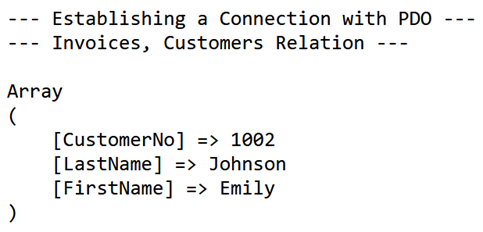
|
|
2.4.3 Notes |
|
Side Note: What Exactly Is $stmt? |
|
Let's consider the following statement: |
|
|
$stmt = $pdo->prepare("SELECT * FROM customers
|
|
|
WHERE CustomerNo = :id");
|
|
The prepare() method prepares the SQL statement for later execution. The statement itself is not executed at this point. After prepare() has been successfully executed, the variable $stmt points to an object of the PDOStatement class. This statement object represents the prepared SQL statement and provides methods that can be used to bind placeholders, execute the statement, and retrieve query results. |
|
The named placeholder :id is not yet replaced by a specific value. The value can be bound, for example, using bindValue(): |
|
|
$stmt->bindValue(":id", $id, PDO::PARAM_INT);
|
|
The prepared SQL statement is then executed: $stmt->execute(); Alternatively, the value can be passed directly when calling execute(): |
|
|
$stmt->execute(["id" => $id]);
|
|
Important methods of the PDOStatement object include: |
|
- bindParam() - binds a variable by reference to a placeholder
- bindValue() - binds a value to a placeholder
- execute() - executes the prepared SQL statement
- fetch() - retrieves the next result row
- fetchAll() - retrieves all result row
|
|
About the Program |
|
The program demonstrates how to retrieve and output a single row from the database. It uses the PDO extension, which provides an object-oriented and secure interface to the database. |
|
First, a search criterion is defined using the variable $id. This is an integer that represents the primary key of a specific row. This value is later inserted into the SQL query. |
|
The output is generated using the echo function. By using the HTML tag <pre>, a formatted display is achieved that preserves line breaks and indentation. This is particularly helpful for debugging purposes or for illustrating data structures. |
|
The actual database operation is embedded in a try/catch block. This construct is used for structured error handling. The try block contains the code to be executed, while the catch block is invoked if an error occurs. Unlike a simple termination using die(), this approach allows for a controlled response to errors. |
try/catch block |
Within the try block, a connection to the database is first established by creating a PDO object. The connection parameters are passed in the form of a so-called DSN (Data Source Name). The input |
|
|
PDO::ATTR_ERRMODE => PDO::ERRMODE_EXCEPTION
|
|
ensures that errors are reported as exceptions. |
|
Next, a prepared statement is prepared. The SQL statement contains a named placeholder, :id. This placeholder is only populated with a specific value when the statement is executed. This enhances security by protecting against SQL injection and, at the same time, ensures a clear separation between SQL code and data. |
|
The prepared statement is executed using the execute() method. During execution, the placeholder :id is bound to the value of the variable $id. |
|
The result set is then retrieved using fetchAll(PDO::FETCH_ASSOC). This returns the result rows as an array of associative arrays. The attribute names serve as keys. A foreach loop then processes the individual rows and displays them using print_r(). |
|
If a PDO database error occurs during execution, an error message is displayed in the catch block. The getMessage() method provides a more detailed description of the problem that occurred. |
|
2.5 CustomerQueriesPDO_2.php |
|
2.5.1 Program Features |
|
- Class used for establishing a connection: PDO
- Input via an HTML form
- Query secured using a prepared statement
- HTML form with POST submission for data entry
- Preformatted output in the browser
|
|
To demonstrate how PHP interacts with HTML, the previous program is now extended by adding an input form. Instead of specifying the customer number directly in the PHP program, the user enters it in the browser. |
|
This is what the input form should look like: |
|
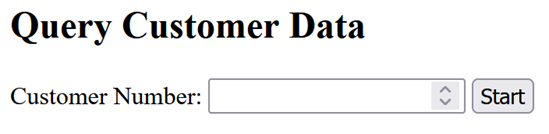
|
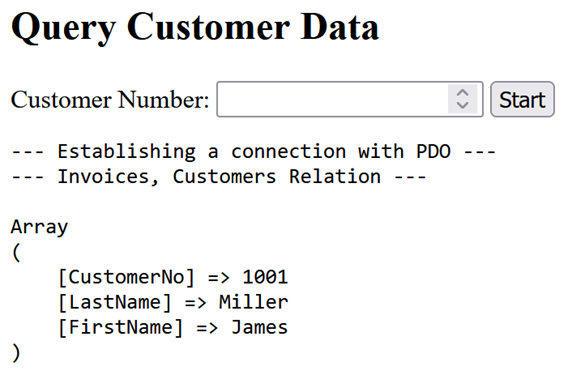
|
And here is the successful result if 1001 was entered: |
|
|
|
2.5.2 The program |
|
|
<?php
|
|
|
/*
|
|
|
As shown several times above, echo is used to send
|
|
|
components of the HTML document to the browser.
|
|
|
The browser interprets the generated HTML code and displays
|
|
|
the web page. It does not execute the PHP code. The PHP code
|
|
|
is executed beforehand on the web server.
|
|
|
*/
|
|
|
echo "<!doctype html>";
|
|
|
echo "<html lang=\"en\">";
|
|
|
echo "<head>";
|
|
|
echo "<meta charset=\"UTF-8\">";
|
|
|
echo "<title>Customer Search</title>";
|
|
|
echo "</head>";
|
|
|
echo "<body>";
|
|
|
echo "<h2>Query Customer Data</h2>";
|
|
|
/*
|
|
Output the HTML form. |
|
method="post" specifies that the entered customer number |
|
is transmitted using the HTTP POST method. |
|
Since no action attribute is specified, the form data is |
|
sent to the same page, that is, to the same URL. |
|
Regarding the backslashes: |
|
The PHP echo statement outputs a string containing HTML code. |
|
Since both the PHP string and the HTML attributes use double |
|
quotation marks, the inner quotation marks must be escaped |
|
with a preceding backslash. |
|
The character sequence \" means that the quotation mark is |
|
part of the string and does not terminate it. The backslash |
|
itself is not displayed. |
|
The forward slash / in </form> or </label>, on the other hand, |
|
is part of the HTML code and marks the closing tag of an |
|
HTML element.. |
|
|
*/
|
|
|
echo "<form method=\"post\">";
|
|
|
echo "<label for=\"id\">Customer Number:</label> ";
|
|
|
echo "<input type=\"number\" id=\"id\" name=\"id\" min=\"1\"
|
|
|
required> ";
|
|
|
echo "<input type=\"submit\" value=\"Start\">";
|
|
|
echo "</form>";
|
|
|
/*
|
|
|
Check whether the form was submitted using the POST HTTP method.
|
|
|
When the page is first loaded, the condition is not met. In that
|
|
|
case, the form is simply displayed.
|
|
|
*/
|
|
|
if ($_SERVER["REQUEST_METHOD"] === "POST") {
|
|
|
/*
|
|
|
Retrieve the input value from the POST data.
|
|
|
The null coalescing operator ?? ensures that, if a
|
|
|
form element is missing, the empty string
|
|
|
is used instead.
|
|
|
The explicit type cast (int) then converts the value
|
|
|
into an integer.
|
|
|
*/
|
|
|
$id = (int)($_POST["id"] ?? "");
|
|
|
echo "<pre>";
|
|
|
echo "--- Establishing a connection with PDO ---\n";
|
|
|
echo "--- Invoices, Customers Relation ---\n\n";
|
|
|
/*
|
|
|
Type conversion alone does not constitute a complete input
|
|
|
validation. Therefore, an additional check is performed to verify
|
|
|
whether the customer number is greater than 0.
|
|
|
*/
|
|
|
if ($id <= 0) {
|
|
|
echo "Please enter a valid customer number.\n";
|
|
|
} else {
|
|
|
try {
|
|
|
/*
|
|
|
Establish a connection to the database.
|
|
|
The DSN contains the database driver, the database server,
|
|
|
the database name, and the character set.
|
|
PDO::ERRMODE_EXCEPTION causes PDO to throw an exception when a |
|
database error occurs. |
|
|
*/
|
|
|
$pdo = new PDO("mysql:host=localhost;" . "dbname=Invoices;"
|
|
|
. "charset=utf8mb4", "root", "",
|
|
|
[PDO::ATTR_ERRMODE => PDO::ERRMODE_EXCEPTION]
|
|
|
);
|
|
|
// Prepare the SQL statement.
|
|
|
// :id is a named placeholder for the customer number.
|
|
|
$stmt = $pdo->prepare("SELECT * FROM customers WHERE customerNo = :id");
|
|
|
// Execute the prepared statement.
|
|
|
// The value of $id is assigned to the placeholder :id.
|
|
|
$stmt->execute(["id" => $id]);
|
|
|
// Retrieve all found rows as associative arrays.
|
|
|
$rows = $stmt->fetchAll(PDO::FETCH_ASSOC);
|
|
|
// Check whether a customer was found.
|
|
|
if (count($rows) === 0) {
|
|
|
echo "No customer with customer number " . $id . " found.\n";
|
|
|
} else {
|
|
|
// Output the found rows (records) one by one
|
|
|
foreach ($rows as $row) {
|
|
|
print_r($row);
|
|
|
echo "\n";
|
|
|
}
|
|
|
}
|
|
|
} catch (PDOException $e) {
|
|
|
// Catch and display PDO database errors.
|
|
|
echo "PDO error: " . $e->getMessage() . "\n";
|
|
|
}
|
|
|
}
|
|
|
// Close the HTML element for the preformatted output.
|
|
|
echo "</pre>";
|
|
|
}
|
|
|
// End the HTML document.
|
|
|
echo "</body>";
|
|
|
echo "</html>";
|
|
|
?>
|
|
2.5.3 Notes |
|
- The browser does not execute the HTML output as program statements. PHP runs on the web server. The browser receives the HTML code generated by PHP, interprets it, and displays the resulting web page.
- The label element is associated with the input field by using for="id" in the label element and id="id" in the input element.
- min="1" tells the browser not to accept a customer number below 1. Server-side validation in PHP is still required because browser-side restrictions cannot be relied upon for validating data received by the server.
- (int) is an explicit type cast, but by itself it does not provide complete input validation. For example, a non-numeric string is converted to 0. Therefore, the program subsequently checks whether $id <= 0.
- $_POST["id"] ?? "" uses the null coalescing operator. If $_POST["id"] does not exist, the expression returns the empty string instead. This prevents an "undefined array key" warning and provides a defined value for the subsequent type conversion.
- As in the previous example, the SQL statement uses a prepared statement with the named placeholder :id. The value entered by the user is therefore passed as parameter data rather than being inserted directly into the SQL statement.
|
3 Inserting Data |
|
This chapter demonstrates how to insert data into relational databases from PHP programs, first using MySQLi and then using PDO. |
|
|
|
3.1 InsertCustomerMySQLi |
|
3.1.1 The program |
|
|
<?php
|
|
|
// Variable for feedback to the user.
|
|
|
// It remains empty for now and will later be populated with a
|
|
|
// success or error message.
|
|
|
$message = "";
|
|
|
// Database connection information.
|
|
|
$host = "localhost";
|
|
|
$user = "root";
|
|
|
$pass = "";
|
|
|
$db = "Invoices";
|
|
|
// Check whether the form was submitted using the POST HTTP method.
|
|
// The PHP code for inserting the data is executed only after |
3.2 SaveInvoiceMySQLi |
|
3.2.1 Program Features |
|
- Saving data to multiple related relations
- Transaction
- Prepared statements
- MySQLi Class
- No user input
|
|
3.2.2 Task |
|
An invoice is to be entered into the Invoices databaseThis requires data to be inserted into two related relations: the invoice header is stored in InvoiceHeaders, while the corresponding line items are stored in InvoiceItems. These operations form a single unit and should therefore be performed within a transaction. Either the invoice header and all its line items are saved successfully, or none of them are saved. |
Transactions |
This is demonstrated by the program SaveInvoiceMySQLi.php. To keep the example focused on transactions, the data is defined directly in the program rather than entered through an HTML form. The new invoice has invoice number 23012, belongs to the customer with customer number 1002, and contains three line items for products 100, 101, and 102. |
|
After the invoice has been saved, the result can be checked using the following query: |
|
|
SELECT ih.InvoiceNo, ih.CustomerNo, ih.InvoiceDate, ii.PositionNo,
|
|
|
ii.ProductNo, ii.Quantity, c.LastName, c.FirstName
|
|
|
FROM InvoiceHeaders AS ih
|
|
|
INNER JOIN Customers AS c ON ih.CustomerNo = c.CustomerNo
|
|
|
INNER JOIN InvoiceItems AS ii ON ih.InvoiceNo = ii.InvoiceNo
|
|
|
WHERE ih.CustomerNo = 1002 AND ih.InvoiceNo = 23012
|
|
|
ORDER BY ii.PositionNo;
|
|
The result should be: |
|
|
|
| InvoiceNo |
CustomerNo |
InvoiceDate |
Pos |
ProductNo |
Quantity |
LastName |
FirstName |
| 23012 |
1002 |
2026-03-28 |
1 |
100 |
2 |
Johnson |
Emily |
| 23012 |
1002 |
2026-03-28 |
2 |
101 |
1 |
Johnson |
Emily |
| 23012 |
1002 |
2026-03-28 |
3 |
102 |
5 |
Johnson |
Emily |
| |
Note: Before the invoice can be saved, customer number 1002 must exist in the Customers relation, and product numbers 100, 101, and 102 must exist in the Products relation. Invoice number 23012 must not yet exist in InvoiceHeaders. |
|
3.2.3 The program |
|
|
<?php
|
|
|
// Data for establishing a connection.
|
|
|
$host = "localhost";
|
|
|
$user = "root";
|
|
|
$pass = "";
|
|
|
$db = "Invoices";
|
|
|
// Invoice header data.
|
|
|
$invoiceNo = 23012;
|
|
|
$customerNo = 1002;
|
|
|
$invoiceDate = "2026-03-28";
|
|
|
// Invoice line item data.
|
|
|
// In this example, the data is defined directly in the program.
|
|
|
// In a web application, it would normally come from a form.
|
|
|
$items = [
|
|
|
["positionNo" => 1, "productNo" => 100, "quantity" => 2],
|
|
|
["positionNo" => 2, "productNo" => 101, "quantity" => 1],
|
|
|
["positionNo" => 3, "productNo" => 102, "quantity" => 5]];
|
|
|
// The variable initially does not contain a connection object.
|
|
|
// After a successful connection is established, it points
|
|
|
// to the created mysqli object.
|
|
|
$con = null;
|
|
|
try {
|
|
|
// Establish a connection to the database.
|
|
|
$con = new mysqli($host, $user, $pass, $db);
|
|
|
// Check whether an error occurred. In this case, an
|
|
|
// exception is thrown.
|
|
|
if ($con->connect_error) {throw new Exception(
|
|
|
"MySQLi connection error: " . $con->connect_error);
|
|
|
}
|
|
|
// Set the character set for the database connection.
|
|
|
$con->set_charset("utf8mb4");
|
|
|
// Start a transaction.
|
|
|
// The invoice header and all invoice line items
|
|
|
// form a single unit of work. They are
|
|
|
// saved either in their entirety or not at all.
|
|
|
$con->begin_transaction();
|
|
|
// Prepare the SQL statement for inserting the invoice header.
|
|
|
// The question marks serve as placeholders.
|
|
|
$stmtHeader = $con->prepare("INSERT INTO InvoiceHeaders
|
|
|
(InvoiceNo, CustomerNo, InvoiceDate) VALUES (?, ?, ?)");
|
|
|
// Check whether the statement was prepared successfully.
|
|
|
if (!$stmtHeader) {throw new Exception(
|
|
|
"Prepare failed (invoice header): "
|
|
|
. $con->error);
|
|
|
}
|
|
|
/*
|
|
|
Bind values to the placeholders.
|
|
|
"i" denotes an integer value.
|
|
|
"s" denotes a string value.
|
|
|
"iis" therefore stands for integer, integer, string.
|
|
|
*/
|
|
|
$stmtHeader->bind_param("iis", $invoiceNo, $customerNo,
|
|
|
$InvoiceDate);
|
|
|
// Execute the prepared statement.
|
|
|
if (!$stmtHeader->execute()) {throw new Exception(
|
|
|
"Execute failed (invoice header): "
|
|
|
. $stmtHeader->error);
|
|
|
}
|
|
|
// Close the statement for the invoice header and
|
|
|
// release the resources used for it.
|
|
|
$stmtHeader->close();
|
|
|
// Prepare the SQL statement for inserting the invoice line items.
|
|
|
$stmtItem = $con->prepare("INSERT INTO InvoiceItems
|
|
|
(InvoiceNo, PositionNo, ProductNo, Quantity)
|
|
|
VALUES (?, ?, ?, ?)");
|
|
|
// Check whether the prepared statement was prepared successfully.
|
|
|
if (!$stmtItem) {throw new Exception(
|
|
|
"Prepare failed (invoice items): "
|
|
|
. $con->error);
|
|
|
}
|
|
|
/*
|
|
|
Variables for the values of an invoice line item.
|
|
|
MySQLi binds variables rather than only their current
|
|
|
values. The values can therefore be changed in the loop
|
|
|
and the prepared statement can be executed repeatedly.
|
|
|
*/
|
|
|
$positionNo = 0;
|
|
|
$productNo = 0;
|
|
|
$quantity = 0;
|
|
|
/*
|
|
|
Bind variables to the placeholders. All four values are integers
|
|
|
numbers. MySQLi binds the variables here, not just their
|
|
|
current values. Therefore, they can be
|
|
|
and the statement can be executed multiple times.
|
|
|
*/
|
|
|
$stmtItem->bind_param("iiii", $invoiceNo, $positionNo, $productNo, $quantity);
|
|
|
// Process the invoice line items one by one.
|
|
|
foreach ($items as $item) {
|
|
|
// Retrieve values from the respective array element
|
|
|
// and convert them to integers.
|
|
|
$productNo = (int)$item["productNo"];
|
|
|
$quantity = (int)$item["quantity"];
|
|
|
if ($productNo == 0 amp;amp; $quantity === 0) {
|
|
|
contionue;
|
|
|
}
|
|
if ($productNo <= 0 || $quantity <= 0) { |
3.3 InsertCustomerPDO.php |
|
3.3.1 Program Features |
|
- Class used to establish the connection: PDO
- Input via an HTML form
- Secured using a prepared statement
- Launched via a browser
- HTML output of the result
|
|
3.3.2 The Program |
|
|
<?php
|
|
|
// Variable for feedback to the user. It remains empty for now and
|
|
|
// will later contain a success or error message.
|
|
|
$message = "";
|
|
|
/*
|
|
|
Data for establishing the connection.
|
|
|
The DSN (Data Source Name) contains:
|
|
|
- the database driver: mysql
|
|
|
- the database server: localhost
|
|
|
- the database name: Invoices
|
|
|
- the character set: utf8mb4
|
|
|
*/
|
|
|
$dsn = "mysql:host=localhost;dbname=Invoices;charset=utf8mb4";
|
|
|
$user = "root";
|
|
|
$pass = "";
|
|
|
/*
|
|
|
Check whether the form was submitted using the HTTP POST method.
|
|
|
The code for inserting the data is executed only after the form
|
|
|
has been submitted.
|
|
|
*/
|
|
|
if ($_SERVER["REQUEST_METHOD"] === "POST") {
|
|
|
/*
|
|
|
Retrieve the input from the form. The ?? operator returns a default
|
|
|
value if no corresponding value was submitted.
|
|
|
trim() removes leading and trailing spaces.
|
|
|
(int) converts the retrieved value to an integer.
|
|
|
*/
|
|
|
$customerNo = (int)($_POST["customerNo"] ?? 0);
|
|
|
$lastName = trim($_POST["lastName"] ?? "");
|
|
|
$firstName = trim($_POST["firstName"] ?? "");
|
|
|
// Check the input values for validity.
|
|
|
// The customer number must be greater than 0.
|
|
|
// Last name and first name must not be empty.
|
|
|
if ($customerNo <= 0 || $lastName === "" || $firstName === "") {
|
|
|
$message = "Please fill out all fields correctly.";
|
|
|
} else {
|
|
|
try {
|
|
|
/*
|
|
|
Establish a connection to the database. PDO stands for PHP
|
|
|
Data Objects. The variable $pdo refers to the created PDO object.
|
|
|
PDO::ATTR_ERRMODE specifies how PDO handles errors.
|
|
|
PDO::ERRMODE_EXCEPTION causes PDO to throw an exception when a
|
|
|
database error occurs.
|
|
|
*/
|
|
|
$pdo = new PDO($dsn,$user,$pass,
|
|
|
[PDO::ATTR_ERRMODE => PDO::ERRMODE_EXCEPTION]);
|
|
|
/*
|
|
|
Prepare the SQL statement.
|
|
|
:customerNo, :lastName, and :firstName are named placeholders.
|
|
|
The actual values are passed separately when the statement is
|
|
|
executed.
|
|
|
*/
|
|
|
$stmt = $pdo->prepare("INSERT INTO Customers (CustomerNo, LastName,
|
|
|
FirstName) VALUES (:customerNo, :lastName, :firstName)");
|
|
|
// Execute the prepared statement. The array assigns a value to each
|
|
|
// named placeholder. The colon can be omitted in the array keys.
|
|
|
$stmt->execute(["customerNo" => $customerNo,"lastName" => $lastName,
|
|
|
"firstName" => $firstName]);
|
|
|
// This line is reached only if execute()
|
|
|
// has not thrown an exception.
|
|
|
$message = "Customer successfully added.";
|
|
|
} catch (PDOException $e) {
|
|
|
// Catch PDO database errors and generate an appropriate message.
|
|
|
$message = "Error inserting customer: " . $e->getMessage();
|
|
|
}
|
|
|
}
|
|
|
}
|
|
|
?>
|
|
|
<!doctype html>
|
|
|
<html lang="en">
|
|
|
<head>
|
|
|
<meta charset="utf-8">
|
|
|
<title>Add a Customer Using PDO</title>
|
|
|
<style>body {font-family: Arial, sans-serif;}</style>
|
|
|
</head>
|
|
|
<body>
|
|
|
<h2>Add Customer (PDO)</h2>
|
|
|
<!--
|
|
|
Form for entering customer data. method="post" specifies that the
|
|
|
form data is transmitted using the HTTP POST method.
|
|
|
Since no action attribute is specified, the data is sent
|
|
|
to the same PHP file from which the form was loaded.
|
|
|
-->
|
|
|
<form method="post">
|
|
|
<label for="customerNo">Customer Number:</label>
|
|
|
<input type="number" id="customerNo" name="customerNo" min="1"
|
|
|
required>
|
|
|
<br><br>
|
|
|
<label for="lastName">Last Name:</label>
|
|
|
<input type="text" id="lastName" name="lastName" maxlength="10"
|
|
|
required>
|
|
|
<br><br>
|
|
|
<label for="firstName">First Name:</label>
|
|
|
<input type="text" id="firstName" name="firstName" maxlength="10"
|
|
|
required>
|
|
|
<br><br>
|
|
|
<!-- Button to submit the form. -->
|
|
|
<button type="submit">Save</button>
|
|
|
</form>
|
|
|
<!--
|
|
|
If feedback is available, it is displayed in bold.
|
|
|
See the Appendix for information on htmlspecialchars().
|
|
|
-->
|
|
|
<?php if ($message !== ""): ?>
|
|
|
<p><strong>
|
|
|
<?php echo htmlspecialchars($message,ENT_QUOTES,"UTF-8"); ?>
|
|
|
</strong></p>
|
|
|
<?php endif; ?>
|
|
|
</body>
|
|
|
</html>
|
|
3.3.3 Program Run |
|
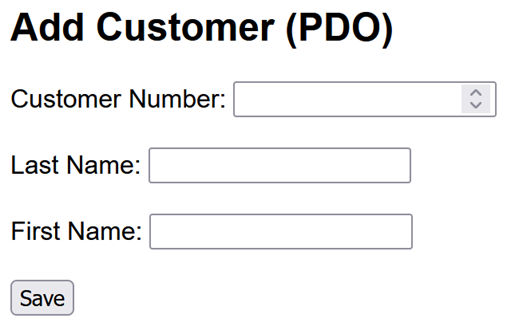
|
|
3.3.4 Notes |
|
- PDO provides a unified interface for accessing different database systems. In this example, the MySQL driver is selected by specifying mysql: in the DSN.
- Unlike in the previous MySQLi version, the character set is specified directly in the DSN using charset=utf8mb4.
- PDO uses named placeholders here: :customerNo, :lastName, and :firstName. Their names make it easy to see which input value is associated with each placeholder.
- The values are passed to execute() separately from the SQL statement. This prevents the parameter values from being interpreted as part of the SQL code and therefore provides protection against SQL injection.
- Because PDO::ERRMODE_EXCEPTION is enabled, PDO throws a PDOException when a database error occurs. Program execution then continues in the corresponding catch block.
- Explicitly closing the statement and database connection is normally not necessary with PDO. The associated resources are released when they are no longer referenced, at the latest when the script terminates.
- The HTML attributes required, min, and maxlength provide initial validation in the browser. Validation in PHP is still necessary because client-side validation can be bypassed.
- A transaction is not required in this example because only a single row is inserted with a single INSERT statement. The statement either succeeds or fails as a whole.
|
|
3.4 SaveInvoicePDO.php |
|
3.4.1 Program Features: |
|
- Saving data to multiple related relations ("invoice")
- Class used to establish the connection: PDO
- Transactions
- Prepared statements
- No user input
- Launched via a browser
- Browser output of the result
|
|
3.4.2 Task |
|
An invoice is entered into the Invoices database. The invoice header is stored in the InvoiceHeaders relation, while the associated line items are stored in the InvoiceItems relation. These operations form a single unit of work and are therefore performed within a transaction. Either the invoice header and all its line items are saved successfully, or none of them are saved. |
Transactions |
This is demonstrated by the program SaveInvoicePDO.php. To keep the example focused on transactions, the data is defined directly in the program rather than entered through an HTML form. |
|
The new invoice has invoice number 23011, refers to customer number 1004, and contains three line items for products 100, 101, and 102. After the invoice has been saved, the following query can be used to check the result: |
|
|
SELECT ih.InvoiceNo, ih.CustomerNo, ih.InvoiceDate, ii.PositionNo,
|
|
|
ii.ProductNo, ii.Quantity, c.LastName, c.FirstName
|
|
|
FROM InvoiceHeaders AS ih
|
|
|
INNER JOIN Customers AS c ON ih.CustomerNo = c.CustomerNo
|
|
|
INNER JOIN InvoiceItems AS ii ON ih.InvoiceNo = ii.InvoiceNo
|
|
|
WHERE ih.InvoiceNo = 23001
|
|
|
ORDER BY ii.PositionNo;
|
|
|
|
|
| InvoiceNo |
CustomerNo |
InvoiceDate |
PositionNo |
ProductNo |
Quantity |
LastName |
FirstName |
| 23001 |
1002 |
2026-03-27 |
1 |
101 |
2 |
Johnson |
Emily |
| 23001 |
1002 |
2026-03-27 |
2 |
554 |
1 |
Johnson |
Emily |
| 23001 |
1002 |
2026-03-27 |
3 |
100 |
1 |
Johnson |
Emily |
| |
|
|
|
3.4.3 The program |
|
|
<?php
|
|
|
/*
|
|
|
The program saves an invoice header and the associated
|
|
|
invoice line items in a single transaction.
|
|
|
This ensures that the invoice is either saved in its
|
|
|
entirety or not at all.
|
|
|
Data for establishing the connection.
|
|
|
DSN stands for Data Source Name. This string contains:
|
|
|
- the database driver: mysql
|
|
|
- the database server: localhost
|
|
|
- the database name: Invoices
|
|
|
- the character set: utf8mb4
|
|
|
*/
|
|
|
$dsn = "mysql:host=localhost;dbname=Invoices;charset=utf8mb4";
|
|
|
$user = "root";
|
|
|
$pass = "";
|
|
|
// Data for the new invoice header. In a web application, these
|
|
|
// values would typically come from a form.
|
|
|
$invoiceNo = 23011;
|
|
|
$customerNo = 1002;
|
|
|
$invoiceDate = "2026-09-21";
|
|
|
// Data for the invoice line items.
|
|
|
// The outer array contains all invoice line items.
|
|
|
// Each inner array describes a single line item.
|
|
|
$items = [
|
|
|
["positionNo" => 1, "productNo" => 100, "quantity" => 2],
|
|
|
["positionNo" => 2, "productNo" => 101, "quantity" => 1],
|
|
|
["positionNo" => 3, "productNo" => 102, "quantity" => 5]
|
|
|
];
|
|
|
try {//1
|
|
|
/*
|
|
|
Establish a connection to the database. PDO stands for PHP Data
|
|
|
Objects. The variable $pdo refers to the created PDO object.
|
|
|
PDO::ERRMODE_EXCEPTION causes PDO to throw an exception when a
|
|
|
database error occurs.
|
|
|
*/
|
|
|
$pdo = new PDO($dsn,$user,$pass,
|
|
|
[PDO::ATTR_ERRMODE => PDO::ERRMODE_EXCEPTION]);
|
|
|
/*
|
|
|
Start a transaction.
|
|
|
All subsequent database operations form a single
|
|
|
unit of work until commit() or rollBack() is called.
|
|
|
*/
|
|
|
$pdo->beginTransaction();
|
|
|
/*
|
|
|
Prepare the SQL statement for the invoice header.
|
|
|
:invoiceNo, :customerNo, and :invoiceDate are named placeholders.
|
|
|
*/
|
|
|
$stmtHeader = $pdo->prepare("INSERT INTO InvoiceHeaders
|
|
|
(InvoiceNo, CustomerNo, InvoiceDate)
|
|
|
VALUES (:invoiceNo, :customerNo, :invoiceDate)");
|
|
|
// Execute the prepared statement for the invoice header.
|
|
|
$stmtHeader->execute(["invoiceNo" => $invoiceNo,
|
|
|
"customerNo" => $customerNo,
|
|
|
"invoiceDate" => $invoiceDate]);
|
|
|
/*
|
|
|
Prepare the SQL statement for the invoice line items.
|
|
|
The statement is prepared only once and then
|
|
|
executed repeatedly for the individual line items.
|
|
|
*/
|
|
|
$stmtItem = $pdo->prepare("INSERT INTO InvoiceItems
|
|
|
(InvoiceNo, PositionNo, ProductNo, Quantity)
|
|
|
VALUES (:invoiceNo, :positionNo, :productNo, :quantity)");
|
|
|
// Process the invoice line items one by one.
|
|
|
foreach ($items as $item) {//2
|
|
|
// Retrieve the values of the current invoice line item
|
|
|
// and convert them to integers.
|
|
|
$positionNo = (int)$item["positionNo"];
|
|
|
$productNo = (int)$item["productNo"];
|
|
|
$quantity = (int)$item["quantity"];
|
|
|
// Simple validity check.
|
|
|
// A quantity less than or equal to 0 must not be saved.
|
|
|
if ($quantity <= 0) {throw new Exception("The quantity
|
|
|
must be greater than 0 " . "(position $positionNo).");}
|
|
|
// Execute the prepared statement for the current invoice line item.
|
|
|
$stmtItem->execute(["invoiceNo" => $invoiceNo,
|
|
|
"positionNo" => $positionNo,"productNo" => $productNo,
|
|
|
"quantity" => $quantity]);
|
|
|
} //2
|
|
|
/*
|
|
|
Successfully complete the transaction. Only after commit() are the
|
|
|
invoice header and all invoice line items permanently saved.
|
|
|
*/
|
|
|
$pdo->commit();
|
|
|
echo "Invoice successfully saved.";
|
|
|
} //1
|
|
|
catch (Exception $e) {//3
|
|
|
/*
|
|
|
Check whether the PDO object exists and whether a transaction is
|
|
|
active. If so, rollBack() reverses all changes made since
|
|
|
beginTransaction().
|
|
|
*/
|
|
|
if (isset($pdo) amp;amp; $pdo->inTransaction()) {
|
|
|
$pdo->rollBack();
|
|
|
}
|
|
|
// Output an error message.
|
|
|
echo "Error saving the invoice. " . "Everything has been rolled
|
|
|
back: " . $e->getMessage();
|
|
|
}//3
|
|
|
?>
|
|
Keep in mind: Running the program again requires deleting the above calculation. |
|
3.4.4 Program Execution |
|
This is what the result looks like after a successful program run. |
|

|
|
3.4.5 Notes |
|
- The values of the invoice line items are explicitly converted to int before they are checked and stored.
- The prepared statement for the invoice line items is prepared only once. Within the loop, it is executed multiple times with different values.
- commit() permanently saves all changes made during the transaction. If an error occurs, rollBack() reverses both the insertion of the invoice header and any invoice line items that have already been inserted.
- inTransaction() checks whether a transaction is currently active. This prevents rollBack() from being called when there is no active transaction.
- Customer number 1004 must already exist in the Customers relation. Likewise, product numbers 100, 101, and 102 must exist in the Products relation. Otherwise, a foreign key constraint prevents the invoice from being saved.
- Invoice number 23011 must not already exist in the InvoiceHeaders relation because InvoiceNo is the primary key.
- To run the program successfully again with the same invoice number, invoice 23011 must first be deleted. Because of the foreign key constraint, the corresponding rows in InvoiceItems must be deleted before the row in InvoiceHeaders.
|
|
3.4.6 Program Description |
|
The program saves a complete invoice using PDO and performs the necessary database operations within a transaction. This is necessary because an invoice consists of two related parts: the invoice header in the InvoiceHeaders relation and the invoice line items in the InvoiceItems relation. Both parts must be saved completely. It must not happen that the invoice header is saved while one or more line items are missing because an error occurred. |
|
First, the database connection information is defined in the variables $dsn, $user, and $pass. This is followed by the data for the new invoice header: the invoice number, customer number, and invoice date. The corresponding line items are stored in a multidimensional array. Each inner array represents one line item and contains the position number, product number, and quantity. |
|
This is followed by a try/catch block. In the try block, a PDO object is first created to establish the connection to the database. The setting |
|
|
PDO::ATTR_ERRMODE => PDO::ERRMODE_EXCEPTION
|
|
causes PDO to throw an exception when a database error occurs. This makes it possible to handle database errors centrally in the catch block. |
|
After the connection has been established, a transaction is started with beginTransaction(). From this point on, the subsequent changes belong to the same transaction. They are not permanently saved until commit() is executed. |
|
Next, a prepared statement is created for the invoice header. The SQL statement contains the named placeholders :invoiceNo, :customerNo, and :invoiceDate. The corresponding values are passed separately when execute() is called. A second prepared statement is then created for the invoice line items. This statement is prepared only once and is reused for each line item. The foreach loop processes the elements of the $items array one by one. Each inner array contains the position number, product number, and quantity of one invoice line item. |
|
Before a line item is inserted, a simple validity check is performed: the quantity must be greater than 0. If this is not the case, an exception is thrown using throw new Exception(...). Normal execution of the try block stops immediately, and program execution continues in the catch block. |
|
If the invoice header and all invoice line items have been inserted successfully, commit() completes the transaction. The changes made during the transaction are then permanently saved in the database. |
|
If an error occurs anywhere after the transaction has started, the catch block is executed. If a transaction is still active, rollBack() reverses all changes made since beginTransaction(). This is the essential advantage of the transaction in this example: the complete invoice is saved, or none of it is saved. This keeps the database in a consistent state. |
|
4 Deleting Data |
|
Here, we’ll first demonstrate deletion in a single relation (Customers) and then deletion across multiple related tables (InvoiceHeaeders and InvoiceItems). First using MySQLi, then using PDO. |
|
|
|
4.1 DeleteCustomerMySQLi.php |
|
4.1.1 Program Features: |
|
- Class used for establishing a connection: mysqli
- Deleting from a single relatioon (Customers)
- Security through prepared statements
- Launched via a browser
- HTML output of the result
|
|
To follow along with the example, first create a customer who is not referenced by an invoice header, for example using the program InsertCustomerMySQLi.php. This customer can then be deleted using the program presented here. |
|
4.1.2 The program |
|
|
<?php
|
|
|
// Variable for feedback to the user.
|
|
|
// It stores success or error messages,
|
|
|
// which are later displayed in the HTML section.
|
|
|
$message = "";
|
|
|
// Data for establishing a connection.
|
|
|
$host = "localhost";
|
|
|
$user = "root";
|
|
|
$pass = "";
|
|
|
$db = "Invoices";
|
|
|
// Check whether the form was submitted using the HTTP POST method
|
|
|
//.
|
|
|
if ($_SERVER["REQUEST_METHOD"] === "POST") {
|
|
|
// Retrieve the customer number from the form.
|
|
|
// The ?? operator returns 0 if the form entry is missing.
|
|
|
// (int) converts the retrieved value to an integer.
|
|
|
$customerNo = (int)($_POST["customerNo"] ?? 0);
|
|
|
// Validate the input. The customer number must be greater than 0.
|
|
|
if ($customerNo <= 0) {
|
|
|
$message = "Please enter a valid customer number.";
|
|
|
} else {
|
|
|
// Establish a connection to the database.
|
|
|
// The variable $con refers to the created mysqli object.
|
|
|
$con = new mysqli($host, $user, $pass, $db);
|
|
|
// Check if an error occurred while establishing the connection.
|
|
|
// die() outputs the message and terminates the program.
|
|
|
if ($con->connect_error) {die("DB connection failed: "
|
|
|
. $con->connect_error
|
|
|
);
|
|
|
}
|
|
|
// Set the character set for the database connection,
|
|
|
// so that special characters are processed correctly.
|
|
|
$con->set_charset("utf8mb4");
|
|
|
// Prepare the SQL statement.
|
|
|
// The question mark serves as a placeholder for the customer number.
|
|
|
$stmt = $con->prepare("DELETE FROM customers WHERE customerNo = ?");
|
|
|
// Check whether the prepared statement could be created.
|
|
|
if (!$stmt) {
|
|
|
$message = "Prepare failed: " . $con->error;
|
|
|
} else {
|
|
|
// Bind the customer number to the placeholder.
|
|
|
// "i" denotes the integer data type.
|
|
|
$stmt->bind_param("i", $customerNo);
|
|
|
// Execute the prepared statement.
|
|
|
if ($stmt->execute()) {
|
|
|
// affected_rows contains the number of rows deleted by the
|
|
|
// DELETE statement.
|
|
|
if ($stmt->affected_rows > 0) {
|
|
|
$message = "Customer was deleted.";
|
|
|
} else {$message = "No customer with this number was found: "
|
|
|
. "customer number.";
|
|
|
}
|
|
|
} else {$message = "Error deleting customer: " . $stmt->error;
|
|
|
}
|
|
|
// Close the prepared statement and release the
|
|
|
// associated resources.
|
|
|
$stmt->close();
|
|
|
}
|
|
|
// Close the database connection and release the associated
|
|
|
// resources.
|
|
|
$con->close();
|
|
|
}
|
|
|
}
|
|
|
?>
|
|
|
<!doctype html>
|
|
|
<html lang="en">
|
|
|
<head>
|
|
|
<meta charset="utf-8">
|
|
|
<title>Delete a customer using MySQLi</title>
|
|
|
<style>
|
|
|
body {font-family: Arial, sans-serif;}
|
|
|
</style>
|
|
|
</head>
|
|
|
<body>
|
|
|
<h2>Delete Customer (MySQLi)</h2>
|
|
|
<!--
|
|
|
Form for entering the customer number.
|
|
|
method="post" specifies that the form data is to be submitted
|
|
|
using the POST HTTP method. Since no action attribute
|
|
|
is specified, the data is sent to the PHP file that submitted
|
|
|
the form.
|
|
|
-->
|
|
|
<form method="post">
|
|
|
<label for="customerNo">Customer Number:</label>
|
|
|
<input type="number" id="customerNo" name="customerNo" min="1" required>
|
|
|
<button type="submit">Delete</button>
|
|
|
</form>
|
|
|
<!--
|
|
|
For more information on htmlspecialchars(), see the appendix.
|
|
|
-->
|
|
|
<?php if ($message !== ""): ?>
|
|
|
<p><strong>
|
|
|
<?php echo htmlspecialchars($message, ENT_QUOTES, "UTF-8"); ?>
|
|
|
</strong>
|
|
|
</p>
|
|
|
<?php endif; ?>
|
|
|
</body>
|
|
|
</html>
|
|
4.1.3 Program Execution |
|
Important: Enter the customer number of a customer who is not referenced by an invoice header. For example, use the InsertCustomerMySQLi.php program presented earlier to add a new customer. Then use the program presented here to delete that customer. |
|
The input form looks like this. |
|

|
|
4.2 DeleteInvoiceMySQLi.php |
|
4.2.1 Program Features |
|
- Class used for establishing a connection: mysqli
- Deleting data from multiple related relations (InvoiceHeaders and InvoiceItems)
- Transaction
- Prepared statements
- Input via an HTML form
- Launched via a browser
- HTML output of the result
|
|
4.2.2 Task |
|
An invoice is deleted from the Invoices database. This means that both the invoice header and all associated invoice line items must be deleted. These delete operations form a single unit of work and are therefore performed within a transaction. Either the complete invoice is deleted, including all its line items, or none of the data is deleted. |
Transaction |
This is demonstrated by the program DeleteInvoiceMySQLi.php. The invoice number is entered using an HTML form. The following example uses invoice number 23001, which belongs to customer number 1002 and contains several invoice line items. |
|
|
SELECT ih.InvoiceNo, ih.CustomerNo, ih.InvoiceDate, ii.PositionNo,
|
|
|
ii.ProductNo, ii.Quantity, c.LastName, c.FirstName
|
|
|
FROM InvoiceHeaders AS ih
|
|
|
INNER JOIN Customers AS c ON ih.CustomerNo = c.CustomerNo
|
|
|
INNER JOIN InvoiceItems AS ii ON ih.InvoiceNo = ii.InvoiceNo
|
|
|
WHERE ih.InvoiceNo = 23001
|
|
|
ORDER BY ii.PositionNo;
|
|
|
|
|
| InvoiceNo |
CustomerNo |
InvoiceDate |
PositionNo |
ProductNo |
Quantity |
LastName |
FirstName |
| 23001 |
1002 |
2026-03-27 |
1 |
101 |
2 |
Johnson |
Emily |
| 23001 |
1002 |
2026-03-27 |
2 |
554 |
1 |
Johnson |
Emily |
| 23001 |
1002 |
2026-03-27 |
3 |
100 |
1 |
Johnson |
Emily |
| |
4.2.3 The program |
|
|
<?php
|
|
|
// Data for establishing the connection.
|
|
|
$host = "localhost";
|
|
|
$user = "root";
|
|
|
$pass = "";
|
|
|
$db = "Invoices";
|
|
|
// Variable for feedback to the user.
|
|
|
$message = "";
|
|
|
// Establish a connection to the database.
|
|
|
// The variable $con refers to the created mysqli object.
|
|
|
$con = new mysqli($host, $user, $pass, $db);
|
|
|
// Check if an error occurred while establishing the connection.
|
|
|
// die() outputs the message and terminates the program.
|
|
|
if ($con->connect_error) {
|
|
|
die("DB connection failed: " . $con->connect_error);
|
|
|
}
|
|
|
// Set the character set for the database connection.
|
|
|
$con->set_charset("utf8mb4");
|
|
|
// Check whether the form was submitted using the POST HTTP method.
|
|
|
if ($_SERVER["REQUEST_METHOD"] === "POST") {
|
|
|
// Retrieve the invoice number from the form.
|
|
|
// The ?? operator returns 0 if the form entry is missing.
|
|
|
// (int) converts the retrieved value to an integer.
|
|
|
$invoiceNo = (int)($_POST["invoiceNo"] ?? 0);
|
|
|
// Validate the input. The invoice number must be greater than 0.
|
|
|
if ($invoiceNo <= 0) {
|
|
|
$message = "Please enter a valid invoice number.";
|
|
|
} else {
|
|
|
// try/catch block to handle potential errors.
|
|
|
try {
|
|
|
// Start the transaction. $con is the MySQLi connection object.
|
|
|
// All subsequent delete operations form a single unit of work.
|
|
|
$con->begin_transaction();
|
|
|
/*
|
|
|
Check whether an invoice header with the entered invoice number
|
|
|
exists.
|
|
|
$stmtCheck refers to a statement object of the mysqli_stmt class.
|
|
|
The prepare() method creates a prepared statement. The
|
|
|
question mark serves as a placeholder for the invoice number.
|
|
|
*/
|
|
|
$stmtCheck = $con->prepare("SELECT 1 FROM invoiceHeaders
|
|
|
WHERE InvoiceNo = ?");
|
|
|
// Check whether the prepared statement was created.
|
|
|
if (!$stmtCheck) {throw new Exception(
|
|
|
"Prepare failed (check): " . $con->error);
|
|
|
}
|
|
|
// Bind the invoice number to the placeholder.
|
|
|
// "i" denotes the integer data type.
|
|
|
$stmtCheck->bind_param("i", $invoiceNo);
|
|
|
// Execute the prepared statement.
|
|
|
if (!$stmtCheck->execute()) {
|
|
|
throw new Exception("Execute failed (check): "
|
|
|
. $stmtCheck->error
|
|
|
);
|
|
|
}
|
|
|
// Temporarily store the result set so that
|
|
|
// the number of rows found can be determined.
|
|
|
$stmtCheck->store_result();
|
|
|
// Check whether an invoice header was found.
|
|
|
if ($stmtCheck->num_rows === 0) {$stmtCheck->close();
|
|
|
// There is nothing to delete. The transaction is
|
|
|
// ended without any permanent changes.
|
|
|
$con->rollback();
|
|
|
$message = "No invoice with invoice number = $invoiceNo found.";
|
|
|
} else {
|
|
|
$stmtCheck->close();
|
|
|
/*
|
|
|
1. Delete the line items associated with the invoice.
|
|
|
The line items must be deleted before the invoice header if
|
|
|
the foreign key was not defined with ON DELETE CASCADE.
|
|
|
*/
|
|
|
$stmtItemDel = $con->prepare("DELETE FROM InvoiceItems
|
|
|
WHERE InvoiceNo = ?");
|
|
|
if (!$stmtItemDel) {throw new Exception("Prepare failed "
|
|
|
. "(delete invoice items): " . $con->error);
|
|
|
}
|
|
|
$stmtItemDel->bind_param("i", $invoiceNo);
|
|
|
if (!$stmtItemDel->execute()) {throw new Exception(
|
|
|
"Execute failed " . "(delete invoice items): "
|
|
|
. $stmtItemDel->error);
|
|
|
}
|
|
|
// Determine the number of deleted invoice line items.
|
|
|
$deletedItems = $stmtItemDel->affected_rows;
|
|
|
$stmtItemDel->close();
|
|
|
// 2. Delete the invoice header.
|
|
|
$stmtHeaderDel = $con->prepare("DELETE FROM invoiceHeaders
|
|
|
WHERE InvoiceNo = ?");
|
|
|
if (!$stmtHeaderDel) {throw new Exception("Prepare failed "
|
|
|
. "(delete invoice header): " . $con->error);
|
|
|
}
|
|
|
$stmtHeaderDel->bind_param("i", $invoiceNo);
|
|
|
if (!$stmtHeaderDel->execute()) {throw new Exception(
|
|
|
"Execute failed" . "(delete invoice header):"
|
|
|
. $stmtHeaderDel->error);
|
|
|
}
|
|
|
// Determine the number of deleted invoice headers. For a
|
|
|
// unique invoice number, the value should be 1.
|
|
|
$deletedHeader = $stmtHeaderDel->affected_rows;
|
|
|
$stmtHeaderDel->close();
|
|
|
// Commit the transaction successfully. Only now are the
|
|
|
// deletions permanently saved in the database.
|
|
|
$con->commit();
|
|
|
$message = "Invoice No. $invoiceNo deleted "
|
|
|
. "(Header: $deletedHeader, " . "Items: $deletedItems).";
|
|
|
}
|
|
|
} catch (Exception $e) {
|
|
|
// In case of an error, undo all changes made since the start of the transaction
|
|
|
// Reversing all changes made since the start of the transaction.
|
|
|
$con->rollback();
|
|
|
$message = "Error deleting. " . "Everything has been reset: "
|
|
|
. $e->getMessage();
|
|
|
}
|
|
|
}
|
|
|
}
|
|
|
?>
|
|
|
<!doctype html>
|
|
|
<html lang="en">
|
|
|
<head>
|
|
|
<meta charset="utf-8">
|
|
|
<title>Invoices - Delete Invoice</title>
|
|
|
<style>body {font-family: Arial, sans-serif;}</style>
|
|
|
</head>
|
|
|
<body>
|
|
|
<h2>Delete Invoice (MySQLi)</h2>
|
|
|
<!--
|
|
|
Form for entering the invoice number. Since no action attribute is
|
|
|
specified, the data is sent to the calling PHP file.
|
|
|
-->
|
|
|
<form method="post">
|
|
|
<label for="invoiceNo">Invoice Number (InvoiceNo):</label>
|
|
|
<input type="number" id="invoiceNo" name="invoiceNo" min="1"
|
|
|
required>
|
|
|
<button type="submit">Delete</button>
|
|
|
</form>
|
|
|
<!--
|
|
|
If feedback is available, it is displayed in bold. For more on
|
|
|
htmlspecialchars(), see the appendix.
|
|
|
-->
|
|
|
<?php if ($message !== ""): ?>
|
|
|
<p><strong>
|
|
|
<?php echo htmlspecialchars($message, ENT_QUOTES, "UTF-8"); ?>
|
|
|
</strong>
|
|
|
</p>
|
|
|
<?php endif; ?>
|
|
|
</body>
|
|
|
</html>
|
|
|
<?php
|
|
|
// Close the database connection and release the associated
|
|
|
// resources.
|
|
|
$con->close();
|
|
|
?>
|
|
4.2.4 Program Execution |
|
This is what the result looks like after a successful program run. |
|

|
|
4.2.5 Program Description |
|
The program deletes a complete invoice using MySQLi. A transaction is used to ensure database consistency. In the Invoices database, an invoice consists of two related parts: the invoice header in the InvoiceHeaders relation and the associated invoice line items in the InvoiceItems relation. Both parts must be deleted together. |
|
First, the database connection information is defined and a connection is established using new mysqli(...). If the connection cannot be established, die() outputs an error message and terminates the program. The character set for the connection is then set to utf8mb4. When the form is submitted, the program retrieves the entered invoice number and checks whether it is greater than 0. If the input is valid, a transaction is started using begin_transaction(). |
|
Before deleting any data, the program checks whether an invoice with the specified invoice number exists. A prepared statement with a placeholder (?) is used for this purpose. store_result() stores the result so that num_rows can be used to determine whether a matching invoice header was found. |
|
If no invoice exists, the transaction is ended using rollback(), and an appropriate message is displayed. No database data has been changed at this point. If the invoice exists, the deletion is performed in two steps. First, all corresponding rows are deleted from InvoiceItems. This must happen before the invoice header is deleted because the foreign key in InvoiceItems refers to InvoiceHeaders. |
|
The invoice header is then deleted from InvoiceHeaders. The affected_rows property is used to determine how many rows were deleted by each DELETE statement. If both delete operations are successful, commit() completes the transaction. Only then are the deletions permanently stored in the database. |
|
If an error occurs during the transaction, an exception is thrown and execution continues in the catch block. rollback() then reverses all changes made since the transaction was started. The invoice is therefore either deleted completely, including all its line items, or not deleted at all. |
|
4.2.6 Notes on Programming |
|
- $message does not contain user input. It contains feedback that is displayed to the user.
- die() does not simply mean "terminate." It outputs a message and then terminates program execution.
- The execution of $stmtCheck->execute() is also checked for errors.
|
|
The HTML element |
|
|
<input type="number" id="invoiceNo" name="invoiceNo" min="1" required>
|
|
creates an input field for a number in an HTML form - in this case, for an invoice number. The individual components have the following meanings: |
|
- <input ...> creates an input field in an HTML form.
- type="number" specifies that a number is to be entered. The browser often provides small arrows for increasing or decreasing the value.
- id="invoiceNo" assigns the unique identifier invoiceNo to the input element. This identifier is used, for example, to associate the input element with a <label> or to access it using CSS or JavaScript.
- name="invoiceNo" specifies the name under which the entered value is sent to the server when the form is submitted. With method="post", PHP can access the value using $_POST["invoiceNo"].
- min="1" specifies the smallest permitted value. Thus, only numbers greater than or equal to 1 are accepted by the browser.
- required specifies that the field must be filled in. The browser will normally not allow the form to be submitted without a valid value.
|
|
In summary, the HTML element creates a numeric input field with the ID and name invoiceNo. The entered value must be at least 1. The required attribute makes the field mandatory. When the form is submitted, the entered value is sent to the server under the name invoiceNo. |
|
It is important to distinguish between id and name. The id attribute identifies the element within the web page. The name attribute, on the other hand, specifies the name under which the entered value is transmitted when the form is submitted. |
|
4.3 DeleteCustomerPDO.php |
|
A customer row is deleted. |
|
4.3.1 Program Features |
|
- Class used to establish the connection: PDO
- Launched via browser command
- HTML output of the result
|
|
4.3.2 The program |
|
|
<?php
|
|
|
// Variables for success and error messages.
|
|
|
$message = "";
|
|
|
// Connection details for PDO.
|
|
|
// DSN stands for "Data Source Name." The DSN here contains the host,
|
|
|
// the database name, and the character set used.
|
|
|
$dsn = "mysql:host=localhost;dbname=Invoices;charset=utf8mb4";
|
|
|
$user = "root";
|
|
|
$pass = "";
|
|
|
// Check whether the form was submitted using the POST HTTP method.
|
|
|
if ($_SERVER["REQUEST_METHOD"] === "POST") {
|
|
|
// Retrieve the input value from the form.
|
|
|
// The ?? operator returns 0 if the form entry is missing.
|
|
|
// (int) converts the retrieved value to an integer.
|
|
|
$customerNo = (int)($_POST["customerNo"] ?? 0);
|
|
|
// Validate the input. The customer number must be greater than 0.
|
|
|
if ($customerNo <= 0) {
|
|
|
$message = "Please enter a valid customer number.";
|
|
|
} else {
|
|
|
// try/catch block to handle potential database errors.
|
|
|
try {
|
|
|
// Establish a database connection using PDO. The error mode ensures
|
|
|
// PDO to throw an exception in the event of an error.
|
|
|
$pdo = new PDO($dsn, $user, $pass,
|
|
|
[PDO::ATTR_ERRMODE => PDO::ERRMODE_EXCEPTION]);
|
|
|
// Prepare the SQL statement as a prepared statement.
|
|
|
// :customerNo is a named placeholder.
|
|
|
$stmt = $pdo->prepare("DELETE FROM Customers WHERE CustomerNo = :customerNo");
|
|
|
// Bind the value of the PHP variable $customerNo to the placeholder
|
|
|
// and execute the prepared SQL statement.
|
|
|
$stmt->execute(["customerNo" => $customerNo]);
|
|
|
// Check whether a row was actually deleted.
|
|
|
// rowCount() returns the number of deleted rows here.
|
|
|
if ($stmt->rowCount() > 0) {$message = "Row was deleted.";
|
|
|
} else {
|
|
|
// If no row was deleted, there was no customer
|
|
|
// with the entered customer number.
|
|
|
$message = "No row found with this customer number.";
|
|
|
}
|
|
|
} catch (PDOException $e) {
|
|
|
// Error handling: If an error occurs while establishing a connection or
|
|
|
// executing the SQL statement, an
|
|
|
// error message is generated here.
|
|
|
$message = "Error: " . $e->getMessage();
|
|
|
}
|
|
|
}
|
|
|
}
|
|
|
?>
|
|
|
<!doctype html>
|
|
|
<html lang="en">
|
|
|
<head>
|
|
|
<meta charset="utf-8">
|
|
|
<title>Delete a customer using PDO</title>
|
|
|
<style>body {font-family: Arial, sans-serif;}</style>
|
|
|
</head>
|
|
|
<body>
|
|
|
<h2>Delete Customer (PDO)</h2>
|
|
|
<!--
|
|
|
Form for entering the customer number.
|
|
|
method="post" specifies that the form data is to be transmitted using the
|
|
|
POST HTTP method. Since no action attribute
|
|
|
is specified, the data is sent to the calling PHP file.
|
|
|
-->
|
|
|
<form method="post">
|
|
|
<label for="customerNo">Customer Number:</label>
|
|
|
<input type="number" id="customerNo" name="customerNo" min="1" required>
|
|
|
<!-- Button to submit the form. -->
|
|
|
<button type="submit">Delete</button>
|
|
|
</form>
|
|
|
<!--
|
|
|
If a message is present, it is displayed in bold.
|
|
|
htmlspecialchars() prevents any special characters it contains from being
|
|
|
parts of the HTML code. See also the
|
|
|
Appendix.
|
|
|
-->
|
|
|
<?php if ($message !== ""): ?>
|
|
|
<p><strong>
|
|
|
<?php echo htmlspecialchars($message, ENT_QUOTES, "UTF-8"); ?>
|
|
|
</strong>
|
|
|
</p>
|
|
|
<?php endif; ?>
|
|
|
</body>
|
|
|
</html>
|
|
4.3.3 Program Execution |
|
This is what the result looks like after a successful program run. |
|
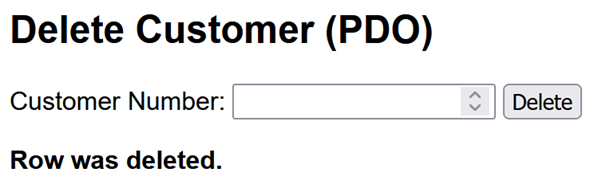
|
|
4.3.4 Program Explanation |
|
This program demonstrates how to delete a customer row from the Invoices database using the PDO (PHP Data Objects) extension. First, a variable named $message is defined. It is used to store status messages that inform the user whether the operation was successful or if an error occurred. Next, the connection parameters are specified in the form of a DSN (Data Source Name) along with a username and password. The DSN contains all the necessary information for establishing the database connection. |
PHP Data Objects |
After the form is submitted, the program checks whether the request was made using the POST method. This ensures that the data comes from the form and was not passed by directly calling the URL. The entered customer number is then read and converted to an integer. If no value is provided, the default value of 0 is used. |
|
The next step involves validating the input. Only positive values are accepted as valid customer numbers. If the input is invalid, a corresponding error message is logged and no database operation is performed. |
|
If the input is valid, a try/catch block is executed. Within the try block, a PDO object is created to establish a connection to the database. The option |
|
|
PDO::ATTR_ERRMODE => PDO::ERRMODE_EXCEPTION
|
|
causes any database errors that occur to be reported as exceptions, which can be handled centrally. |
|
The row is deleted using a prepared statement. The SQL statement contains a named parameter (:customerNo) that serves as a placeholder. This placeholder is replaced with the actual value only when the statement is executed. This approach enhances both security (particularly protection against SQL injection) and the readability of the code. |
|
After execution, the rowCount() method is used to determine how many rows were affected. If at least one row was deleted, a success message is displayed. Otherwise, the program reports that no matching row was found. |
|
If an error occurs during execution, a PDOException is thrown and caught in the catch block. The corresponding error message is then stored in the variable $message. |
|
In the concluding HTML section, a simple form is provided for entering the customer number. If the variable $message is not empty, its content is displayed. The htmlspecialchars() function ensures that special characters are correctly encoded, thereby preventing potential security issues such as HTML injection. See also the appendix. |
|
4.4 DeleteInvoicePDO.php |
|
An entire invoice, consisting of an invoice header and its associated invoice items, is deleted from the Invoices database. |
|
4.4.1 Program Features |
|
- Class used to establish the connection: PDO
- Deleting data from multiple related relations (InvoiceHeaders and InvoiceItems)
- Transaction
- Prepared statements
- Input via an HTML form
- Launched via a browser
- HTML output of the result
|
|
4.4.2 The Program |
|
|
<?php
|
|
|
// Variable for user feedback.
|
|
|
$message = "";
|
|
|
// Connection details for PDO. DSN stands for "Data Source Name".
|
|
|
// The DSN contains the host, the database name
|
|
|
// and the character set used.
|
|
|
$dsn = "mysql:host=localhost;dbname=Invoices;charset=utf8mb4";
|
|
|
$user = "root";
|
|
|
$pass = "";
|
|
|
// The variable is initially set to null.
|
|
|
// Later, it will point to the created PDO object.
|
|
|
$pdo = null;
|
|
|
try {
|
|
|
// Establish a connection to the database.
|
|
|
// PDO::ATTR_ERRMODE => PDO::ERRMODE_EXCEPTION causes
|
|
|
// PDO to throw an exception in the event of a database error.
|
|
|
$pdo = new PDO($dsn, $user, $pass,
|
|
|
[PDO::ATTR_ERRMODE => PDO::ERRMODE_EXCEPTION]);
|
|
|
// Check whether the form was submitted using the POST HTTP method
|
|
|
// was used.
|
|
|
if ($_SERVER["REQUEST_METHOD"] === "POST") {
|
|
|
// Retrieve the invoice number from the form.
|
|
|
// The ?? operator returns 0 if the form entry is missing.
|
|
|
// (int) converts the retrieved value to an integer.
|
|
|
$invoiceNo = (int)($_POST["invoiceNo"] ?? 0);
|
|
|
// Validate the input. The invoice number must be greater than 0.
|
|
|
if ($invoiceNo <= 0) {
|
|
|
$message = "Please enter a valid invoice number.";
|
|
|
} else {
|
|
|
try {
|
|
|
// Start transaction. All subsequent delete operations form
|
|
|
// a single unit. They are either executed in full or rolled back
|
|
|
// in full.
|
|
|
$pdo->beginTransaction();
|
|
|
// Check whether an invoice header with the entered
|
|
|
// invoice number exists.
|
|
|
// :invoiceNo is a named placeholder for the invoice number.
|
|
|
$stmtCheck = $pdo->prepare(
|
|
|
"SELECT 1 FROM invoiceHeaders WHERE InvoiceNo = :invoiceNo");
|
|
|
// Execute the prepared statement.
|
|
|
// The value of the PHP variable $invoiceNo is assigned to the
|
|
|
// placeholder :invoiceNo.
|
|
|
$stmtCheck->execute(["invoiceNo" => $invoiceNo]);
|
|
|
// fetchColumn() returns the contents of the first column of the
|
|
|
// first row. If no row is found, the method returns false.
|
|
|
$invoiceExists = $stmtCheck->fetchColumn();
|
|
|
// Check whether an invoice header was found.
|
|
|
if ($invoiceExists === false) {
|
|
|
// There is nothing to delete. The transaction is
|
|
|
// be rolled back without any permanent changes.
|
|
|
$pdo->rollBack();
|
|
|
$message = "No invoice with invoice number " . "$invoiceNo was found.";
|
|
|
} else {
|
|
|
/*
|
|
|
1. Delete the line invoice items associated with the invoice.
|
|
|
The line items must be deleted before the invoice header,
|
|
|
unless the foreign key has been defined with ON DELETE CASCADE.
|
|
|
*/
|
|
|
$stmtItemDel = $pdo->prepare("DELETE FROM InvoiceItems
|
|
|
WHERE InvoiceNo = :invoiceNo");
|
|
|
$stmtItemDel->execute(["invoiceNo" => $invoiceNo]);
|
|
|
// With this DELETE statement, rowCount() returns
|
|
|
// the number of deleted invoice line items.
|
|
|
$deletedItems = $stmtItemDel->rowCount();
|
|
|
// 2. Delete the invoice header.
|
|
|
$stmtHeaderDel = $pdo->prepare("DELETE FROM invoiceHeaders
|
|
|
WHERE InvoiceNo = :invoiceNo");
|
|
|
$stmtHeaderDel->execute(["invoiceNo" => $invoiceNo]);
|
|
|
// Determine the number of deleted invoice headers.
|
|
|
// If the invoice number is unique, the value should be 1.
|
|
|
$deletedHeader = $stmtHeaderDel->rowCount();
|
|
|
// Additional safety check:
|
|
|
if ($deletedHeader !== 1) {throw new Exception(
|
|
|
"The invoice header could not be deleted.");
|
|
|
}
|
|
|
// Commit the transaction successfully. Only then are
|
|
|
// the deletions permanently saved in the database.
|
|
|
$pdo->commit();
|
|
|
$message = "Invoice No. $invoiceNo deleted "
|
|
|
. "(Header: $deletedHeader, " . "Items: $deletedItems).";
|
|
|
}
|
|
|
} catch (Exception $e) {
|
|
|
// Check if a transaction is still active.
|
|
|
// rollBack() may only be called if this is the case.
|
|
|
if ($pdo->inTransaction()) {
|
|
|
// Undo all changes made since the start of the transaction
|
|
|
// are rolled back.
|
|
|
$pdo->rollBack();
|
|
|
}
|
|
|
$message = "Error deleting. " . "Everything has been rolled back: "
|
|
|
. $e->getMessage();
|
|
|
}
|
|
|
}
|
|
|
}
|
|
|
} catch (PDOException $e) {
|
|
|
// Error establishing a database connection.
|
|
|
$message = "DB connection failed: " . $e->getMessage();
|
|
|
}
|
|
|
?>
|
|
|
<!doctype html>
|
|
|
<html lang="en">
|
|
|
<head>
|
|
|
<meta charset="utf-8">
|
|
|
<title>Invoices - Delete Invoice</title>
|
|
|
<style>body {font-family: Arial, sans-serif;}</style>
|
|
|
</head>
|
|
|
<body>
|
|
|
<h2>Delete Invoice (PDO)</h2>
|
|
|
<!--
|
|
|
Form for entering the invoice number.
|
|
|
method="post" specifies that the form data is to be
|
|
|
POST HTTP method. Since no action attribute is specified, the data
|
|
|
is sent to the same PHP file from which the form was loaded.
|
|
|
-->
|
|
|
<form method="post">
|
|
|
<label for="invoiceNo">Invoice Number (InvoiceNo):</label>
|
|
|
<input type="number" id="invoiceNo" name="invoiceNo" min="1"
|
|
|
required>
|
|
|
<button type="submit">Delete</button>
|
|
|
</form>
|
|
|
<!--
|
|
|
If feedback is available, it is displayed in bold.
|
|
|
htmlspecialchars() converts characters that have a special
|
|
|
meaning in HTML into their corresponding HTML entities.
|
|
|
See also the Appendix.
|
|
|
-->
|
|
|
<?php if ($message !== ""): ?>
|
|
|
<p>
|
|
|
<strong>
|
|
|
<?php echo htmlspecialchars($message, ENT_QUOTES, "UTF-8"); ?>
|
|
|
</strong>
|
|
|
</p>
|
|
|
<?php endif; ?>
|
|
|
</body>
|
|
|
</html>
|
|
4.4.3 Program Execution |
|
This is what the result looks like after a successful program run. |
|
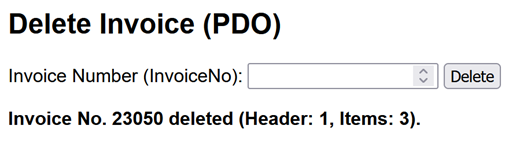
|
|
4.4.4 Program Explanation |
|
The program deletes an entire invoice from the Invoices database. An invoice consists of an invoice header in the InvoiceHeaders relation and the associated invoice items in the InvoiceItems relation. The program uses PDO, prepared statements, and a transaction. The transaction ensures that either the complete invoice is deleted or none of the deletions are made permanent. |
|
First, the connection details for PDO are specified. The DSN (Data Source Name) contains the database driver, host, database name, and character set. A connection to the database is then established by creating a PDO object. The option |
|
|
PDO::ATTR_ERRMODE => PDO::ERRMODE_EXCEPTION
|
|
causes PDO to throw an exception when a database error occurs. If an error occurs while establishing the connection, it is caught by the outer catch block. |
|
When the form is submitted, the entered invoice number is retrieved from $_POST and converted to an integer. Only positive values are accepted. If the value is less than or equal to 0, an error message is stored in $message and no database operation is performed. |
|
If the input is valid, a transaction is started with beginTransaction(). From this point on, the following database operations form a single unit of work. The program first checks whether an invoice with the specified invoice number exists. A prepared SELECT statement with the named placeholder :invoiceNo is used for this purpose. The value of $invoiceNo is passed when execute() is called. The fetchColumn() method returns the value of the first column of the first row. If no matching row exists, it returns false. |
|
If no invoice is found, the transaction is ended with rollBack(), and an appropriate message is displayed. At this point no rows have been deleted, so there are no actual database changes to undo. |
|
If the invoice exists, deletion is performed in two steps. First, all associated rows are deleted from InvoiceItems. These rows must be deleted before the corresponding row in InvoiceHeaders because InvoiceItems.InvoiceNo is a foreign key that references InvoiceHeaders.InvoiceNo. As long as the invoice items exist, the invoice header cannot be deleted unless the foreign key has been defined with ON DELETE CASCADE. |
|
The rowCount() method is used to determine how many invoice items were deleted. Next, the corresponding row is deleted from InvoiceHeaders. Again, rowCount() is used to determine the number of deleted rows. Since InvoiceNo is the primary key of InvoiceHeaders, exactly one invoice header should be deleted. If this is not the case, the program throws an exception. |
|
If both delete operations are successful, commit() completes the transaction. Only then are the deletions made permanent. The program displays a message containing the invoice number and the numbers of deleted invoice headers and invoice items. If an error occurs during the transaction, the inner catch block handles the exception. The inTransaction() method first checks whether a transaction is still active. If so, rollBack() undoes the changes made since the transaction was started. This prevents a situation in which the invoice items are deleted while the corresponding invoice header remains in the database. The invoice is therefore either deleted completely or not deleted at all. |
|
Explicitly closing the database connection is normally not required with PDO. The connection is released when the PDO object is destroyed, at the latest when script execution ends. |
|
5 Modifying Data |
|
|
|
5.1 UpdateCustomerMySQLi.php |
|
5.1.1 Program Features |
|
- Class used to establish the connection: MySQLi
- Modifying data in a single relation (Customers)
- Security through a prepared statement
- Input via an HTML form
- Launched via a browser
- HTML output of the result
|
|
5.1.2 Task |
|
Data of an existing customer in the Customers relation is to be modified. The customer is identified by the customer number. A new last name and first name can then be entered. The input form should look like this: |
|

|
|
5.1.3 The Program |
|
|
<?php
|
|
|
// Variable for the user feedback.
|
|
|
$message = "";
|
|
|
// Data for establishing a connection later.
|
|
|
$host = "localhost";
|
|
|
$user = "root";
|
|
|
$pass = "";
|
|
|
$db = "Invoices";
|
|
|
/*
|
|
|
For clarity, the curly braces are numbered.
|
|
|
Matching opening and closing braces have the same number.
|
|
|
This makes the structure of the program easier to follow.
|
|
|
Check whether the form was submitted using the HTTP POST method.
|
|
|
*/
|
|
|
if ($_SERVER["REQUEST_METHOD"] === "POST") { // 1
|
|
|
/*
|
|
|
Retrieve values from the form fields.
|
|
|
$_POST is an associative array.
|
|
|
"customerNo", "lastName", and "firstName" are the names of the
|
|
|
form fields.
|
|
|
The ?? operator specifies a default value in case a form entry is
|
|
|
missing.
|
|
|
(int) converts the received value to an integer.
|
|
|
trim() removes leading and trailing spaces from a string.
|
|
|
*/
|
|
|
$customerNo = (int)($_POST["customerNo"] ?? 0);
|
|
|
$lastName = trim($_POST["lastName"] ?? "");
|
|
|
$firstName = trim($_POST["firstName"] ?? "");
|
|
|
// Handle invalid or empty inputs.
|
|
|
if ($customerNo <= 0 || $lastName === "" || $firstName === "") { // 2
|
|
|
$message = "Please fill out all fields correctly.";
|
|
|
} // 2
|
|
|
else { // 3
|
|
|
// Establish a connection to the database.
|
|
|
// The variable $con refers to the created mysqli object.
|
|
|
$con = new mysqli($host, $user, $pass, $db);
|
|
|
// Check if an error occurred while establishing the connection.
|
|
|
if ($con->connect_error) { // 4
|
|
|
die("Database connection failed: " . $con->connect_error);
|
|
|
} // 4
|
|
|
// Set the character set for the database connection.
|
|
|
$con->set_charset("utf8mb4");
|
|
|
// Prepare the SQL statement as a prepared statement.
|
|
|
// The question marks serve as placeholders for the values to be bound.
|
|
|
$stmt = $con->prepare("UPDATE Customers SET LastName = ?,
|
|
|
FirstName = ? WHERE CustomerNo = ?");
|
|
|
// Check whether the prepared statement could be created.
|
|
|
if (!$stmt) { // 5
|
|
|
$message = "Prepare failed: " . $con->error;
|
|
|
} // 5
|
|
|
else { // 6
|
|
|
/*
|
|
|
Bind values to the placeholders.
|
|
|
"ssi" refers to the data types:
|
|
|
s = string for the label
|
|
|
s = string for the first name
|
|
|
i = integer for the customer number
|
|
|
*/
|
|
|
$stmt->bind_param("ssi", $lastName, $firstName, $customerNo);
|
|
|
// Execute the prepared SQL statement.
|
|
|
if ($stmt->execute()) { // 7
|
|
|
// Check whether a row was actually modified.
|
|
|
if ($stmt->affected_rows > 0) { // 8
|
|
|
$message = "Customer was updated.";
|
|
|
} // 8
|
|
|
else {
|
|
|
$message = "No changes were made.";
|
|
|
}
|
|
|
} // 7
|
|
|
else {
|
|
|
$message = "Error: " . $stmt->error;
|
|
|
}
|
|
|
// Close the prepared statement and
|
|
|
// resources.
|
|
|
$stmt->close();
|
|
|
} // 6
|
|
|
// Close the database connection.
|
|
|
$con->close();
|
|
|
} // 3
|
|
|
} // 1
|
|
|
?>
|
|
|
<!doctype html>
|
|
|
<html lang="en">
|
|
|
<head>
|
|
|
<meta charset="utf-8">
|
|
|
<title>Modify a Customer Using MySQLi</title>
|
|
|
<style>body {font-family: Arial, sans-serif;}
|
|
|
label {font-weight: bold;}</style>
|
|
|
</head>
|
|
|
<body>
|
|
|
<!-- Input form for editing a customer. -->
|
|
|
<h2>Edit Customer (MySQLi)</h2>
|
|
|
<!--
|
|
|
Form for submitting the entered data to the server.
|
|
|
Since no action attribute is specified, the form is forwarded to the
|
|
|
PHP file that sent it.
|
|
|
"required" marks the required fields.
|
|
|
-->
|
|
|
<form method="post">
|
|
|
<label for="customerNo">Customer Number:</label>
|
|
|
<input type="number" id="customerNo" name="customerNo" required>
|
|
|
<br><br>
|
|
|
<label for="lastName">Name:</label>
|
|
|
<input type="text" id="lastName" name="lastName" maxlength="10" required>
|
|
|
<br><br>
|
|
|
<label for="firstName">First Name:</label>
|
|
|
<input type="text" id="firstName" name="firstName" maxlength="10"
|
|
|
required>
|
|
|
<br><br>
|
|
|
<!-- Button to submit the form. -->
|
|
|
<button type="submit">Modify</button>
|
|
|
</form>
|
|
|
<!--
|
|
|
PHP can also be used within the HTML section. See
|
|
|
Chapter 9.
|
|
|
If there is a response, it is displayed in bold.
|
|
|
-->
|
|
|
<?php
|
|
|
if ($message !== "") {echo "<p><strong>"
|
|
|
. htmlspecialchars($message, ENT_QUOTES, "UTF-8") .
|
|
|
"</strong></p>";
|
|
|
}
|
|
|
?>
|
|
|
</body>
|
|
|
</html>
|
|
5.1.4 Program Description |
|
The program modifies an existing customer in the Customers relation of the Invoices database. It uses MySQLi and follows the typical sequence of a web application: |
|
- Process input,
- validate data,
- perform a database operation, and
- provide feedback.
|
|
First, the database connection details are specified and the variable $message is initialized. This variable is used to provide feedback to the user about the result of the operation. When the form is submitted, the program checks whether the request uses the HTTP POST method. The values entered in the form are then retrieved from the $_POST array. The customer number is converted to an integer. The trim() function removes leading and trailing spaces from the last name and first name. |
|
The next step is input validation. The program checks whether the customer number is greater than 0 and whether a last name and first name have been entered. If the input is invalid, an appropriate message is stored in $message and no database operation is performed. If the input is valid, a connection to the database is established. If an error occurs while establishing the connection, the program is terminated using die(). The character set for the connection is then set to utf8mb4. |
|
The actual modification is performed using a prepared statement. The SQL statement contains three question marks (?) as placeholders. The first two represent the new last name and first name. The third represents the customer number of the customer whose data is to be modified. |
Prepared Statement |
The bind_param() method binds the PHP variables to these placeholders. The specification "ssi" defines their data types: |
|
s = string for the last name |
|
s = string for the first name |
|
i = integer for the customer number |
|
The order is important because the variables in bind_param() must correspond to the placeholders in the SQL statement. |
|
After executing the statement with execute(), the system checks whether any rows were actually modified. This is done using the affected_rows property. If the value is greater than 0, at least one row was successfully updated. If affected_rows is 0, the statement was executed successfully but no row was changed. This can occur, for example, if the entered last name and first name are identical to the values already stored in the database. It can also occur if no customer with the specified customer number exists. |
|
After the database operation is complete, the prepared statement is closed with close(), and the database connection is then terminated. This releases any resources that were being used. |
|
In the HTML section, a form is provided through which the user can enter the data to be modified. The feedback from the variable $message is displayed only if it is not empty. The htmlspecialchars() function ensures that special characters are displayed correctly and that no security issues arise from HTML injection. See Appendix. |
|
The program thus illustrates the complete process of a typical update operation (UPDATE) in a web application: from data entry through validation to the secure and controlled execution of the database statement. |
|
5.2 UpdateCustomerPDO.php |
|
5.2.1 Program Features |
|
- Class used to establish the connection: PDO
- Modifying data in a single relation (Customers)
- Security through a prepared statement
- Input via an HTML form
- Launched via a browser
- HTML output of the result
5.2.2 Task |
|
Data of an existing customer in the Customers relation is to be modified. The customer is identified by the customer number. A new last name and first name can then be entered. |
|
The input form should look like this. If the entered data is invalid or incomplete, an appropriate message is displayed. If the UPDATE statement does not modify a row, the program reports that no changes were made. |
|
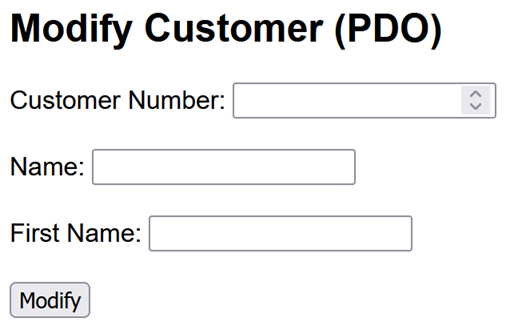
|
|
5.2.3 The Program |
|
|
<?php
|
|
|
// Variable for user feedback.
|
|
|
$message = "";
|
|
|
// Data for establishing the connection.
|
|
|
// DSN stands for "Data Source Name".
|
|
|
$dsn = "mysql:host=localhost;dbname=Invoices;charset=utf8mb4";
|
|
|
$user = "root";
|
|
|
$pass = "";
|
|
|
// Check if the form was submitted using the POST HTTP method.
|
|
|
if ($_SERVER["REQUEST_METHOD"] === "POST") {
|
|
|
// Retrieve values from the form fields.
|
|
|
// The ?? operator sets a default value if a field is missing.
|
|
|
$customerNo = (int)($_POST["customerNo"] ?? 0);
|
|
|
$lastName = trim($_POST["lastName"] ?? "");
|
|
|
$firstName = trim($_POST["firstName"] ?? "");
|
|
|
// Handle invalid or empty inputs.
|
|
|
if ($customerNo <= 0 || $lastName === "" || $firstName === "") {
|
|
|
$message = "Please fill out all fields correctly.";
|
|
|
} else {
|
|
|
// try/catch block to handle potential database errors.
|
|
|
try {$pdo = new PDO($dsn, $user, $pass,
|
|
|
[PDO::ATTR_ERRMODE => PDO::ERRMODE_EXCEPTION]);
|
|
|
// Prepare the SQL statement.
|
|
|
// Named parameters such as :name serve as placeholders.
|
|
|
$stmt = $pdo->prepare( "UPDATE customers SET LastName = :name,
|
|
|
FirstName = :firstname WHERE CustomerNo = :customerNo");
|
|
|
// Bind values to the named parameters and
|
|
|
// execute the prepared SQL statement.
|
|
|
$stmt->execute(["lastName" => $lastName, "firstName" => $firstName,
|
|
|
"customerNo" => $customerNo]);
|
|
|
// Check whether a row was actually modified.
|
|
|
if ($stmt->rowCount() > 0) {
|
|
|
$message = "Customer was updated.";
|
|
|
} else {
|
|
|
$message = "No changes were made.";
|
|
|
}
|
|
|
} catch (PDOException $e) {
|
|
|
// Error message for development and testing.
|
|
|
$message = "Error: " . $e->getMessage();
|
|
|
}
|
|
|
}
|
|
|
}
|
|
|
?>
|
|
|
<!doctype html>
|
|
|
<html lang="en">
|
|
|
<head>
|
|
|
<meta charset="utf-8">
|
|
|
<title>Modify a customer using PDO</title>
|
|
|
<style>body {font-family: Arial, sans-serif;}</style>
|
|
|
</head>
|
|
|
<body>
|
|
|
<!--
|
|
|
Input form for editing a customer.
|
|
|
-->
|
|
|
<h2>Modify Customer (PDO)</h2>
|
|
|
<!--
|
|
|
Form for submitting the entered data to the server.
|
|
|
Since no action attribute is specified, the data is sent
|
|
|
to the same PHP file from which the form was loaded.
|
|
|
required marks the fields as mandatory.
|
|
|
-->
|
|
|
<form method="post">
|
|
|
<label for="customerNo">Customer Number:</label>
|
|
|
<input type="number" id="customerNo" name="customerNo"
|
|
|
min="1" required>
|
|
|
<br><br>
|
|
|
<label for="lastName">Name:</label>
|
|
|
<input type="text" id="lastName" name="lastName" maxlength="15"
|
|
|
required>
|
|
|
<br><br>
|
|
|
<label for="firstName">First Name:</label>
|
|
|
<input type="text" id="firstName" name="firstName" maxlength="15"
|
|
|
required>
|
|
|
<br><br>
|
|
|
<!-- Button to submit the form. -->
|
|
|
<button type="submit">Modify</button>
|
|
|
</form>
|
|
|
<!--
|
|
|
If feedback is available, it is displayed in bold.
|
|
|
See the appendix for information on htmlspecialchars().
|
|
|
-->
|
|
|
<?php if ($message !== ""): ?>
|
|
|
<p><strong>
|
|
|
<?php echo htmlspecialchars($message, ENT_QUOTES, "UTF-8"); ?>
|
|
|
</strong></p>
|
|
|
<?php endif; ?>
|
|
|
</body>
|
|
|
</html>
|
|
5.2.4 Notes |
|
- ?? is not a placeholder. It is the null coalescing operator. In this program, it provides a default value if a form entry is missing.
- $message does not contain user input. It contains feedback about the result of the operation.
- rowCount() === 0 does not necessarily mean that no customer with the specified customer number exists. It can also mean that the entered values are identical to the values already stored in the database and therefore no row had to be modified.
- The names of the named placeholders in the SQL statement must correspond to the names used when execute() is called. For example, the placeholder :lastName corresponds to "lastName" => $lastName.
|
|
|
6 Overview of CRUD Operations |
|
The preceding examples demonstrate the four basic operations used to work with data in a database: |
|
- Create (C): insert new data
- Read (R): retrieve existing data
- Update (U): modify existing data
- Delete (D): delete existing data
|
|
Together, these operations are referred to as CRUD operations. The following sections provide a compact overview using the Customers relation of the Invoices database. The same operations are shown first with PDO and then with MySQLi. |
|
All code snippets are PHP code and must therefore be placed between <?php and ?> when used in a PHP program. |
|
|
|
6.1 CRUD Overview with PDO |
|
Establishing the Connection |
|
|
$pdo = new PDO(
|
|
|
"mysql:host=localhost;dbname=Invoices;charset=utf8mb4","root","",
[PDO::ATTR_ERRMODE => PDO::ERRMODE_EXCEPTION]);
|
|
CREATE - Insert a Customer |
|
|
$stmt = $pdo->prepare(
|
|
|
"INSERT INTO Customers (customerNo, lastName, firstName) VALUES (:customerNo, :lastName, :firstName)");
|
|
|
$stmt->execute(['customerNo' => 2001, 'lastName' => 'Miller', 'firstName' => 'Susan']);
|
|
READ - Retrieve a Customer |
|
|
$stmt = $pdo->prepare("SELECT * FROM Customers WHERE CustomerNo = :customerNo");
|
|
|
$stmt->execute(['customerNo' => 2001]);
|
|
|
$row = $stmt->fetch(PDO::FETCH_ASSOC);
|
|
|
print_r($row);
|
|
UPDATE - Modify a Customer |
|
|
$stmt = $pdo->prepare("UPDATE Customers SET LastName = :lastName,
|
|
|
FirstName = :firstName
|
|
|
WHERE CustomerNo = :customerNo");
|
|
|
$stmt->execute(["lastName" => "Williams","firstName" => "Susan",
|
|
|
"customerNo" => 2001]);
|
|
DELETE - Delete a Customer |
|
|
$stmt = $pdo->prepare("DELETE FROM Customers
|
|
|
WHERE CustomerNo = :customerNo");
|
|
|
$stmt->execute(['customerNo' => 2001]);
|
|
6.2 CRUD Overview with MySQLi |
|
Establishing the connection |
|
|
$con = new mysqli("localhost", "root", "", "Invoices");
|
|
|
if ($con->connect_error) {
|
|
|
die("Connection failed: " . $con->connect_error);
|
|
|
}
|
|
|
$con->set_charset("utf8mb4");
|
|
CREATE - Insert a Customer |
|
|
$customerNo = 2001;
|
|
|
$lastName = "Miller";
|
|
|
$firstName = "Susan";
|
|
|
$stmt = $con->prepare("INSERT INTO Customers
|
|
|
(CustomerNo, LastName, FirstName) VALUES (?, ?, ?)");
|
|
|
$stmt->bind_param("iss",$customerNo,$lastName,$firstName);
|
|
|
$stmt->execute();
|
|
|
$stmt->close();
|
|
READ - Retrieve a Customer |
|
|
$customerNo = 2001;
|
|
|
$stmt = $con->prepare("SELECT * FROM customers
|
|
|
WHERE customerNo = ?");
|
|
|
$stmt->bind_param("i", $customerNo);
|
|
|
$stmt->execute();
|
|
|
$result = $stmt->get_result();
|
|
|
$row = $result->fetch_assoc();
|
|
|
print_r($row);
|
|
|
$stmt->close();
|
|
UPDATE - Modify a Customer |
|
|
$customerNo = 2001;
|
|
|
$lastName = "Williams";
|
|
|
$firstName = "Susan";
|
|
|
$stmt = $con->prepare("UPDATE Customers SET LastName = ?,
|
|
|
FirstName = ? WHERE CustomerNo = ?");
|
|
|
$stmt->bind_param("ssi",$lastName,$firstName,$customerNo);
|
|
|
$stmt->execute();
|
|
|
$stmt->close();
|
|
DELETE - Delete a Customer |
|
|
$customerNo = 2001;
|
|
|
$stmt = $con->prepare("DELETE FROM customers WHERE CustomerNo = ?");
|
|
|
$stmt->bind_param("i", $customerNo);
|
|
|
$stmt->execute();
|
|
|
$stmt->close();
|
|
|
$con->close();
|
|
7 Invoice Management |
|
The following sections present a somewhat more comprehensive example that illustrates the basic features of invoice management. The main objective is to enter and manage complete invoices. The programs in this example are implemented using PDO. |
|
The database used for the example is named Invoices. It contains the four relations Customers, InvoiceHeaders, InvoiceItems, and Products. |
|
|
|
7.1 Main Menu |
|
At the top level, a simple web interface provides access to the programs for the Invoices database. The start page is opened in the browser at: http://localhost/InvoicesStart.php |
|

|
|
The first step is to implement invoice entry; the remaining features will be added later. The program for the main page is named InvoicesStart.php. The required CSS file is InvoicesStart.css. Both are located in the htdocs directory. All other programs are located in a subdirectory named /htdocs/Invoices. The links in the buttons point to this location accordingly. Overall, the folder structure is as follows: |
Folder Structure |
- Start page: http://localhost/InvoicesStart.php
- Enter invoices: http://localhost/Invoices/EnterInvoices.php
- Edit products: http://localhost/Invoices/EditProducts.php
- Edit customer data: http://localhost/Invoices/EditCustomers.php
- List invoices: http://localhost/Invoices/ListInvoices.php
- List customers: http://localhost/Invoices/ListCustomers.php
- Product inventory: http://localhost/Invoices/ProductInventory.php
|
|
The Programs |
|
The program DisplayInvoice.php is also required as a supporting program. It displays an invoice after it has been entered and saved. |
|
The programs in the Invoices directory use the common CSS file Invoices.css. The start page uses its own CSS file, InvoicesStart.css. |
|
This results in the following set of files: |
|
- InvoicesStart.php
- InvoicesStart.css
- Invoices/Invoices.css
- Invoices/EnterInvoices.php
- Invoices/DisplayInvoice.php
- Invoices/ListInvoices.php
- Invoices/EditProducts.php
- Invoices/EditCustomers.php
- Invoices/ListCustomers.php
- Invoices/ProductInventory.php
|
|
7.2 Start Page |
|
7.2.1 InvoicesStart.php |
|
|
<!doctype html>
|
|
|
<html lang="en">
|
|
|
<head>
|
|
|
<meta charset="utf-8">
|
|
|
<title>Invoice Management</title>
|
|
|
<link rel="stylesheet" href="InvoicesStart.css">
|
|
|
</head>
|
|
|
<body>
|
|
|
<!--
|
|
|
Outer area of the start page.
|
|
|
The "box" class can be used in the CSS file, for example,
|
|
|
to specify width, background color, borders, and spacing.
|
|
|
-->
|
|
|
<div class="box">
|
|
|
<h1>Invoice Management</h1>
|
|
|
<!--
|
|
|
Navigation area with links to the individual invoice management
|
|
|
programs.
|
|
|
The "menu" class is used to control the layout
|
|
|
and arrangement of the menu items.
|
|
|
-->
|
|
|
<nav class="menu">
|
|
|
<!-- Entering new invoices -->
|
|
|
<a class="btn" href="Invoices/EnterInvoices.php">
|
|
|
Enter Invoices</a>
|
|
|
<!-- Editing product data -->
|
|
|
<div class="btn disabled">
|
|
|
In Preparation: Edit Products
|
|
|
</div>
|
|
|
<!-- Editing customer data -->
|
|
|
<div class="btn disabled">
|
|
|
In Preparation: Edit Customer Data
|
|
|
</div>
|
|
|
<!-- Separator between data management and reports -->
|
|
|
<hr class="sep">
|
|
|
<!-- Displaying the entire database -->
|
|
|
<a class="btn" href="Invoices/ListInvoices.php">
|
|
|
Display Entire Database</a>
|
|
|
<!-- Displaying a list of customers -->
|
|
|
<div class="btn disabled">
|
|
|
In Preparation: List of Customers
|
|
|
</div>
|
|
|
<!-- Display current inventory -->
|
|
|
<div class="btn disabled">
|
|
|
In Preparation: Product Inventory
|
|
|
</div>
|
|
|
</nav>
|
|
|
</div>
|
|
|
</body>
|
|
|
</html>
|
|
Note on the nav Element |
|
nav is not an instruction, but a semantic HTML element. The name is derived from "navigation." It identifies an area that contains important navigation links, such as a main menu. By itself, the nav element does not normally have a significant effect on the visual appearance of a page. Its main purpose is to describe the meaning of the area. This is useful for browsers, search engines, and assistive technologies such as screen readers. |
|
7.2.2 InvoicesStart.css |
|
As always, unless otherwise stated, the following explanations refer to the CSS code shown below. |
|
|
/*
|
|
|
InvoicesStart.css
|
|
|
Stylesheet for the main menu of the
|
|
|
invoice management application.
|
|
|
*/
|
|
|
/*
|
|
|
1. UNIVERSAL SELECTOR
|
|
|
This rule applies to all HTML elements.
|
|
|
box-sizing: border-box causes the dimensions specified
|
|
|
by width and height to include padding and borders.
|
|
|
The asterisk (*) is the universal selector.
|
|
|
It selects all HTML elements on the web page.
|
|
|
*/
|
|
|
* {box-sizing: border-box;}
|
|
|
/*
|
|
|
2. BASIC PAGE STYLING
|
|
|
margin: 0 removes the browser's default outer margin.
|
|
|
padding: 20px creates spacing between the edge
|
|
|
of the browser window and the page content.
|
|
|
Arial is used as the font.
|
|
|
If Arial is not available, the browser selects
|
|
|
another sans-serif font.
|
|
|
*/
|
|
|
body {margin: 0;padding: 20px;font-family: Arial, sans-serif;}
|
|
|
|
|
|
/*
|
|
|
3. OUTER AREA OF THE MAIN MENU
|
|
|
width: 100% causes the box to use the available width.
|
|
|
max-width: 500px limits its width to 500 pixels.
|
|
|
margin: 20px auto sets the top and bottom margins
|
|
|
to 20 pixels.
|
|
|
The value auto for the left and right margins
|
|
|
centers the box horizontally.
|
|
|
padding specifies the inner spacing:
|
|
|
- top: 18 pixels
|
|
|
- right: 18 pixels
|
|
|
- bottom: 22 pixels
|
|
|
- left: 18 pixels
|
|
|
border creates a solid black border
|
|
|
with a width of 3 pixels.
|
|
|
*/
|
|
|
.box {width: 100%;max-width: 500px;margin: 20px auto;
|
|
|
padding: 18px 18px 22px;border: 3px solid #000;}
|
|
|
|
|
|
/*
|
|
|
4. MAIN HEADING
|
|
|
margin defines the outer spacing:
|
|
|
- top: 6 pixels
|
|
|
- right: 0
|
|
|
- bottom: 18 pixels
|
|
|
- left: 0
|
|
|
font-size sets the font size to 28 pixels.
|
|
|
text-align: center centers the text
|
|
|
within the heading area.
|
|
|
*/
|
|
|
h1 {margin: 6px 0 18px;font-size: 28px;text-align: center;}
|
|
|
|
|
|
/*
|
|
|
5. NAVIGATION MENU
|
|
|
display: flex activates the Flexbox layout method.
|
|
|
flex-direction: column arranges the direct
|
|
|
child elements vertically, one below another.
|
|
|
gap sets a spacing of 12 pixels
|
|
|
between the child elements.
|
|
|
*/
|
|
|
.menu {
|
|
|
display: flex;
|
|
|
flex-direction: column;
|
|
|
gap: 12px;
|
|
|
}
|
|
|
|
|
|
/*
|
|
|
6. BUTTON STYLING
|
|
|
The class btn is used to style links
|
|
|
and other menu items as buttons.
|
|
|
btn is an abbreviation of button.
|
|
|
display: block makes the element a block element.
|
|
|
This allows it to occupy the available width.
|
|
|
padding sets the inner spacing:
|
|
|
- top and bottom: 12 pixels
|
|
|
- left and right: 14 pixels
|
|
|
border creates a solid black border
|
|
|
with a width of 2 pixels.
|
|
|
background-color sets a light gray background.
|
|
|
color: #000 sets the text color to black.
|
|
|
font-size sets the font size to 16 pixels.
|
|
|
text-decoration: none removes the underline
|
|
|
normally displayed for links.
|
|
|
*/
|
|
|
.btn {
|
|
|
display: block;
|
|
|
padding: 12px 14px;
|
|
|
border: 2px solid #000;
|
|
|
background-color: #eee;
|
|
|
color: #000;
|
|
|
font-size: 16px;
|
|
|
text-decoration: none;
|
|
|
}
|
|
|
|
|
|
/*
|
|
|
7. HOVER EFFECT
|
|
|
The pseudo-class :hover applies when
|
|
|
the mouse pointer is positioned over an element.
|
|
|
The background color becomes slightly darker.
|
|
|
This provides the user with visual feedback.
|
|
|
The selector .btn:hover applies to elements
|
|
|
with the class btn while they are being hovered over.
|
|
|
*/
|
|
|
.btn:hover {
|
|
|
background-color: #ddd;
|
|
|
}
|
|
|
|
|
|
/*
|
|
|
8. DISABLED MENU ITEMS
|
|
|
Some programs are not yet available.
|
|
|
These menu items have two classes:
|
|
|
- btn
|
|
|
- disabled
|
|
|
The selector .btn.disabled selects elements
|
|
|
that have both classes.
|
|
|
There is no space between the two class names.
|
|
|
A light gray background and gray text
|
|
|
indicate that the menu item is unavailable.
|
|
|
cursor: not-allowed changes the mouse pointer
|
|
|
to indicate that the item cannot be selected.
|
|
|
*/
|
|
|
.btn.disabled {
|
|
|
background-color: #f5f5f5;
|
|
|
color: #777;
|
|
|
cursor: not-allowed;
|
|
|
}
|
|
|
|
|
|
/*
|
|
|
9. HOVER EFFECT FOR DISABLED MENU ITEMS
|
|
|
Disabled menu items should not change
|
|
|
their background color when hovered over.
|
|
|
The selector .btn.disabled:hover applies
|
|
|
to elements with both classes while
|
|
|
the mouse pointer is positioned over them.
|
|
|
This rule is more specific than .btn:hover.
|
|
|
*/
|
|
|
.btn.disabled:hover {
|
|
|
background-color: #f5f5f5;
|
|
|
}
|
|
|
|
|
|
/*
|
|
|
10. SEPARATOR
|
|
|
The class sep is used for the horizontal line
|
|
|
between the data management programs
|
|
|
and the reporting programs.
|
|
|
margin: 6px 0 sets the vertical margins
|
|
|
to 6 pixels and the horizontal margins to 0.
|
|
|
border: none removes the default border
|
|
|
of the hr element.
|
|
|
border-top creates a solid black top border
|
|
|
with a width of 2 pixels.
|
|
|
*/
|
|
|
.sep {
|
|
|
margin: 6px 0;
|
|
|
border: none;
|
|
|
border-top: 2px solid #000;
|
|
|
}
|
|
7.2.3 Explanation: Classes Everywhere |
|
In the CSS file InvoicesStart.css shown above, dot notation appears very frequently and may be confusing at first. Therefore, a more detailed explanation is provided here, using the CSS rules for .btn as an example. |
|
.btn |
|
In CSS, the dot identifies a class selector. It selects HTML elements based on their class attribute. In the program above: |
Class Selector |
|
.btn {
|
|
|
display: block;
|
|
|
padding: 12px 14px;
|
|
|
border: 2px solid #000;
|
|
|
background-color: #eee;
|
|
|
color: #000;
|
|
|
font-size: 16px;
|
|
|
text-decoration: none;
|
|
|
}
|
|
Matching HTML elements include, for example: |
|
|
<a class="btn" href="Invoices/EnterInvoices.php">Enter Invoices</a>
|
|
and |
|
|
<div class="btn">Edit Products</div>
|
|
In HTML code, the class name is written without a dot: class="btn". In CSS code, the class name is preceded by a dot: .btn. |
|
.btn |
Pseudo-class xxx |
In this example: |
|
|
.btn:hover {background-color: #ddd;}
|
|
two syntax elements are combined: |
|
|
.btn is the class selector.
|
|
|
:hover is a pseudo-class.
|
|
|
:hover describes the state in which the mouse pointer is positioned over an element. The rule therefore means: When the mouse pointer is positioned over an element belonging to the class btn, the element receives the background color #ddd.
|
|
|
The colon before hover therefore has a different meaning from the dot before btn.
|
|
.btn.disabled |
Two Classes |
This example shows another way of using the dot notation. |
|
|
.btn.disabled {background-color: #f5f5f5; color: #777;
|
|
|
cursor: not-allowed;}
|
|
There is no space between .btn and .disabled. The selector therefore means: Select elements that belong to both the btn and disabled classes at the same time. A matching HTML element is: |
|
|
<div class="btn disabled">In Preparation: Edit Products</div>
|
|
The element belongs to two classes: btn and disabled. In the HTML attribute, the class names are separated by a space. In the CSS rule, however, they are written without a space, each preceded by a dot: .btn.disabled. |
|
The rule applies only to elements that have both classes, not to elements that have only btn or only disabled as their class. |
Important! |
.btn.disabled |
With a Pseudo-class |
It is also possible to combine the two-class selector shown above with a pseudo-class. Example: |
|
|
.btn.disabled:hover {background-color: #f5f5f5;}
|
|
This selector means: Select an element that belongs to both the btn and disabled classes and over which the mouse pointer is currently positioned. The background color remains #f5f5f5. This overrides the general hover rule: |
|
|
.btn:hover {background-color: #ddd;}
|
|
In the example above, a disabled button therefore does not become darker when the mouse pointer is positioned over it. |
|
Summary: Selectors With and Without Spaces |
|
The following notations have different meanings: .btn.disabled and .btn .disabled. The first notation means that a single element belongs to both classes. Example: |
|
|
<div class="btn disabled">In Preparation</div>
|
|
The second notation means that an element belonging to the class disabled is located inside an element belonging to the class btn. Example: |
|
|
<div class="btn">
|
|
|
<span class="disabled">In Preparation</span>
|
|
|
</div>
|
|
A space in a CSS selector therefore has a specific meaning and must not be omitted or inserted arbitrarily. |
|
7.3 Enter Invoices |
|
7.3.1 Task |
|
Now, the program "behind" this button: |
|

|
|
After clicking the button, the following form should appear: |
|

|
|
The form should include or enable the following features: |
|
Entering the number of invoice line items (“Customize Form”). |
|
Clicking "Customize Form" should then change the number of line items to be entered and lead to the following display: |
|
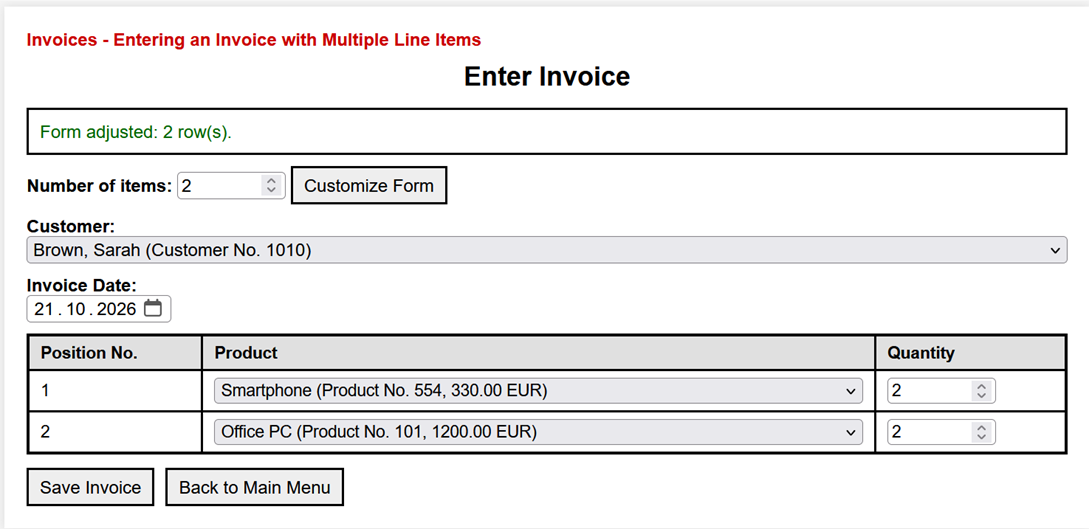
|
|
The display format of a date input depends on the language and regional settings of the browser. The value submitted to the PHP program, however, uses the format YYYY-MM-DD. |
|
Selection of the customer to whom the invoice applies. |
|
The input window accesses the customer database, displays the name and customer number via a drop-down menu, and allows the data to be selected. |
|
Entering the invoice date |
|
The invoice date is entered in a date field. |
|
Selecting the item. |
|
Clicking on an item field displays the items from the "Items" file (relation) via a drop-down menu, from which a selection can be made. |
|
The number of items for the line item is then specified in the last column. Once the invoice data has been entered, clicking Save Invoice the data is saved to the database. Afterward, the new invoice should be displayed as follows, for example: |
Save Invoice |

|
|
This is done by the program DisplayInvoice.php, which is shown below. Clicking "Back to Main Menu" returns you to the main page. |
|
Now for the programs. |
|
7.3.2 EnterInvoices.php |
|
|
<?php
|
|
|
/*
|
|
|
EnterInvoices.php
|
|
|
ENTERING AN INVOICE WITH MULTIPLE LINE ITEMS
|
|
|
A single HTML form is used for two actions:
|
|
|
- resize: change the number of visible invoice item rows
|
|
|
- save: save the invoice header and line items
|
|
|
When the form is resized, previously entered values
|
|
|
are sent to the server and displayed again.
|
|
|
*/
|
|
|
/*
|
|
|
1. DATABASE CONNECTION INFORMATION
|
|
|
The DSN (Data Source Name) specifies the PDO driver,
|
|
|
database server, database name, and character set.
|
|
|
*/
|
|
|
$dsn = "mysql:host=localhost;dbname=Invoices;charset=utf8mb4";
|
|
|
$user = "root";
|
|
|
$pass = "";
|
|
|
/*
|
|
|
2. DEFAULT SETTINGS AND HELPER FUNCTION
|
|
|
Three invoice item rows are displayed initially.
|
|
|
A maximum of 20 rows can be displayed.
|
|
|
*/
|
|
|
$defaultPosCount = 3;
|
|
|
$maxPosCount = 20;
|
|
|
$posCount = $defaultPosCount;
|
|
|
$message = "";
|
|
|
$messageClass = "";
|
|
|
$customers = [];
|
|
|
$products = [];
|
|
|
/*
|
|
|
h() converts special characters to HTML entities.
|
|
|
This protects values displayed in HTML attributes
|
|
|
and text. See Appendix: htmlspecialchars().
|
|
|
*/
|
|
|
function h(mixed $value): string
|
|
|
{
|
|
|
return htmlspecialchars((string)$value, ENT_QUOTES, "UTF-8");
|
|
|
}
|
|
|
/*
|
|
|
3. DETERMINE THE REQUESTED ACTION
|
|
|
Both buttons belong to the same HTML form.
|
|
|
Their name and value identify the selected action.
|
|
|
*/
|
|
|
$action = $_POST["action"] ?? "";
|
|
|
if (isset($_POST["posCount"])) {
|
|
|
$posCount = max(1, min($maxPosCount, (int)$_POST["posCount"]));
|
|
|
}
|
|
|
try {
|
|
|
/*
|
|
|
4. ESTABLISH A DATABASE CONNECTION
|
|
|
$pdo refers to the PDO connection object.
|
|
|
Database errors are reported as exceptions.
|
|
|
*/
|
|
|
$pdo = new PDO(
|
|
|
$dsn,
|
|
|
$user,
|
|
|
$pass,
|
|
|
[PDO::ATTR_ERRMODE => PDO::ERRMODE_EXCEPTION]
|
|
|
);
|
|
|
/*
|
|
|
5. LOAD CUSTOMERS AND PRODUCTS
|
|
|
These SQL statements do not contain user input,
|
|
|
so prepared statements are not required.
|
|
|
*/
|
|
|
$customers = $pdo->query(
|
|
|
"SELECT CustomerNo, LastName, FirstName
|
|
|
FROM Customers
|
|
|
ORDER BY LastName, FirstName"
|
|
|
)->fetchAll(PDO::FETCH_ASSOC);
|
|
|
$products = $pdo->query(
|
|
|
"SELECT ProductNo, Description, Price
|
|
|
FROM Products
|
|
|
ORDER BY Description"
|
|
|
)->fetchAll(PDO::FETCH_ASSOC);
|
|
|
/*
|
|
|
6. CASE 1: CUSTOMIZE THE FORM
|
|
|
No database changes are made. All current form
|
|
|
values are transmitted by the shared HTML form.
|
|
|
*/
|
|
|
if ($action === "resize") {
|
|
|
$message = "Form adjusted: $posCount row(s).";
|
|
|
$messageClass = "ok";
|
|
|
}
|
|
|
/*
|
|
|
7. CASE 2: SAVE THE INVOICE
|
|
|
*/
|
|
|
if ($action === "save") {
|
|
|
$customerNo = (int)($_POST["CustomerNo"] ?? 0);
|
|
|
$invoiceDate = trim((string)($_POST["InvoiceDate"] ?? ""));
|
|
|
if ($customerNo <= 0 || $invoiceDate === "") {
|
|
|
throw new Exception(
|
|
|
"The customer and invoice date must be specified."
|
|
|
);
|
|
|
}
|
|
|
/*
|
|
|
Validate the date in YYYY-MM-DD format.
|
|
|
This is the format submitted by an HTML date field.
|
|
|
*/
|
|
|
$date = DateTime::createFromFormat("!Y-m-d", $invoiceDate);
|
|
|
if ($date === false || $date->format("Y-m-d") !== $invoiceDate) {
|
|
|
throw new Exception("The invoice date is invalid.");
|
|
|
}
|
|
|
/*
|
|
|
8. COLLECT THE INVOICE LINE ITEMS
|
|
|
Empty rows are ignored. Incomplete rows cause
|
|
|
an error. Position numbers are consecutive.
|
|
|
Only visible rows (1 through posCount) are saved.
|
|
|
*/
|
|
|
$positions = [];
|
|
|
for ($i = 1; $i <= $posCount; $i++) {
|
|
|
$productNo = (int)($_POST["ProductNo_$i"] ?? 0);
|
|
|
$quantity = (int)($_POST["Quantity_$i"] ?? 0);
|
|
|
if ($productNo === 0 amp;amp; $quantity === 0) {
|
|
|
continue;
|
|
|
}
|
|
|
if ($productNo <= 0 || $quantity <= 0) {
|
|
|
throw new Exception(
|
|
|
"Item $i is incomplete or has not been filled out correctly."
|
|
|
);
|
|
|
}
|
|
|
$positions[] = [
|
|
|
"positionNo" => count($positions) + 1,
|
|
|
"productNo" => $productNo,
|
|
|
"quantity" => $quantity
|
|
|
];
|
|
|
}
|
|
|
if (count($positions) === 0) {
|
|
|
throw new Exception(
|
|
|
"At least one invoice line item must be filled in."
|
|
|
);
|
|
|
}
|
|
|
/*
|
|
|
9. START TRANSACTION
|
|
|
Either the invoice header and all its line
|
|
|
items are saved, or all changes are rolled back.
|
|
|
*/
|
|
|
$pdo->beginTransaction();
|
|
|
/*
|
|
|
10. DETERMINE THE NEW INVOICE NUMBER
|
|
|
For this introductory example, the highest
|
|
|
existing invoice number is increased by one.
|
|
|
This method is not safe for concurrent users.
|
|
|
*/
|
|
|
$stmt = $pdo->query(
|
|
|
"SELECT IFNULL(MAX(InvoiceNo), 0) + 1 AS NewInvoiceNo
|
|
|
FROM InvoiceHeaders"
|
|
|
);
|
|
|
$row = $stmt->fetch(PDO::FETCH_ASSOC);
|
|
|
$newInvoiceNo = (int)$row["NewInvoiceNo"];
|
|
|
/*
|
|
|
11. SAVE THE INVOICE HEADER
|
|
|
The question marks are placeholders. Their
|
|
|
values are supplied in the same order.
|
|
|
*/
|
|
|
$stmtHeader = $pdo->prepare(
|
|
|
"INSERT INTO InvoiceHeaders
|
|
|
(InvoiceNo, CustomerNo, InvoiceDate)
|
|
|
VALUES (?, ?, ?)"
|
|
|
);
|
|
|
$stmtHeader->execute([
|
|
|
$newInvoiceNo,
|
|
|
$customerNo,
|
|
|
$invoiceDate
|
|
|
]);
|
|
|
/*
|
|
|
12. SAVE THE INVOICE LINE ITEMS
|
|
|
The prepared statement is reused for each item.
|
|
|
*/
|
|
|
$stmtItem = $pdo->prepare(
|
|
|
"INSERT INTO InvoiceItems
|
|
|
(InvoiceNo, PositionNo, ProductNo, Quantity)
|
|
|
VALUES (?, ?, ?, ?)"
|
|
|
);
|
|
|
foreach ($positions as $position) {
|
|
|
$stmtItem->execute([
|
|
|
$newInvoiceNo,
|
|
|
$position["positionNo"],
|
|
|
$position["productNo"],
|
|
|
$position["quantity"]
|
|
|
]);
|
|
|
}
|
|
|
/*
|
|
|
13. COMMIT AND REDIRECT
|
|
|
After saving, DisplayInvoice.php receives
|
|
|
the new invoice number as a URL parameter.
|
|
|
*/
|
|
|
$pdo->commit();
|
|
|
header(
|
|
|
"Location: DisplayInvoice.php?InvoiceNo="
|
|
|
. urlencode((string)$newInvoiceNo)
|
|
|
);
|
|
|
exit;
|
|
|
}
|
|
|
} catch (Exception $e) {
|
|
|
/*
|
|
|
14. ERROR HANDLING
|
|
|
If a transaction is active, its changes are
|
|
|
rolled back. The message is escaped in the HTML.
|
|
|
*/
|
|
|
if (isset($pdo) amp;amp; $pdo->inTransaction()) {
|
|
|
$pdo->rollBack();
|
|
|
}
|
|
|
$message = "Error: " . $e->getMessage();
|
|
|
$messageClass = "err";
|
|
|
}
|
|
|
?>
|
|
|
<!doctype html>
|
|
|
<html lang="en">
|
|
|
<head>
|
|
|
<meta charset="utf-8">
|
|
|
<title>Invoices - Enter Invoice</title>
|
|
|
<link rel="stylesheet" href="Invoices.css">
|
|
|
</head>
|
|
|
<body>
|
|
|
<div class="box">
|
|
|
<div class="caption">
|
|
|
Invoices - Entering an Invoice with Multiple Line Items
|
|
|
</div>
|
|
|
<h2>Enter Invoice</h2>
|
|
|
<?php if ($message !== ""): ?>
|
|
|
<!-- Display a success or error message. -->
|
|
|
<div class="msg <?= h($messageClass) ?>">
|
|
|
<?= h($message) ?>
|
|
|
</div>
|
|
|
<?php endif; ?>
|
|
|
<!--
|
|
|
15. ONE FORM FOR BOTH ACTIONS
|
|
|
Both buttons submit the same input fields.
|
|
|
The action value determines what PHP should do.
|
|
|
-->
|
|
|
<form method="post">
|
|
|
<!--
|
|
|
NUMBER OF VISIBLE ITEM ROWS
|
|
|
formnovalidate on the Customize Form button allows
|
|
|
resizing before required header fields are filled in.
|
|
|
-->
|
|
|
<div class="row">
|
|
|
<label for="posCount">Number of items:</label>
|
|
|
<input
|
|
|
type="number"
|
|
|
id="posCount"
|
|
|
name="posCount"
|
|
|
min="1"
|
|
|
max="20"
|
|
|
required
|
|
|
value="<?= (int)$posCount ?>"
|
|
|
>
|
|
|
<button
|
|
|
type="submit"
|
|
|
name="action"
|
|
|
value="resize"
|
|
|
formnovalidate
|
|
|
>Customize Form</button>
|
|
|
</div>
|
|
|
<!-- Select a customer from the Customers relation. -->
|
|
|
<div class="row">
|
|
|
<label for="CustomerNo">Customer:</label><br>
|
|
|
<select id="CustomerNo" name="CustomerNo" required>
|
|
|
<option value="">-- please select --</option>
|
|
|
<?php foreach ($customers as $customer): ?>
|
|
|
<?php
|
|
|
$value = (int)$customer["CustomerNo"];
|
|
|
$selectedCustomerNo = (int)($_POST["CustomerNo"] ?? 0);
|
|
|
?>
|
|
|
<option
|
|
|
value="<?= $value ?>"
|
|
|
<?= $selectedCustomerNo === $value ? "selected" : "" ?>
|
|
|
><?= h(
|
|
|
$customer["LastName"] . ", "
|
|
|
. $customer["FirstName"]
|
|
|
. " (Customer No. " . $customer["CustomerNo"] . ")"
|
|
|
) ?></option>
|
|
|
<?php endforeach; ?>
|
|
|
</select>
|
|
|
</div>
|
|
|
<!-- Enter the invoice date in a date field. -->
|
|
|
<div class="row">
|
|
|
<label for="InvoiceDate">Invoice Date:</label><br>
|
|
|
<input
|
|
|
type="date"
|
|
|
id="InvoiceDate"
|
|
|
name="InvoiceDate"
|
|
|
required
|
|
|
value="<?= h($_POST["InvoiceDate"] ?? "") ?>"
|
|
|
>
|
|
|
</div>
|
|
|
<!--
|
|
|
16. ENTER THE INVOICE LINE ITEMS
|
|
|
The displayed rows are numbered from 1 to posCount.
|
|
|
Values already submitted are displayed again.
|
|
|
-->
|
|
|
<div class="row">
|
|
|
<table class="rel">
|
|
|
<thead>
|
|
|
<tr>
|
|
|
<th>Position No.</th>
|
|
|
<th>Product</th>
|
|
|
<th>Quantity</th>
|
|
|
</tr>
|
|
|
</thead>
|
|
|
<tbody>
|
|
|
<?php for ($i = 1; $i <= $posCount; $i++): ?>
|
|
|
<?php
|
|
|
$productValue = $_POST["ProductNo_$i"] ?? "";
|
|
|
$quantityValue = $_POST["Quantity_$i"] ?? "";
|
|
|
?>
|
|
|
<tr>
|
|
|
<td><?= $i ?></td>
|
|
|
<td>
|
|
|
<select name="ProductNo_<?= $i ?>">
|
|
|
<option value="0">-- empty --</option>
|
|
|
<?php foreach ($products as $product): ?>
|
|
|
<?php
|
|
|
$value = (int)$product["ProductNo"];
|
|
|
$selected = (string)$productValue !== ""
|
|
|
amp;amp; (int)$productValue === $value;
|
|
|
?>
|
|
|
<option
|
|
|
value="<?= $value ?>"
|
|
|
<?= $selected ? "selected" : "" ?>
|
|
|
><?= h(
|
|
|
$product["Description"]
|
|
|
. " (Product No. " . $product["ProductNo"]
|
|
|
. ", " . $product["Price"] . " EUR)"
|
|
|
) ?></option>
|
|
|
<?php endforeach; ?>
|
|
|
</select>
|
|
|
</td>
|
|
|
<td>
|
|
|
<input
|
|
|
type="number"
|
|
|
name="Quantity_<?= $i ?>"
|
|
|
min="0"
|
|
|
step="1"
|
|
|
value="<?= h($quantityValue) ?>"
|
|
|
>
|
|
|
</td>
|
|
|
</tr>
|
|
|
<?php endfor; ?>
|
|
|
</tbody>
|
|
|
</table>
|
|
|
</div>
|
|
|
<!--
|
|
|
17. PRESERVE TEMPORARILY HIDDEN ITEM ROWS
|
|
|
When the number of visible rows is reduced, values
|
|
|
in higher-numbered rows are retained as hidden fields.
|
|
|
They reappear if the form is enlarged again.
|
|
|
These hidden rows are not saved as invoice items.
|
|
|
-->
|
|
|
<?php for ($i = $posCount + 1; $i <= $maxPosCount; $i++): ?>
|
|
|
<?php if (isset($_POST["ProductNo_$i"]) || isset($_POST["Quantity_$i"])): ?>
|
|
|
<input
|
|
|
type="hidden"
|
|
|
name="ProductNo_<?= $i ?>"
|
|
|
value="<?= h($_POST["ProductNo_$i"] ?? "") ?>"
|
|
|
>
|
|
|
<input
|
|
|
type="hidden"
|
|
|
name="Quantity_<?= $i ?>"
|
|
|
value="<?= h($_POST["Quantity_$i"] ?? "") ?>"
|
|
|
>
|
|
|
<?php endif; ?>
|
|
|
<?php endfor; ?>
|
|
|
<!--
|
|
|
18. ACTION BUTTONS
|
|
|
Save Invoice validates and saves the invoice.
|
|
|
Back to Main Menu leaves the form without saving.
|
|
|
-->
|
|
|
<div class="actions">
|
|
|
<button type="submit" name="action" value="save">
|
|
|
Save Invoice
|
|
|
</button>
|
|
|
<button
|
|
|
type="button"
|
|
|
onclick="location.href='/InvoicesStart.php'"
|
|
|
>Back to Main Menu</button>
|
|
|
</div>
|
|
|
</form>
|
|
|
</div>
|
|
|
</body>
|
|
|
</html>
|
|
7.3.3 Program Description |
|
This program is used to create a new invoice with multiple line items in the Invoices database. It saves both the invoice header—including the customer and invoice date—and the corresponding invoice line items, including the item and quantity. |
|
Access to the database is handled via PDO (PHP Data Objects). First, the connection parameters—DSN, username, and password—are specified. A connection to the database is then established. The variable $posCount controls the number of input rows for the invoice line items. By default, three line items are displayed. The user can change this number via a form. |
|
After the connection is established, the required master data is loaded first: |
|
- Customers from the Customers table
- Articles from the "Articles" section
|
|
This data will later be displayed in selection fields (dropdown menus). The program uses two HTML forms: |
|
- a form for adjusting the number of line items
- a form for entering and saving the invoice
|
|
When a form is submitted, the $action variable is used to determine which action should be performed: |
|
- "resize": The number of line items is adjusted.
- "save": The entered invoice data is validated and saved.
|
|
Saving the Invoice |
|
When saving, the input data is first validated. A customer must have been selected and an invoice date specified. The entered line item data is then processed. Completely empty line items are ignored. Only line items with a valid item number and a valid quantity are accepted. Line item numbers (PositionNo) are automatically assigned sequentially. |
|
The program also checks whether at least one valid invoice line item exists. Otherwise, an error message is displayed. |
|
A new invoice number (InvoiceNo) is generated for the new invoice. The following SQL query is used for this: |
|
|
SELECT IFNULL(MAX(InvoiceNo), 0) + 1
|
|
MAX(InvoiceNo) determines the highest invoice number to date. If no invoice exists yet, IFNULL() returns the value 0 instead. Adding 1 results in the new invoice number. This method is suitable for the local training system. In an application with multiple users working simultaneously, however, an automatically generated invoice number—for example, using AUTO_INCREMENT—would be appropriate. |
|
Transaction |
|
Saving takes place within a transaction. First, the invoice header is inserted into the InvoiceHeaders relation. Then, the associated invoice line items are saved in the InvoiceItems relation. The transaction ensures that either the invoice header and all line items are saved completely, or—in the event of an error—none of these changes are permanently committed. If the transaction is executed successfully, it is completed with commit(). If an error occurs during saving, the changes that have already been made are rolled back with rollBack(). |
|
Redirection and Error Handling |
|
After successful saving, the user is automatically redirected to view the newly created invoice: |
|
|
header(
|
|
|
"Location: Invoices_6_show.php?InvoiceNo=" . $invoiceNo
|
|
|
);
|
|
The invoice number is passed to Invoices_6_show.php as a URL parameter. This program retrieves the invoice header and the associated invoice line items from the database and displays them. |
|
If an error occurs, a corresponding error message is displayed. If a transaction has already been started, it is rolled back using rollBack(). |
|
User Interface |
|
Input is entered via a clearly structured HTML page: |
|
- Select the customer from a dropdown menu
- Entering the invoice date
- Form for entering multiple invoice line items
- "Customize Form" button to change the number of line items
- "Save Invoice" button to start the saving process
- "Back" button to return to the home page
- Error messages displayed above the form
|
|
After successful saving, the new invoice is displayed on a separate page. |
|
Security Considerations |
|
Database access is handled using prepared statements. In this process, the SQL statements and the values to be processed are passed to the database system separately. This provides protection against SQL injection in particular. |
|
The htmlspecialchars() function ensures the secure output of data within the HTML page. Special characters in HTML are converted into corresponding HTML character references. This prevents output data from being interpreted as unwanted HTML or JavaScript code. Validation and type conversion of input values further ensure that only appropriate data is processed. See also the appendix. |
|
Summary |
|
The program demonstrates the typical workflow of a database application using PHP and PDO: |
|
- Loading master data
- Dynamic customization of a form
- Validating user input
- Processing multiple related rows
- Using prepared statements
- Using a transaction
- Structured error handling
- Redirecting to Display the Stored Data
|
|
Now for the other programs. |
|
7.4 Display Entire Database |
|
The following button requests a list of all existing invoices. This is included for demonstration purposes because all relations have to be joined, which requires several joins. |
|
7.4.1 ListInvoices.php |
|
|
<?php
|
|
|
/*
|
|
|
ListInvoices.php
|
|
|
DISPLAYING THE ENTIRE DATABASE
|
|
|
This program retrieves data from all four relations
|
|
|
of the Invoices database:
|
|
|
- Customers
|
|
|
- InvoiceHeaders
|
|
|
- InvoiceItems
|
|
|
- Products
|
|
|
The relations are connected using three INNER JOINs.
|
|
|
The result is displayed as an HTML table.
|
|
|
Each result row represents one invoice line item.
|
|
|
*/
|
|
|
|
|
|
/*
|
|
|
1. DATABASE CONNECTION INFORMATION
|
|
|
The DSN (Data Source Name) describes the connection:
|
|
|
- mysql specifies the PDO driver being used.
|
|
|
- host=localhost means that the database server
|
|
|
is running on the same computer.
|
|
|
- dbname=Invoices specifies the database being used.
|
|
|
- charset=utf8mb4 specifies the character set
|
|
|
for the connection.
|
|
|
*/
|
|
|
$dsn = "mysql:host=localhost;dbname=Invoices;charset=utf8mb4";
|
|
|
$user = "root";
|
|
|
$pass = "";
|
|
|
|
|
|
/*
|
|
|
2. HELPER FUNCTION FOR SAFE HTML OUTPUT
|
|
|
The function h() is used to safely display values
|
|
|
in the HTML output.
|
|
|
htmlspecialchars() converts special characters
|
|
|
into their corresponding HTML entities.
|
|
|
ENT_QUOTES converts both double and single
|
|
|
quotation marks.
|
|
|
htmlspecialchars() - see Appendix.
|
|
|
*/
|
|
|
function h(mixed $value): string
|
|
|
{
|
|
|
return htmlspecialchars(
|
|
|
(string)$value,
|
|
|
ENT_QUOTES,
|
|
|
"UTF-8"
|
|
|
);
|
|
|
}
|
|
|
|
|
|
/*
|
|
|
3. ESTABLISH A CONNECTION TO THE DATABASE
|
|
|
The try/catch block handles possible database errors.
|
|
|
new PDO() creates an object of the PDO class.
|
|
|
The variable $pdo refers to this connection object.
|
|
|
PDO::ATTR_ERRMODE => PDO::ERRMODE_EXCEPTION
|
|
|
causes PDO to throw a PDOException in the event
|
|
|
of a database error.
|
|
|
This exception is handled in the catch block.
|
|
|
*/
|
|
|
try {
|
|
|
$pdo = new PDO(
|
|
|
$dsn,
|
|
|
$user,
|
|
|
$pass,
|
|
|
[
|
|
|
PDO::ATTR_ERRMODE => PDO::ERRMODE_EXCEPTION
|
|
|
]
|
|
|
);
|
|
|
|
|
|
/*
|
|
|
4. RETRIEVING DATA FROM THE FOUR RELATIONS
|
|
|
The SELECT statement joins the following relations:
|
|
|
- Customers
|
|
|
- InvoiceHeaders
|
|
|
- InvoiceItems
|
|
|
- Products
|
|
|
For each invoice line item, data is retrieved
|
|
|
about the customer, the invoice header,
|
|
|
the invoice line item, and the associated product.
|
|
|
The aliases shorten the notation:
|
|
|
- c stands for Customers
|
|
|
- ih stands for InvoiceHeaders
|
|
|
- ii stands for InvoiceItems
|
|
|
- p stands for Products
|
|
|
CONCAT() combines the first name and last name
|
|
|
into a single output column named Customer.
|
|
|
DATE_FORMAT() formats the invoice date
|
|
|
as month/day/year.
|
|
|
The three INNER JOINs connect the four relations
|
|
|
using their primary and foreign keys.
|
|
|
For more information on INNER JOIN,
|
|
|
see the Appendix.
|
|
|
*/
|
|
|
$sql = "
|
|
|
SELECT
|
|
|
c.CustomerNo,
|
|
|
CONCAT(
|
|
|
c.FirstName,
|
|
|
' ',
|
|
|
c.LastName
|
|
|
) AS Customer,
|
|
|
ih.InvoiceNo,
|
|
|
DATE_FORMAT(
|
|
|
ih.InvoiceDate,
|
|
|
'%m/%d/%Y'
|
|
|
) AS InvoiceDate,
|
|
|
ii.PositionNo,
|
|
|
p.ProductNo,
|
|
|
p.Description,
|
|
|
p.Price,
|
|
|
ii.Quantity
|
|
|
FROM InvoiceHeaders AS ih
|
|
|
INNER JOIN Customers AS c
|
|
|
ON ih.CustomerNo = c.CustomerNo
|
|
|
INNER JOIN InvoiceItems AS ii
|
|
|
ON ih.InvoiceNo = ii.InvoiceNo
|
|
|
INNER JOIN Products AS p
|
|
|
ON ii.ProductNo = p.ProductNo
|
|
|
ORDER BY
|
|
|
ih.InvoiceNo,
|
|
|
ii.PositionNo
|
|
|
";
|
|
|
|
|
|
/*
|
|
|
5. EXECUTE SQL STATEMENT
|
|
|
query() executes the SELECT statement.
|
|
|
Since the SQL statement does not contain
|
|
|
any user input, no prepared statement
|
|
|
is required here.
|
|
|
fetchAll(PDO::FETCH_ASSOC) reads all result rows
|
|
|
and returns them as an array.
|
|
|
Each row is an associative array whose keys
|
|
|
correspond to the selected column names.
|
|
|
*/
|
|
|
$rows = $pdo->query($sql)->fetchAll(PDO::FETCH_ASSOC);
|
|
|
|
|
|
} catch (PDOException $e) {
|
|
|
/*
|
|
|
6. ERROR HANDLING
|
|
|
If a database error occurs while establishing
|
|
|
the connection or executing the SQL statement,
|
|
|
the program terminates with die().
|
|
|
h() converts special characters in the error
|
|
|
message before it is displayed in the browser.
|
|
|
Displaying detailed database errors is useful
|
|
|
during development. In a production application,
|
|
|
such details should not be shown to users.
|
|
|
*/
|
|
|
die("Database error: " . h($e->getMessage()));
|
|
|
}
|
|
|
?>
|
|
|
<!doctype html>
|
|
|
<html lang="en">
|
|
|
<head>
|
|
|
<meta charset="utf-8">
|
|
|
<title>Display Entire Database</title>
|
|
|
<!--
|
|
|
The common CSS file is located in the same
|
|
|
directory as ListInvoices.php.
|
|
|
-->
|
|
|
<link rel="stylesheet" href="Invoices.css">
|
|
|
</head>
|
|
|
<body>
|
|
|
<div class="box">
|
|
|
|
|
|
<!--
|
|
|
7. CAPTION
|
|
|
The caption indicates that the output contains
|
|
|
data from all four relations of the database.
|
|
|
-->
|
|
|
<div class="caption">
|
|
|
All Four Relations
|
|
|
</div>
|
|
|
|
|
|
<!-- Main heading. -->
|
|
|
<h2>Display Entire Database</h2>
|
|
|
|
|
|
<!--
|
|
|
8. DISPLAY THE QUERY RESULT
|
|
|
The result of the SQL query is displayed
|
|
|
as an HTML table.
|
|
|
Each row in the result represents one invoice
|
|
|
line item.
|
|
|
If an invoice contains several line items,
|
|
|
the customer and invoice header data are
|
|
|
therefore displayed repeatedly.
|
|
|
This redundancy is accepted here
|
|
|
for illustrative purposes.
|
|
|
The class rel provides the general table layout.
|
|
|
The additional class invoice-list provides
|
|
|
formatting for the nine-column invoice list.
|
|
|
Both classes are defined in Invoices.css.
|
|
|
-->
|
|
|
<table class="rel invoice-list">
|
|
|
<thead>
|
|
|
<tr>
|
|
|
<th>Customer No.</th>
|
|
|
<th>Customer</th>
|
|
|
<th>Invoice No.</th>
|
|
|
<th>Invoice Date</th>
|
|
|
<th>Position No.</th>
|
|
|
<th>Product No.</th>
|
|
|
<th>Product</th>
|
|
|
<th>Price</th>
|
|
|
<th>Quantity</th>
|
|
|
</tr>
|
|
|
</thead>
|
|
|
<tbody>
|
|
|
|
|
|
<!--
|
|
|
9. CHECK WHETHER DATA IS AVAILABLE
|
|
|
If the query returns no rows,
|
|
|
a corresponding message is displayed.
|
|
|
colspan="9" causes the message to span
|
|
|
all nine columns of the HTML table.
|
|
|
-->
|
|
|
<?php if (count($rows) === 0): ?>
|
|
|
<tr>
|
|
|
<td colspan="9">
|
|
|
No data available.
|
|
|
</td>
|
|
|
</tr>
|
|
|
|
|
|
<?php else: ?>
|
|
|
|
|
|
<!--
|
|
|
10. DISPLAY ALL RESULT ROWS
|
|
|
foreach processes the result rows one by one.
|
|
|
For each result row, one row of the HTML table
|
|
|
is generated.
|
|
|
The values are retrieved using the column names
|
|
|
or aliases specified in the SELECT statement.
|
|
|
All values are escaped using h().
|
|
|
-->
|
|
|
<?php foreach ($rows as $row): ?>
|
|
|
<tr>
|
|
|
<td>
|
|
|
<?= h($row["CustomerNo"]) ?>
|
|
|
</td>
|
|
|
<td>
|
|
|
<?= h($row["Customer"]) ?>
|
|
|
</td>
|
|
|
<td>
|
|
|
<?= h($row["InvoiceNo"]) ?>
|
|
|
</td>
|
|
|
<td>
|
|
|
<?= h($row["InvoiceDate"]) ?>
|
|
|
</td>
|
|
|
<td>
|
|
|
<?= h($row["PositionNo"]) ?>
|
|
|
</td>
|
|
|
<td>
|
|
|
<?= h($row["ProductNo"]) ?>
|
|
|
</td>
|
|
|
<td>
|
|
|
<?= h($row["Description"]) ?>
|
|
|
</td>
|
|
|
<td>
|
|
|
<?= h($row["Price"]) ?>
|
|
|
</td>
|
|
|
<td>
|
|
|
<?= h($row["Quantity"]) ?>
|
|
|
</td>
|
|
|
</tr>
|
|
|
<?php endforeach; ?>
|
|
|
<?php endif; ?>
|
|
|
|
|
|
</tbody>
|
|
|
</table>
|
|
|
|
|
|
<!--
|
|
|
11. RETURN TO MAIN MENU
|
|
|
The button returns to the main menu
|
|
|
of the invoice management system.
|
|
|
type="button" specifies that the button
|
|
|
does not submit a form.
|
|
|
The JavaScript instruction location.href
|
|
|
opens the specified page.
|
|
|
The leading slash refers to the root directory
|
|
|
of the local web server.
|
|
|
-->
|
|
|
<div class="actions">
|
|
|
<button
|
|
|
type="button"
|
|
|
onclick="location.href='/InvoicesStart.php'"
|
|
|
>
|
|
|
Back to Main Menu
|
|
|
</button>
|
|
|
</div>
|
|
|
|
|
|
</div>
|
|
|
</body>
|
|
|
</html>
|
|
7.4.2 Program Execution |
|
After clicking Display Entire Database, the following table appears, combining all invoice-related data from the four relations: |
|
|
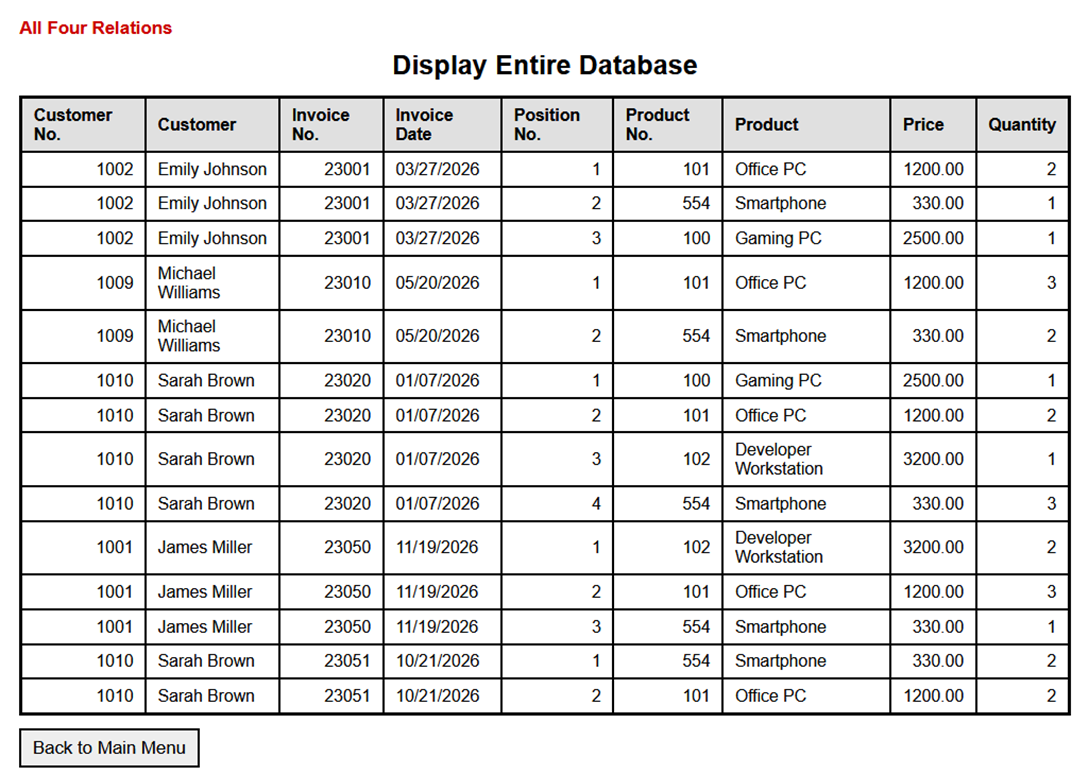
|
|
7.5 Displaying an Invoice |
|
After a newly entered invoice has been saved, this program displays it. See also Section 7.3.1. |
|
7.5.1 DisplayInvoice.php |
|
|
<?php
|
|
|
/*
|
|
|
DISPLAYING A SINGLE INVOICE
|
|
|
This program displays one complete invoice consisting of
|
|
|
- the invoice header,
|
|
|
- the customer data,
|
|
|
- the invoice line items,
|
|
|
- the associated product data,
|
|
|
- and the calculated invoice total.
|
|
|
The invoice number is passed to the program
|
|
|
as a URL parameter.
|
|
|
*/
|
|
|
/*
|
|
|
1. DATABASE CONNECTION INFORMATION
|
|
|
The DSN (Data Source Name) describes how PDO
|
|
|
establishes a connection to the MySQL database:
|
|
|
- mysql specifies the PDO driver to use.
|
|
|
- host=localhost means that the database server
|
|
|
is running on the same computer as the PHP program.
|
|
|
- dbname=Invoices specifies the name of the database.
|
|
|
- charset=utf8mb4 specifies the character set
|
|
|
for the connection.
|
|
|
*/
|
|
|
$dsn = "mysql:host=localhost;dbname=Invoices;charset=utf8mb4";
|
|
|
$user = "root";
|
|
|
$pass = "";
|
|
|
/*
|
|
|
2. HELPER FUNCTION FOR SAFE HTML OUTPUT
|
|
|
The function h() is used to safely display values
|
|
|
in the HTML output.
|
|
|
htmlspecialchars() converts characters with a special
|
|
|
meaning in HTML into corresponding HTML character
|
|
|
references.
|
|
|
ENT_QUOTES converts both double and single
|
|
|
quotation marks.
|
|
|
See Appendix.
|
|
|
*/
|
|
|
function h(mixed $value): string
|
|
|
{
|
|
|
return htmlspecialchars(
|
|
|
(string)$value,
|
|
|
ENT_QUOTES,
|
|
|
"UTF-8"
|
|
|
);
|
|
|
}
|
|
|
/*
|
|
|
3. RETRIEVE THE INVOICE NUMBER FROM THE URL
|
|
|
The program expects a URL in this form:
|
|
|
DisplayInvoice.php?InvoiceNo=23051
|
|
|
$_GET["InvoiceNo"] contains the value passed
|
|
|
with the URL.
|
|
|
The null coalescing operator ?? returns 0 if
|
|
|
InvoiceNo was not specified.
|
|
|
The value is converted to an integer.
|
|
|
*/
|
|
|
$invoiceNo = (int)($_GET["InvoiceNo"] ?? 0);
|
|
|
/*
|
|
|
An invoice number must be greater than 0.
|
|
|
*/
|
|
|
if ($invoiceNo <= 0) {
|
|
|
die(
|
|
|
"Error: Invoice number is missing or invalid."
|
|
|
);
|
|
|
}
|
|
|
try {
|
|
|
/*
|
|
|
4. ESTABLISH A CONNECTION TO THE DATABASE
|
|
|
new PDO() creates an object of the PDO class.
|
|
|
PDO::ATTR_ERRMODE => PDO::ERRMODE_EXCEPTION
|
|
|
causes PDO to throw a PDOException in the event
|
|
|
of a database error.
|
|
|
PDO::ATTR_DEFAULT_FETCH_MODE => PDO::FETCH_ASSOC
|
|
|
causes retrieved rows to be returned as
|
|
|
associative arrays by default.
|
|
|
*/
|
|
|
$pdo = new PDO(
|
|
|
$dsn,
|
|
|
$user,
|
|
|
$pass,
|
|
|
[
|
|
|
PDO::ATTR_ERRMODE =>
|
|
|
PDO::ERRMODE_EXCEPTION,
|
|
|
PDO::ATTR_DEFAULT_FETCH_MODE =>
|
|
|
PDO::FETCH_ASSOC
|
|
|
]
|
|
|
);
|
|
|
/*
|
|
|
5. LOAD THE INVOICE HEADER
|
|
|
The InvoiceHeaders relation contains the general
|
|
|
data of an invoice:
|
|
|
- InvoiceNo
|
|
|
- CustomerNo
|
|
|
- InvoiceDate
|
|
|
The Customers relation is joined using CustomerNo.
|
|
|
This also makes the customer's first name and
|
|
|
last name available for the output.
|
|
|
DATE_FORMAT() formats the invoice date
|
|
|
as month/day/year.
|
|
|
*/
|
|
|
$sqlHead = "
|
|
|
SELECT
|
|
|
ih.InvoiceNo,
|
|
|
DATE_FORMAT(
|
|
|
ih.InvoiceDate,
|
|
|
'%m/%d/%Y'
|
|
|
) AS InvoiceDate,
|
|
|
ih.CustomerNo,
|
|
|
c.LastName,
|
|
|
c.FirstName
|
|
|
FROM InvoiceHeaders AS ih
|
|
|
INNER JOIN Customers AS c
|
|
|
ON ih.CustomerNo = c.CustomerNo
|
|
|
WHERE ih.InvoiceNo = :InvoiceNo
|
|
|
";
|
|
|
/*
|
|
|
prepare() prepares the SQL statement.
|
|
|
:InvoiceNo is a named placeholder.
|
|
|
The actual invoice number is supplied only
|
|
|
when execute() is called.
|
|
|
*/
|
|
|
$stmtHead = $pdo->prepare($sqlHead);
|
|
|
$stmtHead->execute([
|
|
|
"InvoiceNo" => $invoiceNo
|
|
|
]);
|
|
|
/*
|
|
|
fetch() reads the invoice header.
|
|
|
If no matching invoice exists,
|
|
|
fetch() returns false.
|
|
|
*/
|
|
|
$head = $stmtHead->fetch();
|
|
|
/*
|
|
|
Terminate the program if the requested
|
|
|
invoice does not exist.
|
|
|
*/
|
|
|
if ($head === false) {
|
|
|
die(
|
|
|
"Error: Invoice not found "
|
|
|
. "(Invoice No. "
|
|
|
. h($invoiceNo)
|
|
|
. ")."
|
|
|
);
|
|
|
}
|
|
|
/*
|
|
|
6. LOAD THE INVOICE LINE ITEMS
|
|
|
InvoiceItems contains:
|
|
|
- InvoiceNo
|
|
|
- PositionNo
|
|
|
- ProductNo
|
|
|
- Quantity
|
|
|
Products contains the corresponding product data:
|
|
|
- ProductNo
|
|
|
- Description
|
|
|
- Price
|
|
|
The two relations are joined using ProductNo.
|
|
|
The WHERE clause restricts the result to
|
|
|
the requested invoice.
|
|
|
The value of each invoice line item is calculated
|
|
|
within the SELECT statement:
|
|
|
Quantity * Price
|
|
|
The calculated value is given the alias ItemValue.
|
|
|
*/
|
|
|
$sqlItems = "
|
|
|
SELECT
|
|
|
ii.PositionNo,
|
|
|
p.ProductNo,
|
|
|
p.Description,
|
|
|
p.Price,
|
|
|
ii.Quantity,
|
|
|
(ii.Quantity * p.Price) AS ItemValue
|
|
|
FROM InvoiceItems AS ii
|
|
|
INNER JOIN Products AS p
|
|
|
ON ii.ProductNo = p.ProductNo
|
|
|
WHERE ii.InvoiceNo = :InvoiceNo
|
|
|
ORDER BY ii.PositionNo
|
|
|
";
|
|
|
/*
|
|
|
A prepared statement is also used for this query.
|
|
|
*/
|
|
|
$stmtItems = $pdo->prepare($sqlItems);
|
|
|
$stmtItems->execute([
|
|
|
"InvoiceNo" => $invoiceNo
|
|
|
]);
|
|
|
/*
|
|
|
fetchAll() reads all invoice line items
|
|
|
and returns them as an array.
|
|
|
*/
|
|
|
$items = $stmtItems->fetchAll();
|
|
|
/*
|
|
|
7. CALCULATE THE INVOICE TOTAL
|
|
|
$total is initialized to 0.
|
|
|
The foreach loop processes all invoice line items.
|
|
|
The value of each line item is added to the total.
|
|
|
*/
|
|
|
$total = 0.0;
|
|
|
foreach ($items as $item) {
|
|
|
$total += (float)$item["ItemValue"];
|
|
|
}
|
|
|
} catch (PDOException $e) {
|
|
|
/*
|
|
|
8. ERROR HANDLING
|
|
|
If a database error occurs while establishing
|
|
|
the connection or executing an SQL statement,
|
|
|
the program terminates.
|
|
|
For this local learning environment, the technical
|
|
|
error message is displayed.
|
|
|
On a public web server, only a general error
|
|
|
message should normally be shown to the user.
|
|
|
*/
|
|
|
die(
|
|
|
"Database error: "
|
|
|
. h($e->getMessage())
|
|
|
);
|
|
|
}
|
|
|
?>
|
|
|
<!doctype html>
|
|
|
<html lang="en">
|
|
|
<head>
|
|
|
<meta charset="utf-8">
|
|
|
<title>Display Invoice</title>
|
|
|
<!--
|
|
|
The common stylesheet of the invoice management
|
|
|
application is used.
|
|
|
-->
|
|
|
<link rel="stylesheet" href="Invoices.css">
|
|
|
</head>
|
|
|
<body>
|
|
|
<div class="box">
|
|
|
<!--
|
|
|
Indicates that a single invoice is displayed.
|
|
|
-->
|
|
|
<div class="caption">
|
|
|
Displaying a Single Invoice
|
|
|
</div>
|
|
|
<!--
|
|
|
The invoice number is included in the heading.
|
|
|
-->
|
|
|
<h2>
|
|
|
Invoice <?= h($head["InvoiceNo"]) ?>
|
|
|
</h2>
|
|
|
<!--
|
|
|
Display the general invoice data.
|
|
|
-->
|
|
|
<div class="info">
|
|
|
<div>
|
|
|
<strong>Invoice No.:</strong>
|
|
|
<?= h($head["InvoiceNo"]) ?>
|
|
|
</div>
|
|
|
<div>
|
|
|
<strong>Invoice Date:</strong>
|
|
|
<?= h($head["InvoiceDate"]) ?>
|
|
|
</div>
|
|
|
<div>
|
|
|
<strong>Customer No.:</strong>
|
|
|
<?= h($head["CustomerNo"]) ?>
|
|
|
</div>
|
|
|
<div>
|
|
|
<strong>Customer:</strong>
|
|
|
<?= h(
|
|
|
$head["LastName"]
|
|
|
. ", "
|
|
|
. $head["FirstName"]
|
|
|
) ?>
|
|
|
</div>
|
|
|
<div>
|
|
|
<strong>Invoice Total:</strong>
|
|
|
<?= number_format($total, 2, ".", ",") ?> EUR
|
|
|
</div>
|
|
|
</div>
|
|
|
<!--
|
|
|
Display the individual invoice line items
|
|
|
as an HTML table.
|
|
|
-->
|
|
|
<table class="rel invoice-display">
|
|
|
<thead>
|
|
|
<tr>
|
|
|
<th>Position No.</th>
|
|
|
<th>Product No.</th>
|
|
|
<th>Product</th>
|
|
|
<th>Price (EUR)</th>
|
|
|
<th>Quantity</th>
|
|
|
<th>Item Value (EUR)</th>
|
|
|
</tr>
|
|
|
</thead>
|
|
|
<tbody>
|
|
|
<!--
|
|
|
Check whether the invoice contains any line items.
|
|
|
-->
|
|
|
<?php if (count($items) === 0): ?>
|
|
|
<tr>
|
|
|
<td colspan="6">
|
|
|
No invoice line items available.
|
|
|
</td>
|
|
|
</tr>
|
|
|
<?php else: ?>
|
|
|
<?php foreach ($items as $item): ?>
|
|
|
<!--
|
|
|
One table row is generated for each
|
|
|
invoice line item.
|
|
|
-->
|
|
|
<tr>
|
|
|
<td><?= h($item["PositionNo"]) ?></td>
|
|
|
<td><?= h($item["ProductNo"]) ?></td>
|
|
|
<td><?= h($item["Description"]) ?></td>
|
|
|
<td>
|
|
|
<?= number_format(
|
|
|
(float)$item["Price"],
|
|
|
2,
|
|
|
".",
|
|
|
","
|
|
|
) ?>
|
|
|
</td>
|
|
|
<td><?= h($item["Quantity"]) ?></td>
|
|
|
<td>
|
|
|
<?= number_format(
|
|
|
(float)$item["ItemValue"],
|
|
|
2,
|
|
|
".",
|
|
|
","
|
|
|
) ?>
|
|
|
</td>
|
|
|
</tr>
|
|
|
<?php endforeach; ?>
|
|
|
<?php endif; ?>
|
|
|
</tbody>
|
|
|
</table>
|
|
|
<!--
|
|
|
ACTION BUTTONS
|
|
|
The first button opens the invoice entry form
|
|
|
to enter another invoice.
|
|
|
The second button returns to the main menu
|
|
|
of the invoice management system.
|
|
|
-->
|
|
|
<div class="actions">
|
|
|
<button
|
|
|
type="button"
|
|
|
onclick="location.href='EnterInvoices.php'"
|
|
|
>
|
|
|
Enter New Invoice
|
|
|
</button>
|
|
|
<button
|
|
|
type="button"
|
|
|
onclick="location.href='/InvoicesStart.php'"
|
|
|
>
|
|
|
Back to Main Menu
|
|
|
</button>
|
|
|
</div>
|
|
|
</div>
|
|
|
</body>
|
|
|
</html>
|
|
7.5.2 Program Execution |
|
Don't forget: The program is launched via KuRaArStart.php: http://localhost/InvoicesStart.php. See also above. |
|
Then click the "Enter Invoices" button. This takes you to the input form: |
|
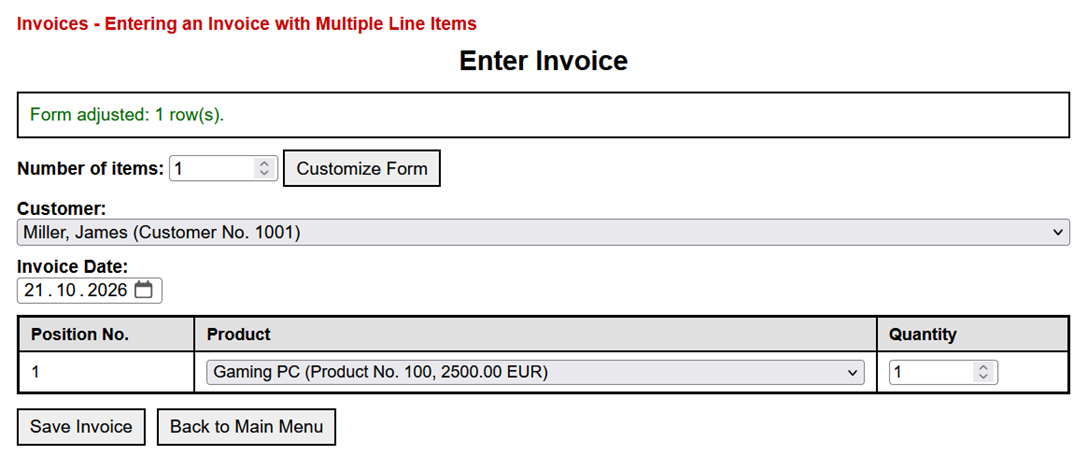
|
|
After clicking Save Invoice, the invoice just entered is displayed: |
|
|
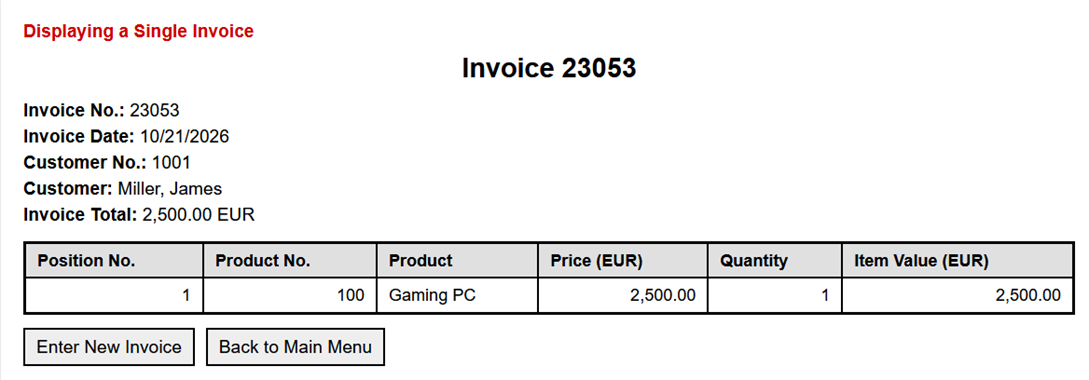
|
|
7.5.3 Notes |
|
The h() function is used to safely output values on an HTML page: |
|
|
function h(mixed $value): string
|
|
|
{
|
|
|
return htmlspecialchars((string)$value, ENT_QUOTES, "UTF-8");
|
|
|
}
|
|
function h(mixed $value): string, defines a function named h. |
|
- function introduces the function definition.
- h is the name of the function. The short name here essentially stands for "HTML-safe output."
- $value is the parameter. When the function is called, the value to be output is passed to the function.
- mixed means that the passed value can be of different data types, such as string, int, float, or null.
- : string specifies that the function always returns a string as its result.
|
|
The type conversion (string)$value first converts the passed value into a string. This allows numbers to be safely passed to htmlspecialchars(). |
|
The htmlspecialchars(...) function converts characters that have special meaning in HTML. For example, the "amp;" symbol, the greater-than and less-than signs, and quotation marks. See also the appendix. |
|
ENT_QUOTES ensures that both double and single quotation marks are converted. "UTF-8" specifies the character set used. This ensures that umlauts such as ä, ö, and ü are processed correctly. return returns the converted string to the calling location. The function can be called concisely and clearly in HTML output: |
|
|
<p>Customer: <?= h($customer["lastName"]) ?></p>
|
|
It thus serves as a helper function for secure HTML output. However, it does not provide general protection against all attacks: Prepared statementsmust still be used for SQL statements. |
|
7.6 Invoices.css |
|
|
|
|
|
/*
|
|
|
Invoices.css
|
|
|
Common stylesheet for the programs in the
|
|
|
Invoices directory.
|
|
|
Used by:
|
|
|
- EnterInvoices.php
|
|
|
- DisplayInvoice.php
|
|
|
- ListInvoices.php
|
|
|
- Other invoice management programs
|
|
|
The main menu InvoicesStart.php uses its own
|
|
|
stylesheet: InvoicesStart.css.
|
|
|
*/
|
|
|
|
|
|
/*
|
|
|
1. GENERAL SETTINGS
|
|
|
box-sizing: border-box ensures that padding
|
|
|
and borders are included in the specified
|
|
|
width and height of an element.
|
|
|
*/
|
|
|
* {
|
|
|
box-sizing: border-box;
|
|
|
}
|
|
|
body {
|
|
|
margin: 0;
|
|
|
padding: 20px;
|
|
|
background-color: #f5f5f5;
|
|
|
font-family: Arial, sans-serif;
|
|
|
}
|
|
|
/*
|
|
|
Form elements use the same font as the
|
|
|
surrounding document.
|
|
|
*/
|
|
|
input,
|
|
|
select,
|
|
|
button {
|
|
|
font: inherit;
|
|
|
}
|
|
|
|
|
|
/*
|
|
|
2. MAIN CONTENT AREA
|
|
|
The box contains the entire program output.
|
|
|
max-width limits its width on large screens.
|
|
|
margin: 0 auto centers the box horizontally.
|
|
|
overflow-x: auto allows horizontal scrolling
|
|
|
if a wide table does not fit on the screen.
|
|
|
*/
|
|
|
.box {
|
|
|
width: 100%;
|
|
|
max-width: 940px;
|
|
|
margin: 0 auto;
|
|
|
padding: 20px;
|
|
|
overflow-x: auto;
|
|
|
background-color: #fff;
|
|
|
box-shadow: 0 0 10px rgba(0, 0, 0, 0.1);
|
|
|
}
|
|
|
|
|
|
/*
|
|
|
3. CAPTION
|
|
|
The caption appears above the main heading.
|
|
|
It is displayed in red.
|
|
|
*/
|
|
|
.caption {
|
|
|
margin: 0 0 8px;
|
|
|
color: #c00;
|
|
|
font-weight: 700;
|
|
|
}
|
|
|
|
|
|
/*
|
|
|
4. HEADINGS
|
|
|
*/
|
|
|
h2 {
|
|
|
margin: 10px 0 14px;
|
|
|
text-align: center;
|
|
|
}
|
|
|
|
|
|
/*
|
|
|
5. USER MESSAGES
|
|
|
Messages inform the user about successful
|
|
|
operations or errors.
|
|
|
The classes ok and err are additional classes
|
|
|
that specify the color of the message text.
|
|
|
*/
|
|
|
.msg {
|
|
|
margin: 10px 0;
|
|
|
padding: 10px;
|
|
|
border: 2px solid #000;
|
|
|
background-color: #fff;
|
|
|
}
|
|
|
.msg.ok {
|
|
|
color: #060;
|
|
|
}
|
|
|
.msg.err {
|
|
|
color: #900;
|
|
|
}
|
|
|
|
|
|
/*
|
|
|
6. FORM ELEMENTS
|
|
|
Labels are displayed in bold.
|
|
|
The row class provides vertical spacing
|
|
|
between groups of form elements.
|
|
|
*/
|
|
|
label {
|
|
|
font-weight: 700;
|
|
|
}
|
|
|
.row {
|
|
|
margin: 10px 0;
|
|
|
}
|
|
|
/*
|
|
|
Number fields are given a fixed width.
|
|
|
*/
|
|
|
input[type="number"] {
|
|
|
width: 90px;
|
|
|
}
|
|
|
/*
|
|
|
Drop-down lists use the available width,
|
|
|
but do not exceed the width of their
|
|
|
containing element.
|
|
|
*/
|
|
|
select {
|
|
|
width: 100%;
|
|
|
max-width: 100%;
|
|
|
}
|
|
|
|
|
|
/*
|
|
|
7. HTML TABLES
|
|
|
The class rel is used for HTML tables
|
|
|
that display relational data.
|
|
|
The borders are deliberately emphasized
|
|
|
to make the individual rows and columns
|
|
|
clearly visible.
|
|
|
*/
|
|
|
table.rel {
|
|
|
width: 100%;
|
|
|
border: 3px solid #000;
|
|
|
border-collapse: collapse;
|
|
|
font-size: 15px;
|
|
|
}
|
|
|
table.rel th,
|
|
|
table.rel td {
|
|
|
padding: 6px 10px;
|
|
|
border: 2px solid #000;
|
|
|
background-color: #fff;
|
|
|
text-align: left;
|
|
|
}
|
|
|
/*
|
|
|
Column headings have a gray background
|
|
|
and are displayed in bold.
|
|
|
*/
|
|
|
table.rel th {
|
|
|
font-weight: 700;
|
|
|
background-color: #e0e0e0;
|
|
|
}
|
|
|
|
|
|
/*
|
|
|
8. ACTION BUTTONS
|
|
|
The actions class arranges buttons next
|
|
|
to each other.
|
|
|
flex-wrap allows buttons to move to the
|
|
|
next line when there is insufficient space.
|
|
|
*/
|
|
|
.actions {
|
|
|
display: flex;
|
|
|
flex-wrap: wrap;
|
|
|
gap: 10px;
|
|
|
margin-top: 12px;
|
|
|
}
|
|
|
button {
|
|
|
padding: 6px 10px;
|
|
|
border: 2px solid #000;
|
|
|
background-color: #eee;
|
|
|
cursor: pointer;
|
|
|
}
|
|
|
/*
|
|
|
A button becomes slightly darker when
|
|
|
the mouse pointer is positioned over it.
|
|
|
*/
|
|
|
button:hover {
|
|
|
background-color: #ddd;
|
|
|
}
|
|
|
|
|
|
/*
|
|
|
9. COMPLETE LIST OF INVOICES
|
|
|
The class invoice-list is used in
|
|
|
ListInvoices.php.
|
|
|
This HTML table contains nine columns.
|
|
|
min-width prevents the columns from
|
|
|
becoming too narrow.
|
|
|
*/
|
|
|
.invoice-list {
|
|
|
min-width: 850px;
|
|
|
}
|
|
|
/*
|
|
|
Numeric columns are aligned to the right.
|
|
|
Column 1: Customer No.
|
|
|
Column 3: Invoice No.
|
|
|
Column 5: Position No.
|
|
|
Column 6: Product No.
|
|
|
Column 8: Price
|
|
|
Column 9: Quantity
|
|
|
*/
|
|
|
.invoice-list td:nth-child(1),
|
|
|
.invoice-list td:nth-child(3),
|
|
|
.invoice-list td:nth-child(5),
|
|
|
.invoice-list td:nth-child(6),
|
|
|
.invoice-list td:nth-child(8),
|
|
|
.invoice-list td:nth-child(9) {
|
|
|
text-align: right;
|
|
|
}
|
|
|
/*
|
|
|
The row under the mouse pointer is
|
|
|
highlighted with a light blue background.
|
|
|
*/
|
|
|
.invoice-list tbody tr:hover td {
|
|
|
background-color: #f0f8ff;
|
|
|
}
|
|
|
|
|
|
/*
|
|
|
10. DISPLAYING A SINGLE INVOICE
|
|
|
The class info is used for the general
|
|
|
invoice information displayed above
|
|
|
the invoice line items.
|
|
|
*/
|
|
|
.info {
|
|
|
margin: 15px 0;
|
|
|
}
|
|
|
.info div {
|
|
|
margin: 5px 0;
|
|
|
}
|
|
|
|
|
|
/*
|
|
|
11. INVOICE LINE ITEMS
|
|
|
The class invoice-display is used in
|
|
|
DisplayInvoice.php.
|
|
|
The table contains six columns.
|
|
|
Numeric columns are aligned to the right.
|
|
|
Column 1: Position No.
|
|
|
Column 2: Product No.
|
|
|
Column 4: Price
|
|
|
Column 5: Quantity
|
|
|
Column 6: Item Value
|
|
|
*/
|
|
|
.invoice-display td:nth-child(1),
|
|
|
.invoice-display td:nth-child(2),
|
|
|
.invoice-display td:nth-child(4),
|
|
|
.invoice-display td:nth-child(5),
|
|
|
.invoice-display td:nth-child(6) {
|
|
|
text-align: right;
|
|
|
}
|
|
|
/*
|
|
|
Highlight the invoice line item
|
|
|
under the mouse pointer.
|
|
|
*/
|
|
|
.invoice-display tbody tr:hover td {
|
|
|
background-color: #f0f8ff;
|
|
|
}
|
|
|
|
|
|
/*
|
|
|
12. RESPONSIVE DISPLAY
|
|
|
On narrow screens, HTML tables may
|
|
|
require more horizontal space than
|
|
|
the screen provides.
|
|
|
The surrounding box therefore allows
|
|
|
horizontal scrolling.
|
|
|
*/
|
|
|
@media (max-width: 700px) {
|
|
|
.box {
|
|
|
overflow-x: auto;
|
|
|
}
|
|
|
table.rel {
|
|
|
min-width: 620px;
|
|
|
}
|
|
|
.invoice-list {
|
|
|
min-width: 850px;
|
|
|
}
|
|
|
}
|
|
8 Quick Overview |
|
Here is a summary of the options described above for linking a website to a database. |
|
|
|
8.1 MySQLi |
|
8.1.1 Typical Process |
|
- Establish a MySQLi connection
- Prepare the SQL statement
- Bind parameters (bind_param)
- Execute the statement
- Retrieve results (using get_result(), fetch_assoc())
- Check for errors ($con->connect_error, $stmt->error)
|
|
8.1.2 Advantages |
|
- Native support for MySQL databases
- Support for prepared statements
- Efficient parameter binding
- Object-oriented and procedural usage
- Good performance for MySQL-specific applications
|
|
8.2 PDO |
|
8.2.1 Typical workflow |
|
- Establish a PDO connection
- Prepare an SQL statement
- Bind parameters (implicitly via execute())
- Execute the statement
- Retrieve results
- Handle errors (try/catch)
|
|
8.2.2 Advantages |
|
- Database-independent interface
- Protection against SQL injection
- Clear separation of SQL and data
- Integrated error handling with exceptions
- Support for named parameters
|
|
8.3 A Direct Comparison |
|
Database Access in PHP: PDO and MySQLi at a Glance |
|
| PDO (PHP Data Objects) |
MySQLi (MySQL Improved) |
| Database-independent interface
(MySQL, PostgreSQL, SQLite, ...) |
Designed specifically for MySQL |
| Connection via DSN (Data Source Name) |
Connection via host, username, password, and database |
| Supports named parameters (:id) |
Uses position-based placeholders (?) |
| Parameter passing directly in execute() |
Parameter binding with bind_param() |
| No explicit type specification required |
Type specifications required (i, s, ...) |
| Error handling via exceptions |
Error checking is usually done manually |
| Flexible result processing (fetch, fetchAll) |
Typical: get_result, fetch_assoc |
| Uniform API for multiple database systems |
MySQL-specific optimization |
| |
|
|
Typical workflow |
|
| PDO |
MySQLi |
| 1. Establish a connection (new PDO) |
1. Establish a connection (new mysqli) |
| 2. Prepare the statement (prepare) |
2. Prepare the statement (prepare) |
| 3. Pass parameters (execute) |
3. Bind parameters (bind_param) |
| 4. Execute the statement |
4. Execute the statement (execute) |
| 5. Retrieve results (fetch) |
5. Retrieve results (fetch_assoc) |
| 6. Handle errors (try/catch) |
6. Check for errors (error) |
| |
|
|
9 Interaction Between HTML and PHP |
|
|
|
9.1 Tasks |
|
PHP and HTML perform different tasks: |
|
- HTML describes the structure and content of the webpage.
- PHP processes data, makes decisions, accesses a database, and generates HTML code as needed.
- The web server executes PHP.
- The browser then receives only the generated HTML. The PHP code itself is not sent to the browser.
|
|
9.2 Interaction |
|
There are several ways to achieve this interaction. |
|
9.2.1 Writing HTML Outside of PHP |
|
This is the simplest approach. Most of the file consists of standard HTML. PHP is inserted only where dynamic content is needed. |
|
|
<!doctype html>
|
|
|
<html lang="en">
|
|
|
<head>
|
|
|
<meta charset="utf-8">
|
|
|
<title>Customer Data</title>
|
|
|
</head>
|
|
|
<body>
|
|
|
<h1>Customer Relationship</h1>
|
|
|
<?php
|
|
|
echo "The data has been loaded.";
|
|
|
?>
|
|
|
</body>
|
|
|
</html>
|
|
This method works well when the page consists mainly of HTML. |
|
9.2.2 Outputting HTML with echo in PHP |
|
PHP can output complete HTML statements as strings: |
|
|
<?php
|
|
|
echo "<h1>Customer Relationship</h1>";
|
|
|
echo "<p>The data has been loaded.</p>";
|
|
|
?>
|
|
The browser receives the following: |
|
|
<h1>Customer Relationship</h1>
|
|
|
<p>The data has been loaded.</p>
|
|
This format is useful for short HTML outputs. However, it quickly becomes confusing for longer HTML sections. |
|
If a PHP string contains double quotes, they must be escaped with a backslash: |
|
|
echo "<p class=\"text-red\">Customer Relationship</p>";
|
|
A simpler option here would be a string enclosed in single quotes: |
|
|
echo '<p class="text-red">Customer Relationship</p>';
|
|
9.2.3 Inserting Values Using the Shorthand <?= ... ?> |
|
This syntax allows a PHP value to be inserted directly into HTML: |
|
|
<p>Customer number: <?= $customerNo ?></p>
|
|
This is the shorthand for: |
|
|
<p>Customer number: <?php echo $customerNo; ?></p>
|
|
For text that comes from a form or a database, you should use htmlspecialchars(): |
|
|
<p>Customer Name:
|
|
|
<?= htmlspecialchars($lastName, ENT_QUOTES, "UTF-8") ?>
|
|
|
</p>
|
|
In the programs in this text, the helper function h() is also used for this purpose: |
|
|
<?php
|
|
|
function h(string $s): string
|
|
|
{
|
|
|
return htmlspecialchars($s, ENT_QUOTES, "UTF-8");
|
|
|
}
|
|
|
?>
|
|
Then this is sufficient: |
|
|
<p>Customer Name: <?= h($lastName) ?></p>
|
|
This syntax is particularly well-suited for inserting individual values into an HTML structure. |
|
9.2.4 Combining PHP Conditions with HTML |
|
If HTML is to be output only under a specific condition, an alternative PHP syntax can be used: |
|
|
<?php if ($message !== ""): ?>
|
|
|
<p><?= h($message) ?></p>
|
|
|
<?php endif; ?>
|
|
This means: If $message is not empty, the HTML element <p> is output. The same processing could be written entirely in PHP: |
|
|
<?php
|
|
|
if ($message !== "") {
|
|
|
echo "<p>" . h($message) . "</p>";
|
|
|
}
|
|
|
?>
|
|
The first option is usually clearer when there is a lot of HTML within the condition. |
|
9.2.5 Combining PHP Loops with HTML |
|
Loops can also be embedded within an HTML structure: |
|
|
<table>
|
|
|
<tbody>
|
|
|
<?php foreach ($Customer as $customer): ?>
|
|
|
<tr>
|
|
|
<td><?= h($customer["lastName"]) ?></td>
|
|
|
<td><?= h($customer["firstName"]) ?></td>
|
|
|
</tr>
|
|
|
<?php endforeach; ?>
|
|
|
</tbody>
|
|
|
</table>
|
|
PHP repeats the HTML code in between for each record. The syntax |
|
|
<?php foreach (...): ?>
|
|
marks the start of the loop. The corresponding |
|
|
<?php endforeach; ?>
|
|
closes it. |
|
This loop could also be written entirely in PHP using echo: |
|
|
<?php
|
|
|
echo "<table>";
|
|
|
echo "<tbody>";
|
|
|
foreach ($customers as $customer) {
|
|
|
echo "<tr>";
|
|
|
echo "<td>" . h($customer["Last Name"]) . "</td>";
|
|
|
echo "<td>" . h($customer["First Name"]) . "</td>";
|
|
|
echo "</tr>";
|
|
|
}
|
|
|
echo "</tbody>";
|
|
|
echo "</table>";
|
|
|
?>
|
|
For complex HTML structures, the first option is usually easier to read. |
|
9.2.6 Concatenation Operator |
|
PHP can construct HTML code from fixed text segments and variables: |
|
|
<?php
|
|
|
echo "<p>Customer name: " . h($lastName) . "</p>";
|
|
|
?>
|
|
The dot is the PHP operator used to concatenate strings: |
|
|
"First Name: " . $firstName
|
|
Multiple text segments are combined into a single string. With more complex HTML statements, this format can become difficult to read: |
|
|
echo "<input type=\"number\" name=\"quantity_$i\" value=\""
|
|
|
. h($quantity) . "\">";
|
|
In such cases, embedded PHP is often clearer: |
|
|
<input type="number"
|
|
|
name="quantity_<?= $i ?>" value="<?= h($quantity) ?>">
|
|
9.2.7 A form passes HTML data to PHP |
|
This interaction also works in the opposite direction: HTML collects data, and PHP processes it. |
|
HTML form: |
|
|
<form method="post">
|
|
|
<label for="lastName">Name:</label>
|
|
|
<input type="text" id="lastName" name="lastName">
|
|
|
<button type="submit">Submit</button>
|
|
|
</form>
|
|
PHP retrieves the entered value: |
|
|
<?php
|
|
|
$lastName = $_POST["lastName"] ?? "";
|
|
|
?>
|
|
The key attribute is: name="lastName". This ensures that the entered value is transmitted under the key "lastName". PHP accesses it as follows: |
|
|
$_POST["lastName"]
|
|
The entire process is as follows: |
|
- PHP generates or returns the HTML form.
- The browser displays the form.
- The user enters data and submits the form.
- The browser transmits the data to the web server.
- PHP reads and processes the data.
- PHP generates new HTML output.
- The browser displays this output.
|
|
9.2.8 Separating PHP Logic and HTML Output |
|
For more complex programs, it makes sense to place the processing at the beginning of the file and the HTML output afterward: |
|
|
<?php
|
|
|
$message = "";
|
|
|
if ($_SERVER["REQUEST_METHOD"] === "POST") {
|
|
|
$lastName = trim($_POST["lastName"] ?? "");
|
|
|
if ($lastName === "") {
|
|
|
$message = "Please enter a name.";
|
|
|
} else {
|
|
|
$message = "Your input has been processed.";
|
|
|
}
|
|
|
}
|
|
|
?>
|
|
|
<!doctype html>
|
|
|
<html lang="en">
|
|
|
<head>
|
|
|
<meta charset="utf-8">
|
|
|
<title>Input</title>
|
|
|
</head>
|
|
|
<body>
|
|
|
<?php if ($message !== ""): ?>
|
|
|
<p><?= htmlspecialchars($message, ENT_QUOTES, "UTF-8") ?></p>
|
|
|
<?php endif; ?>
|
|
|
<form method="post">
|
|
|
<input type="text" name="lastName">
|
|
|
<button type="submit">Submit</button>
|
|
|
</form>
|
|
|
</body>
|
|
|
</html>
|
|
In summary: |
|
- Top: PHP for database access, validation, and processing
- bottom: HTML for display
- In the HTML: short PHP snippets for values, conditions, and loops
|
|
9.3 Basic Rules |
|
The following general rules therefore apply: |
|
- PHP processes the data.
- HTML structures the output.
- CSS controls the appearance of the output.
- Prepared statements protect the handling of values in SQL statements.
- htmlspecialchars(), or the helper function h(), handles values for output within HTML.
|
|
In this way, data processing and presentation remain as clearly separated as possible, even when they are implemented in the same PHP file. |
|
|
|
10 Glossary |
|
ACID Properties
Basic properties of transactions: Atomicity, Consistency, Isolation, and Durability. |
|
Associative array
A data structure in which values are accessed via keys. In database programs, the keys often correspond to the column names of a record. Example: ['customerNo' => 1002, 'last_name' => 'Smith'] |
|
Attribute
A property of an entity that is stored as a column in a relation. |
|
bind_param()
A method of MySQLi prepared statements used to bind parameters to placeholders in an SQL statement. |
|
Commit
Confirmation of a transaction that permanently saves all changes made within it to the database. |
|
connect_error
A property of the MySQLi object that indicates whether a connection error has occurred. |
|
Connection Object (MySQLi)
An object that represents a connection to a MySQL database and is created using new mysqli(...). |
|
Connection Parameters
Specified by the host, username, password, and database name.
Example: new mysqli("localhost", "root", "", "Sales") |
|
DSN (Data Source Name)
The $dsn variable contains a connection description for PDO, consisting of: the database driver, the server host, the database name, and the character set to be used. It is thus the central configuration specification for establishing a database connection. Example: $dsn = "mysql:host=localhost;dbname=Invoices;charset=utf8mb4"; |
|
Entity
An object from the real or conceptual world about which data is stored, such as a customer or an item. |
|
Exception
An object that describes an error or an exceptional situation in the program. Exceptions can be handled using try/catch blocks. |
|
execute()
A method of a prepared statement that executes a prepared SQL statement. |
|
fetch_assoc()
A method of MySQLi result sets that returns one row at a time as an associative array with column names as keys. |
|
fetchAll()
A PDO method that returns all rows from a query result in an array. |
|
Fetch Mode
Specifies the format in which query results are returned.
Example: PDO::FETCH_ASSOC returns results as an associative array |
|
Foreign Key
An attribute or combination of attributes in a table that references the primary key of another table, thereby establishing a relationship between tables. |
|
get_result()
A method that returns the result set of a prepared statement (requires the MySQL Native Driver). |
|
Join
An operation for linking multiple relations based on common attribute values, typically using primary and foreign keys. |
|
Class
A central concept in object-oriented theory; a blueprint for objects. It defines the attributes and methods. |
|
Short-Circuit Evaluation
The AND operator amp;amp; frequently appears in programs. The following applies to it: It terminates evaluation as soon as any subcondition evaluates to false. This behavior is known as short-circuit evaluation. A similar behavior also applies to the logical OR operator. Here, evaluation ends as soon as any subcondition evaluates to true. |
|
Method
A function that belongs to a class or an object and is called through it. |
|
MySQLi Object
Represents the database connection. Created using new mysqli(...). |
|
MySQLi (MySQL improved)
PHP extension for accessing MySQL databases. It supports object-oriented and procedural programming as well as prepared statements. |
|
Named parameter
A placeholder in a prepared statement that is assigned a name (e.g., :invoiceNo) and is filled with a specific value when the statement is executed. |
|
Null coalescence operator
The null coalescing operator ?? returns the value of its left operand if it exists and is not null. Otherwise, it returns the value of the right operand. It thus largely corresponds to a shorthand check using isset() and is frequently used to set a default value for missing form values. |
|
Object
An instance of a class that encapsulates data (attributes) and functions (methods). |
|
Parameter Binding
The assignment of specific values to placeholders in prepared statements, usually at runtime. |
|
PDO (PHP Data Objects)
A PHP interface for accessing databases via a unified, object-oriented API. |
|
PDOStatement
An object that represents a prepared SQL statement. Provides methods such as execute() and fetchAll(). |
|
Prepared Statement
A prepared SQL statement with placeholders that are bound only at execution time. This prevents SQL injection attacks and allows queries to be executed more efficiently. |
|
Primary Key
An attribute or combination of attributes that uniquely identifies each row in a relation (table). |
|
Relation
A table in a relational database system with specific properties, consisting of attributes (columns) and tuples (rows). |
|
Result Set
The set of rows returned by an SQL query. |
|
Rollback
The process of undoing a transaction, in which all changes made since the transaction began are discarded. |
|
SQL (Structured Query Language)
A standardized language for defining, querying, and modifying data in relational database systems. |
|
SQL Injection
A security vulnerability in which malicious SQL code is injected via user input. Can be prevented by using prepared statements. |
|
Statement
An object that represents an SQL statement and enables its execution and result processing. |
|
Transaction
A related sequence of database operations executed as a logical unit of work. A transaction is either fully executed (commit) or fully rolled back (rollback). |
|
try/catch block
A programming construct for handling exceptions. The try block contains the code to be monitored, while the catch block handles any errors that occur. |
|
Tuple
A data row in a relation, represented as a row in a table. |
|
Junction Table
A relation that implements an n:m relationship between two relations. It typically contains the foreign keys of the involved relations as a common primary key. |
|
View
A virtual relation whose content is defined by an SQL query and which does not store any data of its own. |
|
|
|
11 Appendix |
|
This section provides in-depth explanations of selected concepts, constructs, and terms used throughout the book. |
|
|
|
11.1 From the Web to the Database |
|
There are two common architectural approaches for connecting a web interface (HTML forms, lists, and detail pages) to a relational database such as Invoices: |
|
- Server-side processing with PHP, typically generating complete HTML pages.
- API-based communication, in which the frontend sends requests to server-side endpoints.
|
|
There are several specific variations within these categories. |
|
11.1.1 Server-Side Database Access with PHP |
|
PHP + PDO |
|
The form sends data to a PHP script that communicates with MySQL via PDO (prepared statements). |
|
Invoices example (search for customers): |
|
- Form: "CustomerNo" input field
- PHP: SELECT * FROM Customers WHERE CustomerNo = :id
|
|
Advantages |
|
- Protection against SQL injection through properly used prepared statements.
- Flexible (MySQL, PostgreSQL, ...)
- Good error handling/transactions
|
|
Typical use cases in Invoices |
|
- View/edit customers
- Save invoice header
- Save invoice line items (transaction!)
|
|
PHP + MySQLi |
|
Similar to PDO, but specific to MySQL. Also supports prepared statements. |
|
Advantages |
|
- Designed specifically for MySQL/MariaDB
- Fast and simple for small projects
|
|
Disadvantage: Less portable than PDO |
|
Unsafe SQL Statements Using Form Data (Not recommended) |
|
Example: SELECT * FROM customers WHERE CustomerNo = $id. This can quickly lead to SQL injection if not properly validated or escaped. |
|
11.1.2 Database Access Through an API |
|
PHP REST API with Fetch |
|
The web interface (HTML/JS) calls endpoints, e.g.: |
|
- GET /api/customers?customerNo=1003
- POST /api/invoices (invoice header)
- POST /api/invoices/{id}/items
|
|
The API scripts then access Invoices via PDO/MySQLi. |
|
Advantages |
|
- Frontend and database logic are clearly separated
- Multiple frontends possible (web, mobile)
- Better structure for larger projects
|
|
Typical for Invoices |
|
- Load customer list as JSON and render it in a table
- Search for items (autocomplete)
- Save an invoice via multiple calls or as a single payload
|
|
Node.js/, Python, or Java Backend |
|
The API is provided not by PHP but by a backend service that uses a MySQL driver/ORM. |
|
Advantages |
|
- Good architecture for team collaboration and scalability
- Modern toolchains
|
|
Disadvantage: More setup required than with pure PHP |
|
11.1.3 Object-Relational Mapping (ORM) |
|
Doctrine (PHP), Sequelize (Node), Hibernate (Java), etc. |
|
This approach uses classes and objects. The ORM handles the mapping between objects and database relations and automatically generates the necessary SQL commands. |
|
Advantages |
|
- Less manual SQL work
- Relationships (e.g., customers <--> addresses via a junction table such as kuadr/CustomerAddresses) are easier to model
|
|
Disadvantages |
|
- Training is required; many processes are automated and can be difficult for beginners to understand at first.
- Often too complex (overkill) for small projects like Invoices.
|
|
11.1.4 Architectural and Interaction patterns |
|
Classic: Multi-Page / Post-Redirect-Get (PRG) |
|
- Form POST -> PHP saves to Invoices -> Redirect -> Display/Confirmation
- Very robust; works well for Invoices exercises (create a customer, save an invoice)
|
|
Single-page components: AJAX/Fetch |
|
- Form remains on screen, loads data dynamically (e.g., product search, customer filter)
- Data is still saved via API/endpoints
|
|
11.1.5 General Requirements for Database Access |
|
What’s almost always needed with a database like Invoices (regardless of the version) |
|
- Prepared statements (PDO/MySQLi)
- Input Validation (e.g., customer number is an integer, date is valid, quantity > 0)
- Transactions for composite save operations.
Invoices example: Save invoice = invoice headers + multiple invoice line items -> all or nothing.
- The relationship between InvoiceHeaders and Products is an n:m relationship implemented through InvoiceItems. Each invoice can contain several products, and each product can appear on several invoices.
|
|
11.2 HTML Special Characters |
|
PHP function htmlspecialchars() |
|
The PHP function htmlspecialchars() converts certain special characters into HTML entities. This ensures they are not interpreted as HTML code but are displayed as plain text. The function is primarily used to prevent HTML or JavaScript code from being injected via a form. |
|
A typical use case is when user input from a form is captured and entered into the program or database. Example: |
|
|
echo htmlspecialchars($_POST['name']);
|
|
The following characters are converted: |
|

|
|
|
|
| Character |
HTML Entity |
Meaning |
| amp; |
amp;amp; |
Ampersand |
| < |
amp;lt; |
Less-than sign |
| > |
amp;gt; |
Greater-than sign |
| " |
amp;quot; |
Double quotation mark |
| ' |
amp;#039; (or amp;apos;) |
Single quotation mark |
| |
|
|
The following additions are also useful: |
|
|
htmlspecialchars($text, ENT_QUOTES, 'UTF-8');
|
|
The ENT_QUOTES parameter also converts single quotes, and UTF-8 specifies the character encoding. |
|
11.3 Prepared Statements |
|
A |
11.4 Exceptions and Error Handling with PDO |
|
An exception is an object that describes an error or an exceptional situation during program execution. An exception object contains, among other things: |
|
- an error message
- an error code
- the location where the error occurred
- information about the sequence of program calls leading up to the error
|
|
An exception is therefore more than just an error message. It is an object that provides various pieces of information about an error. |
|
PHP can throw an exception. This interrupts the normal flow of program execution. If the statement causing the error is located within a suitable try/catch structure, execution continues in the corresponding catch block. |
|
Error Handling with PDO |
|
When creating a PDO object, you can specify how PDO should respond to database errors: |
|
|
$pdo = new PDO(
|
|
|
"mysql:host=localhost;dbname=Invoices;charset=utf8mb4",
|
|
|
"root","",
|
|
|
[PDO::ATTR_ERRMODE => PDO::ERRMODE_EXCEPTION]
|
|
|
);
|
|
The fourth argument of new PDO() is an array containing additional settings for the database connection. The entry |
|
|
PDO::ATTR_ERRMODE => PDO::ERRMODE_EXCEPTION
|
|
specifies the error-handling mode. PDO::ATTR_ERRMODE is a class constant of the PDO class. It identifies the setting for the error-handling mode. The expression PDO::ATTR_ERRMODE consists of: |
|
- PDO: the name of the class
- :: is the scope resolution operator, used to access a member of the class
- ATTR_ERRMODE: the name of the class constant
|
|
Uppercase letters are commonly used when naming constants. However, a name does not become a constant simply because it is written in uppercase letters. PDO::ERRMODE_EXCEPTION is also a class constant. It specifies that PDO throws a PDOException when a database error occurs. |
|
In PHP 8.2, PDO::ERRMODE_EXCEPTION is already the default behavior. Nevertheless, specifying it explicitly is useful because it makes the intended error-handling behavior immediately visible in the program. This mode has been the default since PHP 8.0. In earlier PHP versions, PDO::ERRMODE_SILENT was the default. |
|
Example of a Database Error |
|
The following query attempts to access a relation that does not exist: |
|
|
$pdo->query(
|
|
|
"SELECT * FROM nonexistent_relation"
|
|
|
);
|
|
As a result, PDO throws a PDOException. A try/catch block allows the program to handle the error in a controlled manner: |
|
|
try {
|
|
|
$pdo->query(
|
|
|
"SELECT * FROM nonexistent_relation"
|
|
|
);
|
|
|
} catch (PDOException $e) {
|
|
|
echo "Error: " . $e->getMessage();
|
|
|
}
|
|
The sequence of events is as follows: |
|
1. PHP executes the statements in the try block. |
|
2. When an erroneous SQL statement is executed, PDO throws a PDOException. |
|
3. Normal execution of the try block is interrupted. |
|
4. PHP searches for a matching catch block. |
|
5. The exception object is assigned to the variable $e. |
|
6. $e->getMessage() returns the error message of the exception. |
|
Without a matching catch block, the exception would remain unhandled. PHP would terminate program execution and report an error. |
|
Errors When Establishing a Database Connection |
|
An error can also occur when creating the PDO object, for example if: |
|
- the database server cannot be reached
- the database name is misspelled
- the username is incorrect
- the password is incorrect
|
|
For this reason, the database connection should also be established inside the try block: |
|
|
try {
|
|
|
$pdo = new PDO(
|
|
|
"mysql:host=localhost;dbname=Invoices;charset=utf8mb4",
|
|
|
"root","",[PDO::ATTR_ERRMODE => PDO::ERRMODE_EXCEPTION]
|
|
|
);
|
|
|
$pdo->query(
|
|
|
"SELECT * FROM Customers");
|
|
|
} catch (PDOException $e) {
|
|
|
echo "Database error: " . $e->getMessage();
|
|
|
}
|
|
An error occurring while establishing the database connection results in a PDOException, regardless of the configured error-handling mode. |
|
In a development or learning environment, displaying the message returned by $e->getMessage() is helpful. On a publicly accessible website, however, detailed internal database error messages should normally not be displayed directly to users. |
|
11.5 Variable $con |
|
$con is a variable that refers to an object (an instance) of the mysqli class. This object is created by calling the constructor new mysqli(...), which establishes a connection to the MySQL server. The object manages this connection and provides methods and properties for performing database operations. These methods and properties can be accessed through the variable $con using the object operator ->. |
|
Important Properties |
|
|
$con->connect_error
|
|
Contains an error message if the connection to the database server could not be established. Otherwise, its value is null. |
|
In modern PHP versions, connection errors normally raise an exception, which can be handled using try and catch. |
|
Frequently Used Methods |
|
- $con->prepare(). Prepares an SQL statement for execution, using placeholders for parameter values
- $con->query(). Executes an SQL statement directly.
- $con->commit(). Commits a transaction, making its changes permanent.
- $con->begin_transaction(). Starts a new transaction.
- $con->rollback(). Rolls back a transaction, undoing its changes.
- $con->close(). Closes to the database server.
|
|
Example |
|
|
$con = new mysqli("localhost", "root", "", "Invoices");
|
|
The following occurs: |
|
- new creates a new object of the mysqli class.
- The constructor establishes a connection to the specified MySQL server and authenticates the user.
- The object contains the current state of this connection as well as the associated methods and properties.
- The variable $con stores a reference to this object, thereby allowing access to its methods and properties.
|
|
11.6 Array of arrays |
|
Multidimensional array, an array of associative arrays |
|
The outer structure looks quite familiar: |
|
|
$positions = [ ... ];
|
|
This is a normal PHP array. It contains 3 elements. The indices are automatically numerical: 0, 1, 2 |
|
But there’s also the inner structure: Each element is, in turn, an associative array: |
|
|
["positionNo" => 1, "productNo" => 100, "quantity" => 2]
|
|
This means: |
|
- Key = String ("positionNo", "productNo", "quantity")
- Values = integers
|
|
The data type is array<int, array<string, int>>. That means: |
|
- Outer array: numerically indexed
- Inner array: string keys -> integer values
|
|
This makes sense here because it models a list of invoice line items. Each line item has attributes such as: |
|
- Line item number
- Item number
- Quantity
|
|
Conceptually, this corresponds to a small “table in memory.” |
|
Access in the code |
|
|
foreach ($items as $p) {
|
|
|
echo $p["positionNo"];
|
|
|
}
|
|
$p is an associative array in each case. |
|
11.7 mysqli Class |
|
The mysqli class provides numerous properties and methods. Properties can be used to retrieve information about the status of the database connection or the result of the most recently executed SQL statement. |
|
In practice, however, only a few properties are regularly needed. The most important ones are presented below. |
|
Properties When Establishing a Connection |
|
After establishing a database connection, you can check whether an error occurred during the process. |
|
connect_errno returns the error number for a connection error: |
|
|
if ($con->connect_errno) {
|
|
|
echo $con->connect_errno;
|
|
|
}
|
|
This may produce the following results: |
|
- 0: The connection was established successfully.
- Not 0: An error occurred while establishing the connection.
|
|
connect_error returns the corresponding error message. |
|
|
echo $con->connect_error;
|
|
This property is often used to display the cause of a connection error. |
|
Properties After SQL Statements |
|
After executing an SQL statement, additional properties can be evaluated. |
|
- errno returns the error number of the most recently executed SQL statement with echo $con->errno;
- error returns the error message of the most recently executed SQL statement with echo $con->error;
|
|
These two properties are helpful when testing and debugging programs. |
|
Properties for Database Changes |
|
affected_rows specifies how many rows were affected by an INSERT, UPDATE, or DELETE statement. Query with echo $con->affected_rows; This can be used, for example, to verify whether a change was actually made. |
|
insert_id returns the automatically assigned AUTO_INCREMENT number of the most recently inserted record. Query using echo $con->insert_id;. This property is particularly important when a row is first saved in a parent table (e.g., InvoiceHeaders) and then associated rows (e.g., InvoiceItems) are to be inserted. |
|
Additional Properties |
|
The mysqli class also has numerous other properties, such as: |
|
- server_info - Version of the MySQL server
- host_info - Information about the server or host
- protocol_version - Protocol version in use
- thread_id - ID of the current server thread
|
|
These properties are primarily used for administrative and diagnostic purposes and play only a minor role in most application programs. |
|
Summary |
|
For most PHP applications, just a few attributes of the mysqli class are sufficient: |
|
|
|
| Property |
Meaning |
| connect_error |
Error message when establishing a connection |
| connect_errno |
Error number when establishing a connection |
| error |
Error message for the most recently executed SQL statement |
| errno |
Error number for the most recently executed SQL statement |
| affected_rows |
Number of modified rows |
| insert_id |
AUTO_INCREMENT value of the most recently inserted record |
| |
11.8 Referencing |
|
The term reference appears very often in texts about PHP, especially regarding PHP objects. For example: |
|
new PDO() creates an object of the PDO class. The variable references this connection object. |
|
This can easily give the impression that the variable contains the object. However, this is not the case. With PHP objects, the variable contains what is known as an object identifier, which is used to access the object. That is why the following phrasing is used here and in similar situations: |
|
new PDO() creates an object of the PDO class. The variable $pdo refers to this connection object. |
|
11.9 isset() |
|
Since the examples above involve many forms and therefore also use the isset() function, here is an explanation. |
|
The PHP function isset() checks whether a variable exists and does not contain the value null. The general syntax is: isset($variable) |
|
The function returns a Boolean value: |
|
- true - the variable exists and is not null
- false – the variable does not exist or contains null
|
|
Simple example |
|
|
$lastName = "Miller";
|
|
|
if (isset($lastName)) {
|
|
|
echo "The variable exists.";
|
|
|
}
|
|
Since $lastName exists and contains the value "Miller," isset($lastName) returns true. |
|
Variable with the value null |
|
|
$lastName = null;
|
|
|
if (isset($lastName)) {
|
|
|
echo "The variable exists.";
|
|
|
}
|
|
Although the variable was created, isset($lastName) returns false because it contains null. |
|
Non-existent variable |
|
|
if (isset($ort)) {
|
|
|
echo "The variable exists.";
|
|
|
}
|
|
If $ort has not been declared previously, isset($ort) also returns false. In this case, isset() does not generate a warning about a missing variable. |
|
Use with Form Data |
|
isset() is often used to check whether a specific form field was submitted: |
|
|
if (isset($_POST["posCount"])) {
|
|
|
$posCount = (int)$_POST["posCount"];
|
|
|
}
|
|
This means: If the $_POST array contains an element with the key "posCount" and its value is not zero, the submitted value is converted to an integer and assigned to the variable $posCount. |
|
Without this check, the access |
|
|
$_POST["posCount"]
|
|
trigger a warning if the form field was not submitted. |
|
Usage with a PDO object |
|
The program CustomerEintragenMySQLi.php contains the following: |
|
|
if (isset($pdo) amp;amp; $pdo->inTransaction()) {
|
|
|
$pdo->rollBack();
|
|
|
}
|
|
Here, isset($pdo) checks whether the variable $pdo exists and is not null. This check is necessary because the connection establishment itself could fail: |
|
|
$pdo = new PDO(...);
|
|
If an exception is thrown during this process, $pdo may not yet have been assigned a PDO object. Therefore, |
|
|
$pdo->inTransaction()
|
|
only be called if $pdo actually exists. Due to the short-circuit evaluation of the AND operator amp;amp;, the second condition is only checked if isset($pdo) returns true. |
|
Checking Multiple Variables |
|
isset() can check multiple variables at once: |
|
|
if (isset($lastName, $firstName, $city)) {
|
|
|
echo "All variables are present.";
|
|
|
}
|
|
The result is true only if all three variables exist and none of them is null. |
|
Therefore: |
|
isset() checks whether a variable or an array element exists and does not contain the value null. The function returns true in this case; otherwise, it returns false. It is often used before accessing form data that may not exist. |
|
11.10 The Null Coalescing Operator |
|
The null coalescing operator ?? checks whether the expression on its left side exists and is not null. The general form is: $leftExpression ?? $defaultValue. The result is: |
|
- the left-hand expression, if it exists and is not null
- otherwise, the right-hand expression as the default value
|
|
Example: |
|
|
$lastName = $_POST["lastName"] ?? "";
|
|
This means: If the element with the key "lastName" exists in the $_POST array and is not null, its value is used. Otherwise, the empty string "" is used. |
|
Equivalent syntax using isset() |
|
The statement $lastName = $_POST["lastName"] ?? ""; is largely equivalent to: |
|
|
if (isset($_POST["lastName"])) {
|
|
|
$lastName = $_POST["lastName"];
|
|
|
} else {
|
|
|
$lastName = "";
|
|
|
}
|
|
It can also be written using the conditional operator: |
|
|
$lastName = isset($_POST["lastName"]) ? $_POST["lastName"] : "";
|
|
The null coalescing operator is thus a shorthand for a check using isset(). |
|
Do not confuse this with a check for "empty" |
|
The ?? operator does not check whether a value is empty. It only checks whether the left-hand expression exists and is not null. Therefore, these values are accepted: |
|
|
0
|
|
|
""
|
|
|
"0"
|
|
|
false
|
|
|
[]
|
|
Use with Form Data |
|
For example, the programs above contain: |
|
|
$action = $_POST["action"] ?? "";
|
|
When the page is first loaded, no form has been submitted yet. The element $_POST["action"] may therefore not exist. Using ?? ensures that $action still receives a defined value: "" After submission, $_POST["action"] may contain "save," for example. In that case, this value is assigned: $action = "save"; |
|
Short-circuit evaluation |
|
The ?? operator uses short-circuit evaluation. The right-hand expression is evaluated only if the left-hand expression is missing or evaluates to null. |
|
|
$value = $exists ?? getReplacementValue();
|
|
If $exists contains a value other than zero, the function getReplacementValue() is not called. |
|
11.11 Joins |
|
A join combines data from two or more relations based on matching attribute values. In relational databases, these matches are typically established through primary key and foreign key relationships. |
|
There are different ways to express joins in SQL. The following examples demonstrate two equivalent ways of joining all four relations of the Invoices database: the explicit INNER JOIN syntax and the traditional syntax using the WHERE clause. |
|
Traditional Join Syntax (Implicit Join)
In the traditional join syntax, which reflects the principles of relational theory, the relations are listed in the FROM clause, separated by commas. This syntax is also known as an implicit join. The corresponding join conditions are specified in the WHERE clause.
Unlike the explicit INNER JOIN syntax, this notation does not use the JOIN or ON keywords. |
|
11.11.1 Joining Relations Using INNER JOIN |
|
The following SQL statement combines data from InvoiceHeaders, Customers, InvoiceItems, and Products: |
|
|
SELECT
|
|
|
ih.InvoiceNo,ih.InvoiceDate,
|
|
|
c.CustomerNo,c.FirstName,c.LastName,
|
|
|
ii.PositionNo,
|
|
|
p.ProductNo,p.Description,
|
|
|
ii.Quantity,
|
|
|
p.Price
|
|
|
FROM InvoiceHeaders AS ih
|
|
|
INNER JOIN Customers AS c
|
|
|
ON ih.CustomerNo = c.CustomerNo
|
|
|
INNER JOIN InvoiceItems AS ii
|
|
|
ON ih.InvoiceNo = ii.InvoiceNo
|
|
|
INNER JOIN Products AS p
|
|
|
ON ii.ProductNo = p.ProductNo;
|
|
The syntax of the joins can be explained as follows. |
|
FROM InvoiceHeaders AS ih |
|
The FROM clause specifies the first relation involved in the query. The keyword AS assigns the alias ih to InvoiceHeaders. This alias can then be used to refer to its attributes, for example ih.InvoiceNo. |
|
INNER JOIN Customers AS c |
|
The keyword INNER JOIN adds another relation to the query. In this case, the relation Customers is added and assigned the alias c. |
|
ON ih.CustomerNo = c.CustomerNo |
|
The ON clause specifies the condition for joining the two relations. The foreign key CustomerNo in InvoiceHeaders is compared with the corresponding primary key in Customers. Only combinations of rows for which these values match are included in the result. |
|
INNER JOIN InvoiceItems AS ii |
|
|
This clause adds the relation InvoiceItems, using the alias ii.
|
|
ON ih.InvoiceNo = ii.InvoiceNo |
|
The invoice number in InvoiceHeaders is compared with the corresponding invoice number in InvoiceItems. This associates each invoice header with its invoice line items. |
|
INNER JOIN Products AS p |
|
This clause adds the relation Products, using the alias p. |
|
ON ii.ProductNo = p.ProductNo |
|
The product number in InvoiceItems is compared with the corresponding product number in Products. This associates each invoice line item with its product description and price. Thus, three join conditions connect the four relations: |
|
|
ih.CustomerNo = c.CustomerNo
|
|
|
ih.InvoiceNo = ii.InvoiceNo
|
|
|
ii.ProductNo = p.ProductNo
|
|
Each INNER JOIN specifies the relation to be added, while its ON clause specifies the corresponding join condition. The keyword INNER is optional. In this context, JOIN and INNER JOIN have the same meaning. Using INNER JOIN explicitly emphasizes that only matching rows are included in the result. |
|
11.11.2 Joining Relations Without the JOIN Keyword |
|
The same query can also be written using the traditional SQL syntax, without the keyword JOIN: |
|
|
SELECT
|
|
|
ih.InvoiceNo, ih.InvoiceDate, c.CustomerNo,c.FirstName,
|
|
|
c.LastName,ii.PositionNo,p.ProductNo,p.Description,
|
|
|
ii.Quantity,p.Price
|
|
|
FROM InvoiceHeaders AS ih,Customers AS c,InvoiceItems AS ii,
|
|
|
Products AS p
|
|
|
WHERE
|
|
|
ih.CustomerNo = c.CustomerNo AND
|
|
|
ih.InvoieNo = ii.InvoiceNo AND
|
|
|
ii.ProductNo = p.ProductNo;
|
|
|
|
|
In this version, all four relations are listed in the FROM clause, separated by commas. The join conditions are specified in the WHERE clause. They compare the corresponding primary key and foreign key values: |
|
|
WHERE ih.CustomerNo = c.CustomerNo
|
|
|
AND ih.InvoiceNo = ii.InvoiceNo
|
|
|
AND ii.ProductNo = p.ProductNo
|
|
The keyword AND combines the three conditions. A combination of rows is included in the result only if all three conditions are satisfied. Without these conditions, the query would produce a Cartesian product, combining every row of one relation with every row of the other relations. |
|
11.11.3 Comparing the Two Variants |
|
Both SQL statements produce the same result. The main difference is where the join conditions are specified: |
|
INNER JOIN syntax: Each relation is added using INNER JOIN, and the corresponding join condition follows ON.
Traditional syntax: All relations are listed in FROM, and their join conditions are specified together in WHERE.
|
The explicit INNER JOIN syntax is generally preferable because it clearly separates the conditions used to join relations from additional selection conditions. In the traditional syntax, both join conditions and other selection conditions appear in the WHERE clause. |
|
For example, a condition such as |
|
|
AND ih.InvoiceNo = 23012
|
|
could be added to the traditional query to restrict the result to a particular invoice. |
|
With INNER JOIN, the same selection condition would normally be placed in a separate WHERE clause after all the joins. |
|
For the examples in this text, the explicit INNER JOIN syntax is therefore preferred. The traditional syntax is included to demonstrate how relational joins can also be expressed by comparing corresponding key values in the WHERE clause. |
|
|